Print Speed in 3d Printers: What It Is and Is It Worth It?
As an Amazon Associate we earn from qualifying purchases. Links on this page are affiliate links.
Print Speed Explained For Buyers
Print speed is the rate at which a 3D printer moves its extruder or laser across the build plate. Manufacturers list this maximum value in millimeters per second. You will often see numbers like 250mm/s, 500mm/s, or 600mm/s on product listings. This specification tells you the upper limit of how fast the machine can physically operate under ideal conditions.
It is important to understand that print speed explained helps you gauge potential efficiency, not actual output time. A higher number does not always mean faster prints. The actual speed depends heavily on the complexity of your model. Simple shapes with few corners allow the printer to maintain high speeds. Complex geometries with many small details force the machine to slow down significantly to maintain accuracy.
When you look at listings, note the difference between maximum travel speed and actual printing speed. Some printers boast 600mm/s but only achieve that during empty moves. The extrusion speed, where plastic is actually deposited, is usually much lower. A 250mm/s printer might handle standard PLA prints well at a consistent pace. A 500mm/s or 600mm/s machine offers more headroom for high-speed materials like PETG or specialized filaments.
Buyers care about this spec because it impacts project turnaround time. If you print many small parts, a faster machine can reduce waiting periods. However, speed often trades off with surface quality. Higher speeds can introduce artifacts like ringing or layer shifts if the printer mechanics are not robust. You should check if the printer has features like input shaping or acceleration control. These technologies help maintain quality at higher speeds. Always match the speed spec to your material choice and desired finish. A high-speed printer is only useful if your workflow can handle the output quality.
Print Speed Options Compared
250mm/s
This speed is standard for entry-level and beginner-focused machines. It prioritizes reliability and ease of setup over raw output. You get consistent layers with less risk of defects like ringing or ghosting. The Entina Tina2 Plus fits this category well. It is fully assembled and includes auto-leveling to reduce frustration. This speed suits hobbyists, students, and kids who value safety and convenience. It is not ideal for rapid prototyping or small batch production. If you print frequently, this speed may feel slow. However, it ensures high-quality results with minimal tuning. You can trust the output without worrying about complex calibration. It is a practical choice for learning the basics of 3D printing without technical hurdles.
500mm/s
This speed bridges the gap between standard and high-performance printing. It offers a noticeable boost in productivity without requiring extreme hardware upgrades. The ELEGOO Centauri Carbon and Creality K2 SE operate at this level. These machines use CoreXY structures for better stability at higher speeds. You can produce durable parts faster than with slower printers. This speed suits makers who need a balance of quality and speed. It is practical for engineering projects and educational use. You may need to adjust slicer settings to maintain quality. High acceleration is often paired with this speed to reduce print times further. It is a versatile choice for users who want to save time but still care about detail. It avoids the complexity of industrial-grade machines while delivering significant time savings.
600mm/s
This is a high-speed category designed for rapid production. The FLASHFORGE Adventurer 5M and Creator 5 Pro lead this group. These printers use CoreXY systems and high acceleration to move quickly. You can complete prints in a fraction of the time. This speed suits users who prioritize rapid prototyping and small batch manufacturing. The FLASHFORGE Adventurer 5M includes automated setup to streamline the process. The Creator 5 Pro adds multi-toolhead capabilities for industrial use. You must ensure your slicer settings are optimized to handle these speeds. Quality can suffer if settings are not adjusted correctly. This speed is best for dedicated workspaces with heavy, enclosed designs. It is not ideal for casual desks due to size and noise. You get maximum output if you invest in proper tuning and maintenance.
Is High Print Speed Worth It
Who needs it
You should prioritize higher print speeds if you need to produce functional parts or prototypes quickly. A machine capable of 500mm/s or 600mm/s significantly reduces the time required for large or complex prints. This matters most when you are iterating on designs rapidly or fulfilling small batch orders. Faster movement allows you to complete jobs in a fraction of the time compared to standard 250mm/s printers. You benefit directly from reduced wait times, which keeps your workflow efficient. If your projects involve high volume or tight deadlines, the speed spec is a practical necessity. It helps you manage your time better and increases your overall output capacity without sacrificing the structural integrity of the final object.
Who can skip it
You can ignore high print speed specifications if you are just starting out or printing decorative items. Beginners often benefit more from the stability and consistency of slower, standard speeds like 250mm/s. Faster movements can introduce vibration artifacts, ringing, or layer shifting if the machine is not perfectly calibrated. You should prioritize build volume, material compatibility, and ease of use instead. These factors have a greater impact on your initial success and learning curve. High speed is unnecessary for small figurines or one-off tests. Focus on getting clean layers and reliable adhesion first. Once you master the basics, you can consider speed upgrades. For now, a steady, moderate pace ensures better quality results and fewer failed prints.
Print Speed Glossary
Print Speed
The maximum rate the extruder moves, measured in millimeters per second. Higher numbers mean faster production times for your models.
Travel Speed
How fast the nozzle moves between print areas without depositing material. This reduces stringing and improves surface quality on complex parts.
Acceleration
How quickly the printer reaches its target speed. High acceleration allows for faster printing without sacrificing layer adhesion or causing defects.
Jerk
The instantaneous change in speed at corners. Properly tuned jerk settings prevent ringing artifacts and ensure smooth edges on printed objects.
Layer Height
The thickness of each printed layer. Thinner layers require more passes, increasing total print time even if the nozzle moves quickly.
Infill Density
The percentage of solid material inside your object. Higher density increases print time significantly, regardless of the machine's maximum speed rating.
Max Speed
The manufacturer's stated limit for nozzle movement. This is a theoretical ceiling; actual speeds depend on firmware settings and mechanical limits.
Quick picks
| # | Product | Best for | Price |
|---|---|---|---|
| 1 | FLASHFORGE Adventurer 5M CoreXY 3D Printer | rapid prototyping and small batch production | Check price of FLASHFORGE Adventurer 5M CoreXY 3D Printer on Amazon |
| 2 | ELEGOO Centauri Carbon CoreXY 3D Printer | High-speed printing with advanced materials | Check price of ELEGOO Centauri Carbon CoreXY 3D Printer on Amazon |
| 3 | Entina Tina2 Plus Compact 3D Printer | Beginners and kids seeking safe, easy setup | Check price of Entina Tina2 Plus Compact 3D Printer on Amazon |
| 4 | Creality K2 Combo Direct Drive 3D Printer | Fast, multi-color printing in a compact space | Check price of Creality K2 Combo Direct Drive 3D Printer on Amazon |
| 5 | Creality K2 SE 4-Color Printer | Fast, colorful hobbyist and educational projects | Check price of Creality K2 SE 4-Color Printer on Amazon |
| 6 | FLASHFORGE Creator 5 Pro 4-Toolhead 3D Printer | High-speed multi-color industrial printing | Check price of FLASHFORGE Creator 5 Pro 4-Toolhead 3D Printer on Amazon |
Our 6 picks

FLASHFORGE Adventurer 5M CoreXY 3D Printer
Best for: rapid prototyping and small batch production
- Print Speed
- 600mm/s (what this guide is about)
- Build Volume
- 220x220x220mm
- Leveling Type
- Fully Auto Leveling
- Motion Structure
- CoreXY
- Extruder Type
- 280°C Direct Extruder
- Features
- High Speed
View on Amazon: FLASHFORGE Adventurer 5M CoreXY 3D Printer Affiliate link
The FLASHFORGE Adventurer 5M delivers high-speed printing with a CoreXY motion system capable of 600mm/s travel speed. It features a 220x220x220mm build volume and a direct extruder reaching 280°C. Fully automatic bed leveling ensures consistent first layers. This printer suits users who need rapid prototyping and mass production capabilities without manual adjustments.
Pros
- CoreXY structure with 600mm/s max travel speed
- 20000mm/s² acceleration for rapid production cycles
- Fully automatic bed leveling for consistent adhesion
- Direct extruder supports 280°C nozzle temperature
Cons
- Smaller 220mm build volume compared to competitors
- No mention of multi-toolhead or multi-color capability
- Standard 0.4mm nozzle included with optional sizes
Good fit if
- You need fast print speeds for rapid prototyping
- You want automatic bed leveling to save time
- You require a compact printer for small spaces
Skip if
- You need large build volumes over 220mm
- You require multi-color printing without manual changes
- You prefer manual leveling for precise control
Verdict: The FLASHFORGE Adventurer 5M High Speed is ideal for users who prioritize rapid production and automated setup. Its CoreXY system and high acceleration make it a practical tool for efficient small-scale manufacturing.
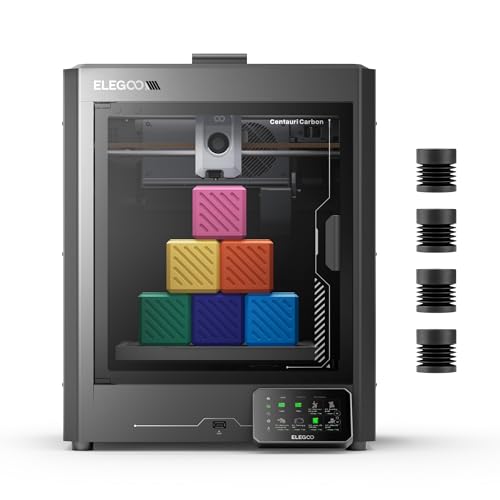
ELEGOO Centauri Carbon CoreXY 3D Printer
Best for: High-speed printing with advanced materials
- Print Speed
- 500mm/s (what this guide is about)
- Build Volume
- 256x256x256 mm
- Leveling Type
- Auto bed leveling
- Motion Structure
- CoreXY
- Extruder Type
- Brass-hardened steel nozzle
- Features
- High Speed, Built-in Camera
View on Amazon: ELEGOO Centauri Carbon CoreXY 3D Printer Affiliate link
The ELEGOO Centauri Carbon delivers high-speed printing with a 500 mm/s print speed and 20000 mm/s² acceleration. It features a CoreXY motion structure and a 256x256x256 mm build volume. The printer arrives fully assembled with auto bed leveling. It includes a 320°C nozzle for advanced materials and a built-in chamber camera for monitoring. This model suits makers who need speed and precision for engineering-grade filaments.
Pros
- 500 mm/s print speed with 20000 mm/s² acceleration
- CoreXY motion structure for stability
- 256x256x256 mm build volume
- Built-in chamber camera for remote monitoring
- Fully assembled and pre-calibrated out of the box
Cons
- Heavier build at 38.6 pounds compared to lighter desktop models
- Smaller build volume than larger industrial-style printers
- No mention of Wi-Fi or network connectivity for remote control
Good fit if
- You need fast print speeds for prototyping
- You want to print with advanced materials like carbon fiber
- You prefer a printer that is ready to use immediately
Skip if
- You require a large build volume for oversized parts
- You need Wi-Fi connectivity for remote monitoring
- You prefer a lightweight, portable printer for travel
Verdict: The ELEGOO Centauri Carbon 3D Printer fits makers who prioritize speed and material versatility. Its high acceleration and CoreXY structure make it ideal for engineering projects. You should choose this if you need rapid production of durable parts.

Entina Tina2 Plus Compact 3D Printer
Best for: Beginners and kids seeking safe, easy setup
- Print Speed
- 250mm/s (what this guide is about)
- Leveling Type
- Auto-leveling
- Features
- Wi-Fi, Fully Assembled
- Target Audience
- Beginners, Kids
- Color
- Blue
- Build Plate Material
- PEI
View on Amazon: Entina Tina2 Plus Compact 3D Printer Affiliate link
The Entina Tina2 Plus delivers print speeds up to 250 mm/s with auto-leveling and a PEI build plate. It arrives fully assembled and connects via Wi-Fi to the Poloprint app. This compact, blue unit targets beginners and kids. Its 40-second ceramic hotend reduces wait times. The design includes a partially enclosed frame for safety. It suits home desks or classrooms needing reliable, simple operation.
Pros
- Prints at 250 mm/s
- Auto-leveling system
- Fully assembled out of the box
- Wi-Fi app control
- 40-second heat ceramic hotend
Cons
- 250 mm/s speed is slower than 500-600 mm/s competitors
- Partially enclosed frame limits high-temp material safety
- No mention of multi-color or multi-toolhead capability
Good fit if
- You need a ready-to-print machine for beginners
- You want Wi-Fi control and app slicing
- You prioritize safety features for kids
Skip if
- You require industrial-grade high-speed printing
- You need multi-material or multi-toolhead flexibility
- You prefer a fully enclosed safety design
Verdict: The Entina Tina2 Plus 250mm/s is a safe, assembled entry point for beginners. It fits users who value convenience and app control over maximum speed or multi-toolhead versatility.

Creality K2 Combo Direct Drive 3D Printer
Best for: Fast, multi-color printing in a compact space
- Print Speed
- 600mm/s (what this guide is about)
- Build Volume
- 260 × 260 × 260 mm
- Multicolor Capacity
- Up to 16 colors
- Leveling Type
- Smart Auto Leveling
- Extruder Type
- Direct drive
- Color Printing
- Multi-Color
View on Amazon: Creality K2 Combo Direct Drive 3D Printer Affiliate link
The Creality K2 Combo delivers 600mm/s print speeds with multi-color capability using up to 16 colors via CFS. It features a 260 x 260 x 260 mm build volume and smart auto-leveling that targets only the print area. The unit comes 95% pre-assembled and includes a built-in AI camera for monitoring. This setup suits users who want fast, colorful prints with minimal initial setup time.
Pros
- 600mm/s maximum print speed
- Supports up to 16 colors with CFS
- Smart auto-leveling for the target print area
- Built-in AI camera for real-time monitoring
- 95% pre-assembled for quick start
Cons
- 260 x 260 x 260 mm build volume is smaller than some competitors
- Combo package includes only one CFS unit
- Silent mode relies on step-servo motors and dynamic fans
Good fit if
- You need fast printing speeds up to 600mm/s
- You want to print in multiple colors without painting
- You prefer a machine that is mostly pre-assembled
Skip if
- You require a build volume larger than 260 mm
- You need more than one CFS unit included
- You prefer manual leveling over smart auto-leveling
Verdict: Creality K2 Combo 3D Printer fits users who prioritize speed and multi-color output in a compact 260 mm cube. It is ideal for makers who want to avoid extensive assembly and enjoy automated bed leveling.

Creality K2 SE 4-Color Printer
Best for: Fast, colorful hobbyist and educational projects
- Print Speed
- 500mm/s (what this guide is about)
- Build Volume
- 220×215×245mm
- Printing Technology
- FDM
- Multicolor Capacity
- 4-color
- Leveling Type
- Auto leveling
- Motion Structure
- CoreXY
View on Amazon: Creality K2 SE 4-Color Printer Affiliate link
The Creality K2 SE 4C is a CoreXY 3D printer that reaches 500mm/s with 20,000mm/s² acceleration. It supports 4-color multicolor printing out of the box. Auto bed leveling and intelligent sensors help protect your prints. This machine suits makers who want fast, colorful results without complex setup. It fits well in home offices or classrooms.
Pros
- 500mm/s print speed with CoreXY motion system
- 4-color multicolor printing capability
- Auto bed leveling for consistent first layers
- Filament runout and power loss recovery sensors
Cons
- Smaller build volume compared to industrial models
- No mention of Wi-Fi or app connectivity
- Limited to PLA, PETG, and breakaway supports
Good fit if
- You want fast, multicolor prints without extra assembly
- You need reliable auto leveling for consistent quality
- You are printing toys, props, or educational models
Skip if
- You require industrial-grade multi-toolhead flexibility
- You need to print large, single-color parts
- You prefer manual bed leveling for total control
Verdict: The Creality K2 SE 4C 500mm/s delivers fast, colorful printing for hobbyists and educators. It is a practical choice for those who value speed and ease of use over industrial scale.

FLASHFORGE Creator 5 Pro 4-Toolhead 3D Printer
Best for: High-speed multi-color industrial printing
- Print Speed
- 600mm/s (what this guide is about)
- Multicolor Capacity
- 4 independent toolheads
- Motion Structure
- CoreXY
- Chamber Heating
- 65°C
- Features
- Heated Chamber
- Dimensions
- 16 × 14 × 18 inches
View on Amazon: FLASHFORGE Creator 5 Pro 4-Toolhead 3D Printer Affiliate link
The FLASHFORGE Creator 5 Pro delivers 600mm/s print speeds using a CoreXY motion structure. It features four independent toolheads with a 7-second FlashSwap changer to eliminate purge waste. The enclosed frame includes an active heated chamber reaching 65°C for advanced materials. This setup supports high-speed, multi-color industrial printing with robust stability and reduced material costs.
Pros
- 600mm/s maximum print speed
- 4 independent toolheads with 7-second FlashSwap
- Active heated chamber up to 65°C
- CoreXY motion structure with linear rails
Cons
- Large footprint at 14x16x18 inches
- Heavy build at 39 pounds
- No mention of automatic bed leveling
Good fit if
- You need fast multi-color prints
- You print with ABS or PC
- You want to minimize purge waste
Skip if
- You need automatic bed leveling
- You have limited floor space
- You only print with PLA
Verdict: The FLASHFORGE Creator 5 Pro 4-Toolhead fits users who need rapid, multi-material production with high-temperature capabilities. Its heavy, enclosed design suits dedicated workspaces rather than casual desks.
Specifications side by side
| Spec | FLASHFORGE Adventurer 5M CoreXY 3D Printer | ELEGOO Centauri Carbon CoreXY 3D Printer | Entina Tina2 Plus Compact 3D Printer | Creality K2 Combo Direct Drive 3D Printer | Creality K2 SE 4-Color Printer | FLASHFORGE Creator 5 Pro 4-Toolhead 3D Printer |
|---|---|---|---|---|---|---|
| Build Volume | 220x220x220mm | 256x256x256 mm | not stated | 260 × 260 × 260 mm | 220×215×245mm | not stated |
| Print Speed | Max 600mm/s | 500 mm/s | 250 mm/s | 600mm/s | 500mm/s | 600mm/s |
| Printing Technology | not stated | not stated | not stated | not stated | FDM | not stated |
| Multicolor Capacity | not stated | not stated | not stated | Up to 16 colors | 4-color | 4 independent toolheads |
| Leveling Type | Fully Auto Leveling | Auto bed leveling | Auto-leveling | Smart Auto Leveling | Auto leveling | not stated |
| Motion Structure | CoreXY | CoreXY | not stated | not stated | CoreXY | CoreXY |
| Extruder Type | 280°C Direct Extruder | Brass-hardened steel nozzle | not stated | Direct drive | not stated | not stated |
| Chamber Heating | not stated | not stated | not stated | not stated | not stated | 65°C |
| Color Printing | not stated | not stated | not stated | Multi-Color | Multi-Color | not stated |
| Structure | CoreXY | CoreXY | not stated | not stated | not stated | CoreXY |
| Leveling | Auto Leveling | not stated | Auto Leveling | Auto Leveling | Auto Leveling | not stated |
| Features | High Speed | High Speed, Built-in Camera | Wi-Fi, Fully Assembled | Built-in Camera | not stated | Heated Chamber |
| Target Audience | not stated | not stated | Beginners, Kids | not stated | Beginners, Kids | not stated |
| Color | Black | Black | Blue | K2 Combo (A) | Black | not stated |
| Build Plate Material | not stated | not stated | PEI | not stated | not stated | not stated |
| Dimensions | 15.8 × 14.3 × 17.6 inches | 15.7 × 15.9 × 19.3 inches | 11.4 × 8.6 × 8.6 inches | 16.9 × 16.5 × 21.1 inches | 14.5 × 14.5 × 19 inches | 16 × 14 × 18 inches |
| Weight | 22 pounds | 38.6 pounds | not stated | not stated | not stated | 39 pounds |
| Model | Adventurer 5M | Centauri Carbon | not stated | K2-Combo_1002110087_LOCALUS1 | not stated | not stated |
| Size | not stated | Centauri Carbon | not stated | K2 Combo (A) | not stated | not stated |
Frequently asked questions
Does a 600mm/s print speed guarantee better quality?
No. Higher speeds prioritize rapid production over surface perfection. Machines like the FLASHFORGE Adventurer 5M use CoreXY structures to maintain stability at 600mm/s. You get efficient output, but you must adjust slicer settings to avoid artifacts. Speed alone does not ensure precision.
Is 250mm/s too slow for practical use?
It is not too slow for beginners. The Entina Tina2 Plus operates at this rate to ensure safe, easy setup. You get consistent layers with minimal risk of defects. This speed suits users who value reliability and app control over maximum throughput for small projects.
Can high-speed printers handle multi-color printing?
Yes, several high-speed models support this. The Creality K2 Combo and K2 SE both print at 600mm/s and 500mm/s respectively while offering multi-color capabilities. You can achieve fast, colorful output without sacrificing speed. These machines are ideal for hobbyists needing vibrant results quickly.
What structure helps a printer maintain speed?
CoreXY is the key structure for high speeds. The FLASHFORGE Adventurer 5M, ELEGOO Centauri Carbon, and Creator 5 Pro all use CoreXY designs. This system decouples axis movement, allowing higher acceleration. You benefit from smoother motion and reduced ringing at speeds up to 600mm/s.
Do I need auto-leveling for fast printing?
Auto-leveling helps maintain quality during high-speed runs. The FLASHFORGE Adventurer 5M and Creality K2 Combo feature this function. It ensures consistent first layers, which is critical when the nozzle moves rapidly. You save time on manual adjustments and get more reliable prints from the start.
Is high print speed worth it for prototyping?
It is highly worth it for rapid prototyping. The FLASHFORGE Adventurer 5M targets this exact use case with its 600mm/s speed. You reduce iteration time significantly, allowing for faster design cycles. This makes high-speed machines practical tools for efficient small-scale manufacturing and engineering projects.