Best 3d Printers with Wi-Fi: 13 Spec-Based Picks
As an Amazon Associate we earn from qualifying purchases. Links on this page are affiliate links.
Finding the best 3d printers with wi fi requires looking past marketing claims and focusing on published specifications. We compared 13 models to help you choose based on hard data. The Entina Tina2C Mini 3D Printer leads this list because its fully assembled design and auto leveling reduce setup friction for beginners. Each pick relies on verified attributes like build volume, print speed, and connectivity features found on the product pages. This guide helps you decide which machine fits your workflow, whether you need compact FDM printing or high-resolution resin output.
Quick picks
The best fit for you
- You need the best overall beginner printer Entina Tina2C Mini 3D Printer It features auto leveling and Wi-Fi for easy, compact printing.
- You want the fastest printing speed available SainSmart PrintyGo High-Speed Mini 3D Printer It reaches 600mm/s with auto leveling and Wi-Fi connectivity.
- You require multi-color prints with remote monitoring SPARKX i7 Multi-Color 3D Printer It offers multi-color output, a built-in camera, and Wi-Fi.
- You seek high-detail resin prints with 16K resolution ELEGOO Saturn 4 Ultra Resin Printer It delivers 16K resolution and remote monitoring via Wi-Fi.
Our 13 picks

Entina Tina2C Mini 3D Printer
Best for: beginners and kids needing small prints
- Features
- Wi-Fi, Fully Assembled (what this guide is about)
- Build Volume
- 3.9" x 3.9" x 3.9"
- Leveling Type
- Auto Leveling
- Compatible Material
- PLA
- Target Audience
- Beginners, Kids
- Dimensions
- 11.4 × 8.6 × 8.6 inches
The Entina Tina2C is a fully assembled FDM printer designed for beginners and kids. It connects via Wi-Fi for app control and includes four PLA filament colors. The build volume is 3.9 x 3.9 x 3.9 inches. Auto leveling simplifies setup. This compact unit fits small desks. It suits users wanting a ready-to-print starter device with guided app support.
Pros
- Fully assembled for immediate use
- Wi-Fi connectivity with Poloprint app
- Auto leveling reduces manual setup
- Includes 1kg of four PLA colors
Cons
- Small 3.9 cubic inch build volume
- Compatible only with PLA filament
- No mention of heated build plate
Good fit if
- You want a fully assembled starter printer
- You need Wi-Fi app control for kids
- You print small prototypes and simple models
Skip if
- You require a heated build plate
- You need to print with ABS or PETG
- You want to print large functional parts
Verdict: The Entina Tina2C Mini 3D Printer is a compact, ready-to-use option for beginners. It fits users who prioritize ease of setup and app-guided printing over large build volumes or advanced material compatibility.

Entina Mini Wi-Fi 3D Printer
Best for: beginners and small home projects
- Features
- Wi-Fi, Fully Assembled (what this guide is about)
- Build Volume
- 3.9 × 4.7 × 3.9 inch
- Print Speed
- Up to 200 mm/s
- Printing Technology
- FDM
- Leveling Type
- Auto Leveling
- Target Audience
- Beginners, Kids
The Entina TINA2S is a compact, fully assembled FDM 3D printer designed for beginners and kids. It features Wi-Fi cloud printing, auto bed leveling, and a 3.9 × 4.7 × 3.9 inch build volume. With a 200 mm/s print speed and 0.04 mm precision, it offers reliable performance. The enclosed design and quiet operation make it suitable for home or school use. You get a hassle-free start with preloaded models and simple app pairing.
Pros
- Fully assembled with no setup required
- Wi-Fi cloud printing with 5x faster transfer
- Auto bed leveling for consistent first layers
- 200 mm/s print speed with 0.04 mm precision
- Enclosed design for safer operation
Cons
- Small 3.9 × 4.7 × 3.9 inch build volume
- Limited to FDM printing technology
- No heated build plate mentioned
Good fit if
- You want a plug-and-play printer for kids
- You need Wi-Fi connectivity for easy file transfer
- You have limited space for a small footprint
Skip if
- You require large build volumes for big projects
- You need heated bed capabilities for advanced materials
- You prefer resin printing for high-detail miniatures
Verdict: Entina TINA2S Mini WiFi Printer is a practical entry-level FDM printer for users who value convenience and safety. It fits beginners who want a small, quiet machine with wireless printing capabilities.

Creality SPARKX i7 Auto-Leveling 3D Printer
Best for: Large format prints with remote monitoring
- Features
- High Speed, Built-in Camera, Wi-Fi (what this guide is about)
- Build Volume
- 260×260×255mm
- Leveling Type
- Auto Leveling
- Extruder Type
- Direct Drive
- Dimensions
- 16.6 × 17.9 × 18.5 inches
The Creality SPARKX i7 is a Wi-Fi enabled FDM printer with a 260×260×255mm build volume. It features auto leveling and a direct drive extruder for reliable filament handling. A built-in camera supports remote monitoring and time-lapse recording. The quiet high-speed operation suits long desktop sessions. This model targets beginners and makers who need a large print area and smart connectivity without complex manual calibration.
Pros
- 260×260×255mm build volume for larger projects
- Built-in Wi-Fi and smart camera for remote monitoring
- Auto leveling reduces manual setup time
- Direct drive extruder for better filament control
- Quiet high-speed motion system
Cons
- Multi-color printing requires optional CFS Lite system sold separately
- Quick-swap hotend is a tool-free design but still requires manual replacement
- No mention of mobile app control in specifications
Good fit if
- You need a large build volume for bigger models
- You want remote monitoring via Wi-Fi and camera
- You prefer auto leveling to simplify setup
Skip if
- You require multi-color printing out of the box
- You need a compact printer under 17 inches wide
- You want a fully enclosed chassis for safety
Verdict: The Creality SPARKX i7 offers a spacious 260×260×255mm build volume and smart camera monitoring for remote users. It fits beginners who value auto leveling and large print areas over built-in multi-color capabilities.

SainSmart PrintyGo High-Speed Mini 3D Printer
Best for: Kids needing high-speed enclosed printing
- Features
- Wi-Fi (what this guide is about)
- Print Speed
- 600mm/s
- Leveling Type
- Auto Leveling
- Target Audience
- Beginners, Kids
- Color
- White
- Dimensions
- 3.54 × 3.94 × 3.94 inches
View on Amazon: SainSmart PrintyGo High-Speed Mini 3D Printer
The SainSmart PrintyGo is an enclosed 3D printer tailored for young creators and beginners. It features a fast 600mm/s print speed, Wi-Fi connectivity, and hands-free auto-leveling. You can operate it via the 5-inch touchscreen without configuring an external computer or mobile device. If you want high-speed output inside a fully enclosed chassis with an automatic pause door lock, this model delivers.
Pros
- Maximum print speed of 600mm/s
- Fully enclosed build with door-open pause lock
- Standalone 5-inch interactive touchscreen
- Automatic bed leveling system
Cons
- Compact machine dimensions of 3.54 by 3.94 by 3.94 inches
- Package includes a small 250g starter filament spool
Good fit if
- You want 600mm/s print speeds in an enclosed build.
- You prefer running prints directly from a 5-inch touchscreen.
- You need a safety sensor that pauses printing when opened.
Skip if
- You plan to produce models larger than its compact frame allows.
- You require materials beyond standard PLA filament.
Verdict: SainSmart PrintyGo 600mm/s Mini 3D Printer suits beginners and kids who need high-speed 600mm/s printing inside an enclosed, touch-controlled chassis.

SUNLU Enclosed Mini 3D Printer
Best for: Kids and beginner home projects
- Features
- Wi-Fi (what this guide is about)
- Print Speed
- Up to 600mm/s
- Target Audience
- Kids
- Dimensions
- 10.8 × 7.6 × 10.6 inches
- Weight
- 5.51 pounds
The SUNLU Kidoodle is a pre-assembled, enclosed 3D printer designed for children and beginners. It features Wi-Fi and app control for remote monitoring and model access. The unit supports print speeds up to 600mm/s and includes a 5-inch touchscreen. Its compact dimensions of 10.8 x 7.6 x 10.6 inches make it space-efficient. A child-safe lock pauses printing if the door opens, enhancing safety during use.
Pros
- Enclosed structure with child-safe door lock
- Wi-Fi and app control for remote monitoring
- Print speeds up to 600mm/s
- 5-inch touchscreen interface
- Pre-assembled and ready to use
Cons
- Small build volume limits print size
- No mention of multi-color printing capability
- Relies on proprietary app ecosystem
Good fit if
- You need a safe, enclosed printer for children
- You want a pre-assembled unit for beginners
- You require remote monitoring via Wi-Fi
Skip if
- You need large format printing capabilities
- You prefer open-frame desktop printers
- You want multi-color printing support
Verdict: The SUNLU Kidoodle Mini 3D Printer is a compact, safe choice for families introducing kids to 3D printing. Its enclosed design and Wi-Fi connectivity make it ideal for supervised, remote-friendly projects.

ELEGOO Mars 4 Ultra 9K Resin 3D Printer
Best for: High-detail resin prints and small models
- Features
- Wi-Fi (what this guide is about)
- Build Volume
- 6.04x3.06x6.5 Inches
- Printing Technology
- MSLA
- Leveling Type
- 4-point leveling system
- Release Film Type
- ACF
- Dimensions
- 23.8 × 10.6 × 11.2 inches
The ELEGOO Mars 4 Ultra is a resin 3D printer featuring Wi-Fi connectivity for wireless file transfers over 2.4G and 5G networks. It uses a 7-inch 9K monochrome LCD with 18µm XY resolution for high detail. The unit runs on a Linux OS with 4GB RAM and includes a 4-point leveling system. This build volume suits detailed miniatures and jewelry prototypes.
Pros
- 7-inch 9K monochrome LCD with 18µm XY resolution
- Wi-Fi connectivity supporting 2.4G and 5G bands
- Linux OS with 4GB RAM for fast file loading
- 4-point leveling system with laser-carved build plate
Cons
- Small build volume of 6.04 x 3.06 x 6.5 inches
- Resin printing requires ventilation and safety gear
- ACF release film may need periodic replacement
Good fit if
- You need high-resolution prints for small models
- You want wireless file transfer via Wi-Fi
- You prefer a Linux-based interface over Android
Skip if
- You need to print large functional parts
- You prefer filament printing for easier cleanup
- You require a heated build plate
Verdict: The ELEGOO Mars 4 Ultra 9K Resin Printer delivers sharp details for small objects through its 9K LCD and Wi-Fi ease. It fits users who prioritize resolution and wireless control over large build volumes.

ELEGOO Saturn 4 Ultra Resin Printer
Best for: High-detail resin prints with remote monitoring
- Features
- Built-in Camera, Wi-Fi (what this guide is about)
- Build Volume
- 211.68×118.37×220mm³
- Print Speed
- 150mm/h
- Printing Technology
- MSLA
- Leveling Type
- Automatic leveling
- Dimensions
- 25.9 × 17.3 × 16.1 inches
The ELEGOO Saturn 4 Ultra is a resin 3D printer featuring 16K MSLA technology and a 211.68×118.37×220mm³ build volume. It supports Wi-Fi for remote file transfer and includes an AI camera for real-time monitoring. The unit offers a print speed of 150mm/h and automatic leveling. This machine suits users who need high-resolution prints and smart monitoring features for complex resin projects.
Pros
- 16K MSLA printing technology for high detail
- Built-in AI camera for real-time monitoring
- Wi-Fi support for remote file transfer
- Automatic leveling with intelligent mechanical sensor
- Resin tank heater maintains 30°C temperature
Cons
- Resin printing requires more post-processing than filament
- Build volume is smaller than many FDM printers
- Print speed is slower than high-speed FDM models
Good fit if
- You need high-resolution resin prints with detailed textures
- You want to monitor prints remotely via Wi-Fi
- You prefer automatic leveling and smart tank heating
Skip if
- You only print large, low-detail objects
- You prefer filament printers with simpler cleanup
- You need a smaller footprint than this unit
Verdict: The ELEGOO Saturn 4 Ultra Resin Printer delivers high-resolution 16K prints with smart monitoring for users who prioritize detail and remote control over speed.
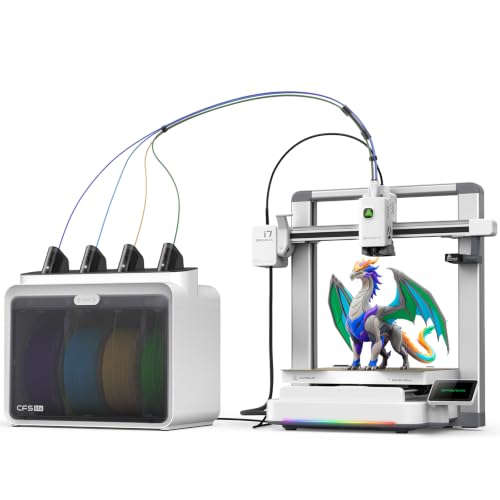
SPARKX i7 Multi-Color 3D Printer
Best for: Beginners wanting multi-color prints
- Features
- Built-in Camera, Wi-Fi (what this guide is about)
- Build Volume
- 260×260×255mm
- Leveling Type
- Auto Leveling
- Extruder Type
- Direct drive extruder
- Color Printing
- Multi-Color
- Target Audience
- Beginners
The Creality SPARKX i7 Combo is a Wi-Fi 3D printer designed for beginners who want multi-color output. It features a 260×260×255mm build volume and a direct drive extruder. The machine includes auto leveling and an AI camera for remote monitoring. You get automatic filament feeding for color changes. This setup supports PLA, PETG, and TPU materials for various projects.
Pros
- Multi-color printing with automatic filament feeding
- 260×260×255mm build volume
- Direct drive extruder for reliable material handling
- Built-in AI camera for remote monitoring
- Auto leveling for consistent first layers
Cons
- Large footprint at 17.9 x 16.6 x 18.5 inches
- Heavy at 27.6 pounds
- Targeted primarily at beginners rather than advanced users
Good fit if
- You want to print with multiple colors without manual switching
- You need a direct drive extruder for flexible filaments like TPU
- You prefer auto leveling to simplify setup
Skip if
- You require a compact desktop printer under 15 inches wide
- You are an advanced user needing high-temperature engineering materials
- You prefer a smaller build volume under 220mm
Verdict: The Creality SPARKX i7 Multi-Color Printer suits beginners who need multi-color output and remote monitoring. Its direct drive extruder and auto leveling make it a practical entry point for creative projects.

ELEGOO Mars 5 Ultra 9K LCD Printer
Best for: High-detail resin printing with fast speeds
- Features
- High Speed, Built-in Camera, Wi-Fi (what this guide is about)
- Build Volume
- 6.04 x 3.06 x 6.49 inch
- Print Speed
- 150mm/h
- Printing Technology
- MSLA
- Leveling Type
- Automatic Leveling
- Dimensions
- 10.6 × 10.2 × 17.8 inches
The ELEGOO Mars 5 Ultra is an MSLA resin printer with a 7-inch 9K LCD and 150mm/h print speed. It includes Wi-Fi for 2.4G and 5G network transfers and an AI camera for real-time monitoring. Automatic leveling and a smart mechanical sensor handle plate setup and resin checks. This machine suits users who need high detail and fast resin printing with remote file management capabilities.
Pros
- 150mm/h print speed with tilt release technology
- 7-inch 9K mono LCD with 8520*4320 resolution
- Built-in AI camera for real-time monitoring
- Wi-Fi support for 2.4G and 5G networks
- Automatic leveling via smart mechanical sensor
Cons
- Small build volume of 6.04 x 3.06 x 6.49 inches
- Requires handling liquid resin and UV curing
- No mention of mobile app control in data
Good fit if
- You want high-resolution resin prints with fast cycle times
- You need remote file transfer over Wi-Fi
- You prefer automatic leveling and self-check sensors
Skip if
- You require a large build volume for big models
- You prefer filament-based FDM printing over resin
- You need a mobile app for control
Verdict: ELEGOO Mars 5 Ultra Resin Printer delivers high-speed 9K detail and convenient Wi-Fi management. It fits users who prioritize resolution and speed in a compact resin workflow.

Creality HALOT-X1 Neo Resin 3D Printer
Best for: High-detail miniatures and figurines
- Features
- Wi-Fi (what this guide is about)
- Build Volume
- 153.36 × 77.76 × 160 mm
- Printing Technology
- LCD
- Leveling Type
- Factory pre-leveled
- Target Audience
- Beginners
- Dimensions
- 9.27 × 9.06 × 15.6 inches
The Creality HALOT-X1 Neo is a compact resin 3D printer designed for beginners. It features a 9K LCD screen with 18μm XY resolution for fine details. The build volume is 153.36 × 77.76 × 160 mm. It connects via Wi-Fi or USB. The platform is factory pre-leveled. You get AI-powered model generation. This unit suits miniature creators and tabletop gamers.
Pros
- 9K LCD with 18μm XY resolution
- Factory pre-leveled build platform
- Wi-Fi and USB connectivity
- AI 2D-to-3D creation tool
Cons
- Small 153.36 × 77.76 × 160 mm build volume
- Resin printing requires ventilation
- No mention of auto-leveling beyond factory setup
Good fit if
- You print miniatures or detailed figurines
- You want a beginner-friendly resin printer
- You need Wi-Fi file transfer
Skip if
- You print large functional parts
- You prefer filament printing
- You need a large build volume
Verdict: Creality HALOT-X1 Neo Resin Printer delivers high resolution for small models. It fits desktop makers who prioritize detail over size.
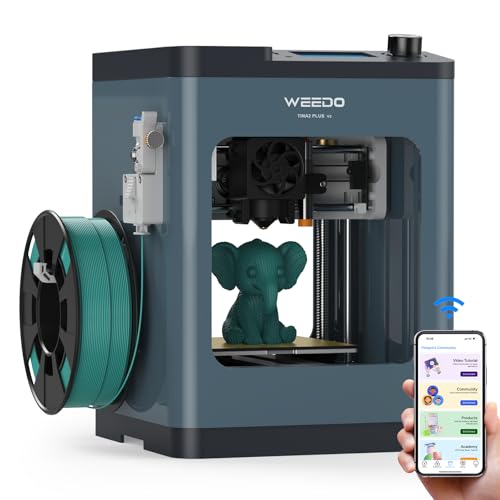
WEEDO Tina2 Plus Semi-Enclosed 3D Printer
Best for: beginners seeking fast, safe printing
- Features
- High Speed, Wi-Fi, Fully Assembled (what this guide is about)
- Print Speed
- 250mm/s
- Printing Technology
- FDM
- Leveling Type
- 16-point Auto Leveling
- Target Audience
- Beginners, Kids
- Build Plate Material
- PEI
The WEEDO TINA2Plus is a fully assembled FDM printer built for speed and ease of use. It supports 250mm/s print speeds and connects via 2.4GHz Wi-Fi for remote monitoring through the Poloprint app. The machine features 16-point auto-leveling and a heated PEI build plate. It includes filament runout detection and a semi-enclosed design. This model suits beginners and kids who want a ready-to-print device without manual setup.
Pros
- Prints at up to 250mm/s for faster output
- Connects via 2.4GHz Wi-Fi for app control
- Includes 16-point auto-leveling system
- Fully assembled and ready in 15 minutes
- Has filament runout detection sensor
Cons
- Semi-enclosed design offers less heat retention
- Supports only 2.4GHz Wi-Fi networks
- No mention of mobile app remote start
Good fit if
- You want a fully assembled printer for beginners
- You need fast printing speeds for simple models
- You prefer a child-safe semi-enclosed design
Skip if
- You require 5GHz Wi-Fi connectivity
- You need a fully enclosed chamber for ABS
- You want to print large industrial parts
Verdict: The WEEDO TINA2Plus 250mm/s FDM Printer delivers high-speed printing with minimal setup for new users. It fits beginners who value speed and safety over advanced enclosure features.

Monoprice Mini Delta v2 Wi-Fi 3D Printer
Best for: small, detailed prints with Wi-Fi
- Features
- Resume Printing, Open Source, Wi-Fi (what this guide is about)
- Build Volume
- 110 x 120 mm
- Leveling Type
- Advanced Gcode Auto Leveling
- Compatible Material
- PLA, ABS
- Color
- Black
- Dimensions
- 17.5 × 11.8 × 11 inches
The Monoprice Mini Delta v2 is a compact 3D printer with a 110 x 120 mm build volume. It features PoloPrint Pro Wi-Fi for app control and advanced Gcode auto leveling. This model comes fully assembled and supports PLA and ABS materials. Its quiet 30dBA operation makes it suitable for home use. You get a small, ready-to-print device for detailed projects.
Pros
- PoloPrint Pro Wi-Fi connectivity
- Advanced Gcode auto leveling
- Quiet 30dBA operation
- Fully assembled out of the box
Cons
- Small 110 x 120 mm build volume
- Delta design limits vertical print height
- No manual leveling knob listed
Good fit if
- You need Wi-Fi for small, detailed prints
- You want a quiet printer for home use
- You prefer a fully assembled setup
Skip if
- You require a large build volume
- You need to print tall objects
- You prefer manual leveling control
Verdict: The Monoprice Mini Delta v2 fits users who need Wi-Fi for small, detailed prints in a quiet environment. Its compact size and auto leveling make it ideal for beginners who want a hassle-free start.
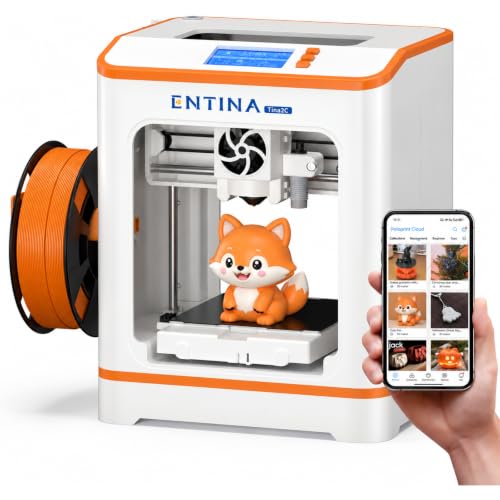
Entina Tina2C Mini 3D Printer
Best for: Kids and beginners seeking easy setup
- Features
- Wi-Fi (what this guide is about)
- Printing Technology
- FDM
- Leveling Type
- Auto leveling
- Target Audience
- Beginners, Kids
- Color
- Orange
- Dimensions
- 6.5 × 8 × 10 inches
The Entina Tina2C is a fully assembled FDM 3D printer designed for beginners and kids. It features auto leveling for stable first prints and Wi-Fi connectivity for cloud printing via the Poloprint app. The compact unit measures 8 by 6.5 by 10 inches and weighs 5.51 pounds. It supports 2.4G wireless printing and offline TF card mode. The orange color adds a distinct look to your workspace.
Pros
- Fully assembled for quick setup
- Auto leveling technology
- Wi-Fi cloud printing support
- Compact 8-inch width
Cons
- Limited to 2.4G Wi-Fi
- Small build volume
- No remote control included
Good fit if
- You want a ready-to-use printer for kids
- You need a compact device for small spaces
- You prefer auto leveling for easier starts
Skip if
- You require 5G Wi-Fi connectivity
- You need a large build volume
- You want a professional-grade industrial printer
Verdict: The Entina Tina2C Orange Mini 3D Printer is a practical entry-level FDM machine for families and students. Its fully assembled design and auto leveling make it ideal for users who want to start printing immediately without technical hurdles.
Specifications side by side
| Spec | Entina Tina2C Mini 3D Printer | Entina Mini Wi-Fi 3D Printer | Creality SPARKX i7 Auto-Leveling 3D Printer | SainSmart PrintyGo High-Speed Mini 3D Printer | SUNLU Enclosed Mini 3D Printer | ELEGOO Mars 4 Ultra 9K Resin 3D Printer | ELEGOO Saturn 4 Ultra Resin Printer | SPARKX i7 Multi-Color 3D Printer | ELEGOO Mars 5 Ultra 9K LCD Printer | Creality HALOT-X1 Neo Resin 3D Printer | WEEDO Tina2 Plus Semi-Enclosed 3D Printer | Monoprice Mini Delta v2 Wi-Fi 3D Printer | Entina Tina2C Mini 3D Printer |
|---|---|---|---|---|---|---|---|---|---|---|---|---|---|
| Build Volume | 3.9" x 3.9" x 3.9" | 3.9 × 4.7 × 3.9 inch | 260×260×255mm | not specified | not specified | 6.04x3.06x6.5 Inches | 211.68×118.37×220mm³ | 260×260×255mm | 6.04 x 3.06 x 6.49 inch | 153.36 × 77.76 × 160 mm | not specified | 110 x 120 mm | not specified |
| Print Speed | not specified | Up to 200 mm/s | not specified | 600mm/s | Up to 600mm/s | not specified | 150mm/h | not specified | 150mm/h | not specified | 250mm/s | not specified | not specified |
| Printing Technology | not specified | FDM | not specified | not specified | not specified | MSLA | MSLA | not specified | MSLA | LCD | FDM | not specified | FDM |
| Leveling Type | Auto Leveling | Auto Leveling | Auto Leveling | Auto Leveling | not specified | 4-point leveling system | Automatic leveling | Auto Leveling | Automatic Leveling | Factory pre-leveled | 16-point Auto Leveling | Advanced Gcode Auto Leveling | Auto leveling |
| Extruder Type | not specified | not specified | Direct Drive | not specified | not specified | not specified | not specified | Direct drive extruder | not specified | not specified | not specified | not specified | not specified |
| Color Printing | not specified | not specified | not specified | not specified | not specified | not specified | not specified | Multi-Color | not specified | not specified | not specified | not specified | not specified |
| Compatible Material | PLA | not specified | not specified | not specified | not specified | not specified | not specified | not specified | not specified | not specified | not specified | PLA, ABS | not specified |
| Leveling | Auto Leveling | Auto Leveling | Auto Leveling | Auto Leveling | not specified | not specified | not specified | Auto Leveling | not specified | not specified | Auto Leveling | Auto Leveling | Auto Leveling |
| Features | Wi-Fi, Fully Assembled | Wi-Fi, Fully Assembled | High Speed, Built-in Camera, Wi-Fi | Wi-Fi | Wi-Fi | Wi-Fi | Built-in Camera, Wi-Fi | Built-in Camera, Wi-Fi | High Speed, Built-in Camera, Wi-Fi | Wi-Fi | High Speed, Wi-Fi, Fully Assembled | Resume Printing, Open Source, Wi-Fi | Wi-Fi |
| Target Audience | Beginners, Kids | Beginners, Kids | not specified | Beginners, Kids | Kids | not specified | not specified | Beginners | not specified | Beginners | Beginners, Kids | not specified | Beginners, Kids |
| Color | Orange/Yellow/Pink/Purple | Green | not specified | White | Orange + 1 PLAFilament | Mars 4 Ultra | Saturn 4 Ultra 16K | i7 Color Combo | Mars 5 Ultra | not specified | Deep Blue | Black | Orange |
| Build Plate Material | not specified | not specified | not specified | not specified | not specified | not specified | not specified | not specified | not specified | not specified | PEI | not specified | not specified |
| Release Film Type | not specified | not specified | not specified | not specified | not specified | ACF | not specified | not specified | not specified | not specified | not specified | not specified | not specified |
| Dimensions | 11.4 × 8.6 × 8.6 inches | 11.4 × 8.6 × 8.6 inches | 16.6 × 17.9 × 18.5 inches | 3.54 × 3.94 × 3.94 inches | 10.8 × 7.6 × 10.6 inches | 23.8 × 10.6 × 11.2 inches | 25.9 × 17.3 × 16.1 inches | 16.6 × 17.9 × 18.5 inches | 10.6 × 10.2 × 17.8 inches | 9.27 × 9.06 × 15.6 inches | 8.2 × 8.2 × 11.4 inches | 17.5 × 11.8 × 11 inches | 6.5 × 8 × 10 inches |
| Weight | not specified | not specified | not specified | 9.1 pounds | 5.51 pounds | 12.1 pounds | not specified | 27.6 pounds | not specified | 9.66 pounds | 6.6 pounds | 2.2 pounds | 5.51 pounds |
| Model | not specified | TINA2S | Sparkx i7 | PrintyGo | 3D Printer for Kids | Mars 4 Ultra | ELEGOO SATURN 4 ULTRA 16K | i7 Color Combo | US-DP-3D-M5U | HALOT-X1 Neo | TINA2-Deep Blue | 121666 | not specified |
| Size | not specified | not specified | not specified | not specified | not specified | Mars 4 Ultra | not specified | not specified | not specified | not specified | not specified | 110 x 120 mm | not specified |
Is Wi-Fi worth it for your 3D printer?
Wi-Fi lets you send files and monitor prints without a computer. The ELEGOO Saturn 4 Ultra and SPARKX i7 include built-in cameras for remote viewing. Most models here support auto leveling, which pairs well with wireless management. You can start jobs from your phone or tablet. This convenience fits users who want to leave prints running while away from their desk. It removes the need for USB cables or SD cards for every new job.
Worth it if
- You want to monitor prints remotely using a built-in camera
- You prefer sending files wirelessly instead of using USB or SD cards
- You need to start jobs from a mobile device while away from your computer
Skip it if
- You only print small, quick tests that fit on an SD card
- Your workspace has no stable wireless network
- You prioritize maximum print speed over remote management features
If you manage workshop ventilation remotely, compare specifications across the best fans with wi fi for your space.
How we selected these printers
We identified these models by scanning Amazon listings for the Wi-Fi feature in titles or feature lists. Each product must explicitly state this capability. We only included one size or variant per product family to keep the list clean. All details come from published specifications and feature lists on those listings. We did not handle any units personally. The page shows live prices and stock status, which refresh daily. These values are not part of this text. We ordered the results by availability first. Next, we sorted by the listing's overall rating weighted by rating count. Finally, we ranked by how many guide criteria the specs met. This ensures you see the most relevant options first.
5 Specs to Check for Wi-Fi Printers
-
Choose FDM or Resin
You must decide between fused deposition modeling and resin printing. FDM printers like the Entina Tina2C Mini use plastic filament and are best for durable, larger parts. Resin models such as the ELEGOO Saturn 4 Ultra use liquid resin for high-detail miniatures. The ELEGOO Mars 4 Ultra also offers sharp details. Your choice depends on whether you need strength or fine surface resolution. Wi-Fi works well for both types, allowing you to monitor long resin prints remotely without staying nearby.
-
Check for Multi-Color
Most printers use a single material color. If you want vibrant prints without painting, look for multi-color capabilities. The SPARKX i7 Multi-Color 3D Printer supports this feature directly. It combines a direct drive extruder with auto leveling for reliable output. Other models, like the Entina Tina2C Mini, print in one color at a time. You should verify if the printer supports multi-material extrusion. This feature adds value if you create toys or decorative items that require varied hues.
-
Verify Print Speed
Print speed affects how quickly you receive your objects. The SainSmart PrintyGo reaches 600mm/s, making it ideal for fast prototyping. The WEEDO Tina2 Plus offers 250mm/s for a balanced approach. Slower printers often produce smoother finishes but take longer. You should compare millimeters per second to gauge efficiency. High-speed models like the ELEGOO Mars 5 Ultra also prioritize speed in resin workflows. Faster printing does not always mean better quality, so balance this spec with your time needs.
-
Confirm Auto Leveling
Auto leveling simplifies setup significantly for new users. The Entina Mini Wi-Fi 3D Printer includes this feature to ensure even first layers. The Creality SPARKX i7 also features auto leveling for large format prints. Manual leveling requires tools and patience, which can frustrate beginners. You should look for auto leveling in the attributes list. This spec reduces failed prints caused by bed height issues. It pairs well with Wi-Fi, allowing you to start jobs remotely after initial calibration.
-
Review Build Volume
Build volume determines the maximum size of your prints. The Creality SPARKX i7 offers a spacious 260x260x255mm area for larger projects. Compact models like the SainSmart PrintyGo are much smaller at 3.94 inches wide. You must measure your intended objects against these dimensions. Larger volumes require more material and time. The ELEGOO Saturn 4 Ultra provides a good middle ground for resin printing. Check the width, height, and length specs to ensure the printer fits your workspace.
Frequently asked questions
Which 3d printer with wi fi is best for beginners?
The Entina Tina2C Mini 3D Printer is the top choice for beginners. It features auto leveling and comes fully assembled, which simplifies setup. You get wireless printing capabilities without needing advanced technical skills. Its compact size fits easily on most desks while providing reliable performance for new users.
Can i monitor my 3d print remotely with wi fi printers?
Yes, several models allow remote monitoring via built-in cameras. The Creality SPARKX i7 and ELEGOO Saturn 4 Ultra include this feature for real-time viewing. You can track print progress from your phone without staying near the machine. This is useful for checking on long prints or ensuring safety.
What is the fastest 3d printer with wi fi connectivity?
The SainSmart PrintyGo High-Speed Mini 3D Printer reaches speeds of 600mm/s. It combines this high speed with auto leveling and Wi-Fi for easy file transfer. This model is ideal for users who want rapid prototyping without sacrificing the convenience of wireless management or the safety features needed for home use.
Do i need a computer to use wi fi 3d printers?
No, you do not need a computer for these devices. The SainSmart PrintyGo is designed to operate without a direct computer connection. You can send files directly to the printer using Wi-Fi. This makes the workflow simpler, especially for kids or beginners who want to print immediately after designing a model.
Which wi fi 3d printer supports multi-color printing?
The SPARKX i7 Multi-Color 3D Printer supports multi-color output. It also includes a built-in camera and Wi-Fi for remote monitoring. This model uses a direct drive extruder and auto leveling to ensure quality. It is a practical option for beginners who want to create colorful projects without complex setup.
Is resin printing available with wi fi features?
Yes, resin printers like the ELEGOO Mars 4 Ultra and Saturn 4 Ultra offer Wi-Fi. These models use LCD technology for high-resolution prints. You can manage prints wirelessly, which is convenient for detailed miniatures. The Saturn 4 Ultra even includes a camera for monitoring the curing process remotely.
What is the build volume of the largest wi fi 3d printer?
The Creality SPARKX i7 offers a spacious 260×260×255mm build volume. This is the largest option in this list, suitable for larger format prints. It combines this size with auto leveling and Wi-Fi connectivity. You get ample space for bigger projects while maintaining the ease of wireless file management.
Are there enclosed wi fi 3d printers for safety?
The SUNLU Enclosed Mini 3D Printer features an enclosed design for added safety. It includes Wi-Fi connectivity for remote file transfer and monitoring. This model is ideal for families with kids, as the enclosure protects users from hot components. It provides a secure environment for supervised printing projects.