SPARKX 3d Printers: 2 Picks Ranked by Specs
As an Amazon Associate we earn from qualifying purchases. Links on this page are affiliate links.
You can find the best SPARKX 3d printers in this guide. We compare 2 models based strictly on published specifications. SPARKX offers compact machines with auto leveling, high-speed printing, and multi-color capabilities. The SPARKX i7 Autofill 3D Printer leads because it supports automated filament loading and reaches 500mm/s print speeds. These picks focus on technical details like build volume and extruder type. You get practical data to help you choose the right tool for your needs.
Quick picks
| # | Product | Best for | Price |
|---|---|---|---|
| 1 | SPARKX i7 Autofill 3D Printer Best overall | automated filament loading and high-speed printing | Check price of SPARKX i7 Autofill 3D Printer on Amazon |
| 2 | SPARKX i7 Multi-Color 3D Printer Best multi-color | multi-color prints and remote monitoring | Check price of SPARKX i7 Multi-Color 3D Printer on Amazon |
Our 2 picks

SPARKX i7 Autofill 3D Printer
Best for: automated filament loading and high-speed printing
- Build Volume
- 260×260×255mm
- Print Speed
- 500mm/s
- Leveling Type
- Auto-leveling
- Features
- High Speed
- Dimensions
- 16.6 × 17.9 × 18.5 inches
View on Amazon: SPARKX i7 Autofill 3D Printer Affiliate link
This high-speed 3D printer provides a 260×260×255mm build volume and print speeds up to 500mm/s. An automated filament system handles loading and refills mid-print to prevent interruptions. It also includes an integrated AI monitoring camera and automatic bed leveling. It suits you if you want fast filament management without manual calibration.
Pros
- Prints at speeds up to 500mm/s
- 260×260×255mm build volume
- Automated filament loading and mid-print refilling
- Built-in AI camera for real-time error detection
Cons
- Vertical build height capped at 255mm
- No fully enclosed print chamber specified
Good fit if
- You want automatic filament loading and mid-print refills.
- You need print speeds reaching up to 500mm/s.
- You prefer automated leveling and Z-offset calibration.
Skip if
- You need a vertical build height taller than 255mm.
- You require an enclosed chamber for temperature-sensitive materials.
Verdict: SPARKX i7 Autofill 3D Printer delivers 500mm/s printing, automatic filament swaps, and a 260×260×255mm build volume for makers prioritizing continuous high-speed output.
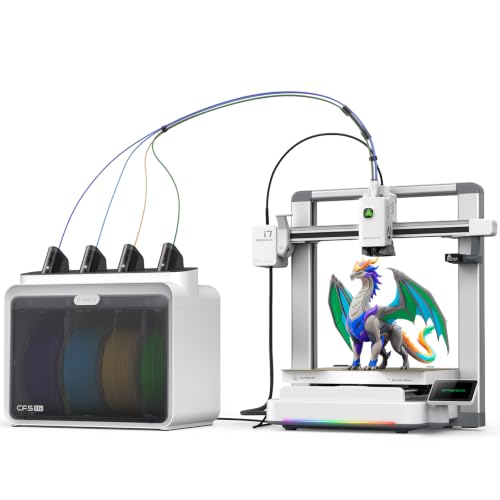
SPARKX i7 Multi-Color 3D Printer
Best for: multi-color prints and remote monitoring
- Build Volume
- 260×260×255mm
- Leveling Type
- Auto Leveling
- Extruder Type
- Direct drive extruder
- Color Printing
- Multi-Color
- Features
- Built-in Camera, Wi-Fi
- Target Audience
- Beginners
View on Amazon: SPARKX i7 Multi-Color 3D Printer Affiliate link
The SPARKX i7 is a multi-color 3D printer with a 260×260×255mm build volume. It features a direct drive extruder and auto leveling for consistent first layers. An AI camera allows remote monitoring via Wi-Fi. The quick-swap hotend simplifies maintenance. This unit suits beginners who want vibrant prints without manual bed adjustment.
Pros
- Multi-color printing with automatic filament feeding
- 260×260×255mm build volume for large parts
- Direct drive extruder supports TPU and PLA
- Auto leveling ensures consistent adhesion
- Built-in AI camera for remote monitoring
Cons
- Heavier at 27.6 pounds
- Larger footprint than compact printers
- No mention of a touchscreen display
Good fit if
- You want multi-color prints without complex setups
- You need a direct drive for flexible filaments
- You prefer remote monitoring via Wi-Fi
Skip if
- You require a smaller build volume
- You need a lighter portable unit
- You prefer manual bed leveling control
Verdict: SPARKX i7 Multi-Color 3D Printer delivers vibrant multi-color prints with a 260mm build volume. It fits beginners who value auto leveling and remote camera monitoring over compact size.
Specifications side by side
| Spec | SPARKX i7 Autofill 3D Printer | SPARKX i7 Multi-Color 3D Printer |
|---|---|---|
| Build Volume | 260×260×255mm | 260×260×255mm |
| Print Speed | 500mm/s | not stated |
| Leveling Type | Auto-leveling | Auto Leveling |
| Extruder Type | not stated | Direct drive extruder |
| Color Printing | not stated | Multi-Color |
| Leveling | Auto Leveling | Auto Leveling |
| Features | High Speed | Built-in Camera, Wi-Fi |
| Target Audience | not stated | Beginners |
| Dimensions | 16.6 × 17.9 × 18.5 inches | 16.6 × 17.9 × 18.5 inches |
| Weight | not stated | 27.6 pounds |
| Model | i7 Autofill Combo | i7 Color Combo |
| Color | not stated | i7 Color Combo |
SPARKX 3d Printers Overview
The SPARKX i7 Autofill 3D Printer targets users who need high-speed output and automated filament loading. It prints at 500mm/s and includes auto leveling. This model suits makers who prioritize continuous production without manual intervention. Its build volume measures 260 by 260 by 255mm. The machine measures 17.9 inches wide and 18.5 inches tall. You get a compact footprint for steady performance.
The SPARKX i7 Multi-Color 3D Printer focuses on vibrant prints and remote monitoring. It features a direct drive extruder and built-in Wi-Fi. This option fits beginners who value auto leveling and camera access. It shares the same physical dimensions as the autofill version. You choose this model if color variety and connectivity matter more than speed. Both units offer reliable auto leveling for consistent results.
Who Should Buy SPARKX Printers
SPARKX targets makers who need speed and color. The i7 Autofill suits users prioritizing high-speed output and automated filament loading. It prints at 500mm/s with a 260 by 260 by 255mm build volume. The i7 Multi-Color model fits beginners who want vibrant prints and remote monitoring via its built-in camera. Both units share similar dimensions, measuring roughly 17.9 by 16.6 by 18.5 inches. Neither model offers large-format printing or manual leveling options. If you require a smaller footprint or industrial-grade reliability, this compact range may not meet your needs. Focus on these specs to decide if the i7 series aligns with your workflow.
How to Choose the Right SPARKX Printer
-
Check Print Speed Needs
Print speed determines how quickly you can finish projects. If you need rapid output for prototyping or batch production, look for models supporting high speeds. The SPARKX i7 Autofill 3D Printer offers a print speed of 500mm/s. This specification allows for faster layer deposition compared to standard machines. You should verify if the listed speed matches your workflow requirements. Higher speeds reduce wait times but may affect surface quality on intricate details. Choose a model with the speed rating that aligns with your production timeline and desired finish quality.
-
Evaluate Color Capabilities
Multi-color printing expands creative possibilities for complex models. If you require vibrant, multi-material outputs without manual swaps, prioritize printers with dedicated color features. The SPARKX i7 Multi-Color 3D Printer supports multi-color printing directly. This eliminates the need for post-processing or manual filament changes during a print job. You should confirm the specific color technology used by the manufacturer. Multi-color systems often involve additional extruders or switching mechanisms. Select a model that explicitly lists multi-color support if your projects demand varied color schemes.
-
Verify Auto Leveling
Auto leveling simplifies the setup process by adjusting the bed automatically. This feature ensures consistent first layers without manual intervention. Both the SPARKX i7 Autofill and i7 Multi-Color models include auto leveling. This specification reduces setup time and minimizes print failures caused by uneven beds. You should check if the leveling process is fully automatic or requires user confirmation. Auto leveling is particularly useful for beginners or users who print frequently. It maintains print quality over time by compensating for minor bed warping or debris.
-
Consider Extruder Type
The extruder type influences material handling and print reliability. Direct drive extruders are better for flexible filaments and precise control. The SPARKX i7 Multi-Color 3D Printer uses a direct drive extruder. This configuration allows for easier retraction and reduces filament grinding. You should compare extruder types if you plan to use varied materials. Bowden setups may suit rigid plastics better, while direct drive offers versatility. Understanding the extruder mechanism helps you predict performance with different filament types and print speeds.
-
Review Built-in Features
Built-in features like cameras and Wi-Fi enhance remote monitoring and control. These capabilities allow you to track prints from a distance. The SPARKX i7 Multi-Color 3D Printer includes a built-in camera and Wi-Fi connectivity. This setup provides real-time visual feedback and remote management options. You should verify if your chosen model supports remote monitoring if you need to check prints while away. Features like Wi-Fi enable file transfer and status updates. Assess which connectivity options are essential for your workspace environment and workflow efficiency.
Frequently asked questions
Which SPARKX 3D printer is best for automated filament loading?
The SPARKX i7 Autofill 3D Printer is the top choice for this feature. It supports automated filament swaps and prints at 500mm/s. This model includes auto leveling and offers a 260 by 260 by 255mm build volume. You get continuous high-speed output without manual intervention.
Can I print in multiple colors with SPARKX printers?
Yes, the SPARKX i7 Multi-Color 3D Printer handles multi-color prints. It is designed for beginners who value color variety. The machine features auto leveling and a 260mm build volume. You can also use the built-in camera for remote monitoring via Wi-Fi.
Do SPARKX i7 models include auto leveling?
Both the i7 Autofill and i7 Multi-Color models include auto leveling. This feature simplifies setup for you. The i7 Autofill prioritizes speed at 500mm/s, while the i7 Multi-Color focuses on color capabilities. Both ensure reliable first layers without manual adjustment.
What is the build volume of the SPARKX i7 Autofill?
The SPARKX i7 Autofill 3D Printer has a build volume of 260 by 260 by 255mm. This size accommodates medium-sized projects. It pairs with a 500mm/s print speed for rapid production. The dimensions allow for substantial prints without requiring a larger footprint.
Is there remote monitoring on the SPARKX i7 Multi-Color?
The SPARKX i7 Multi-Color 3D Printer includes remote monitoring capabilities. It features a built-in camera and Wi-Fi connectivity. You can check on prints from a distance. This is useful for beginners who want to track progress without standing by the machine.
What is the weight of the SPARKX i7 Multi-Color printer?
The SPARKX i7 Multi-Color 3D Printer weighs 27.6 pounds. This weight suggests a sturdy build for stability during printing. The dimensions are 17.9 by 18.5 by 16.6 inches. It fits well on standard desks while providing a 260mm build volume for your projects.
Does the SPARKX i7 Autofill support high-speed printing?
Yes, the SPARKX i7 Autofill 3D Printer supports high-speed printing at 500mm/s. This speed reduces wait times for larger models. It also includes auto leveling and automated filament loading. You get efficient output for prototyping or batch production tasks.