ELEGOO Saturn 4 Ultra 12K Review: Specs, Pros and Cons
As an Amazon Associate we earn from qualifying purchases. Links on this page are affiliate links.
This elegoo saturn 4 ultra 12k msla resin 3d printer review focuses on the hardware that defines your print quality. The machine features a 10-inch 12K LCD screen with an XY resolution of 19 by 24 micrometers. It also includes an inclined release mechanism to reduce stress on models. You get a 11520 by 5120 pixel count for fine detail. The unit weighs 32 pounds and measures 21.6 inches wide. These specs set the baseline for precision and build volume. You should check if these dimensions fit your workspace before ordering.
What stands out
- 10-inch 12K LCD screen with 19x24 μm XY resolution
- Inclined release technology reduces peeling force
- Built-in AI camera for monitoring and time-lapse
- Mechanical sensors detect resin levels and foreign objects
- Auto-leveling build plate for quick setup
Who it fits
Good fit for
You should consider this printer if you need high-resolution details for miniatures or jewelry. The 12K screen and inclined release help with success rates on complex models. The AI camera and mechanical sensors add a layer of safety for unattended prints. Auto-leveling saves you time on calibration. If you value precision and automated checks, this machine aligns with your workflow. The Wi-Fi support also helps if you manage multiple units.
Who should skip it
You might want to look elsewhere if you prioritize large build volumes. The 21.6-inch height is standard, not massive. If you need a larger footprint, check the 16K variation. You should also skip this if you dislike the resin workflow. This is an MSLA printer, not FDM. It requires ventilation and resin handling. If you want dry filament printing, this is not the right tool. The specs are optimized for resin, not filament.
Verdict: The ELEGOO Saturn 4 Ultra 12K offers high resolution and automated safety features for resin printing. It suits users who need detail and reliability over large volume.
Saturn 4 Ultra Key Specs
10" 12K LCD Screen, 19 × 24 μm XY resolution
This screen delivers high detail for your resin prints. The 19 by 24 micrometer XY resolution means smaller features are clearer and smoother. You get sharper edges on miniatures or jewelry. This level of precision is ideal for users who need fine textures. It is a significant upgrade over standard 4K screens found in many mid-range printers.
MSLA Printing Technology
MSLA stands for Masked Stereolithography. This technology uses a UV LCD screen to cure resin layer by layer. It provides consistent light exposure across the build plate. You benefit from reliable prints with fewer defects. This method is standard for high-quality resin printing. It differs from laser-based SLA systems by using a full-panel light source.
Auto-Leveling
The printer levels the build plate automatically when it descends. You do not need to manually adjust screws or test the gap. This saves time and reduces setup errors. You can start printing immediately after installation. This feature is crucial for beginners who may struggle with manual leveling. It ensures the first layer adheres correctly every time.
Inclined Release Technology
This mechanism tilts the build plate during the peel cycle. It reduces the force required to separate the print from the screen. You experience faster print speeds and higher success rates. The reduced stress protects both the model and the LCD screen. This is a key advantage over standard vertical release systems. It helps prevent failed prints due to excessive peeling force.
Design and Build Quality
The listing describes the Saturn 4 Ultra as a substantial machine. It measures 21.6 inches wide, 12.9 inches long, and 13 inches high. The unit weighs 32 pounds. This mass suggests the frame is built for stability. A heavy base helps dampen vibrations during the resin curing process. You will need a sturdy table that can support this weight without wobbling. The footprint is compact enough for most desks, but you must account for the height when planning your workspace ventilation.
According to the listing, the design includes a flip-top lid. This updated layout replaces older hinge styles for easier access. You can lift the cover quickly to check prints or remove the build plate. The auto-leveling system is built into the mechanism. The build plate descends to the screen and levels itself. This means you do not need to manually adjust screws before every job. The hands-free operation saves time and reduces setup errors.
The exterior finish appears to be a solid, industrial plastic. The listing highlights the 9H hardness tempered film on the screen. This protective layer guards the expensive LCD panel from scratches. It is a practical choice for a machine that sees frequent use. The mechanical sensors for leveling and resin detection are integrated into the internal layout. These components sit close to the resin vat and build platform. This placement allows the printer to detect foreign objects or low material levels accurately. The design prioritizes reliability and ease of maintenance for daily users.
Setup and daily operation guide
The Saturn 4 Ultra simplifies initial configuration through its auto-leveling system. The build plate descends to the LCD screen and levels itself automatically. This feature removes the need for manual adjustments, allowing you to start printing immediately after unboxing. The unit arrives ready for use without complex calibration steps.
Daily operation relies on several integrated safeguards and connectivity options. The printer includes mechanical sensors that estimate resin levels, alert you to shortages, detect foreign objects, and troubleshoot leveling issues. These sensors help maintain a stable printing environment. An AI smart camera allows you to monitor the process remotely. You can view the print in real time or enable time-lapse recording to share progress.
Connectivity supports Wi-Fi file transfers on both 2.4G and 5G networks, with speeds between 6 and 10 Mbps. You can also control multiple machines via network printing for cluster operations. The flip-top lid design improves accessibility during resin changes.
The software manages safety through automatic hardware checks at startup. Power outage recovery ensures prints resume correctly after interruptions. Temperature protection pauses the job if the environment exceeds 80°C. You can adjust print speeds to match your material needs. The inclined release technology reduces force on the model, which speeds up the cycle and increases success rates. These features combine to create a streamlined workflow for resin printing.
Before you buy Saturn 4 Ultra
You need to prepare your workspace for resin printing. The Saturn 4 Ultra uses MSLA technology, so you must have proper ventilation and resin disposal methods. Check that your surface can support the 32-pound weight. The machine measures 21.6 inches wide, so ensure you have enough room for the flip-top lid to open fully. You will need a resin wash and cure station, which is not included. Verify that your computer has enough storage for large 12K print files. The Wi-Fi transfer speed of 6-10 Mbps helps, but large files may still take time. Consider the cost of resin, as this printer has a large build volume. You should also buy extra LCD screen protectors, as the 9H film wears over time. Compare this model with the Saturn 4 and Saturn 4 Ultra 16K options. The 16K version offers higher resolution, while the standard Saturn 4 is less powerful. Choose based on your detail needs and budget. Always check your local laws regarding resin handling.
Check before you buy
- Ensure adequate ventilation for resin fumes.
- Verify workspace fits 21.6-inch width and lid.
- Confirm surface supports 32-pound machine weight.
- Purchase separate wash and cure station.
- Check local regulations for resin disposal.
The product at a glance
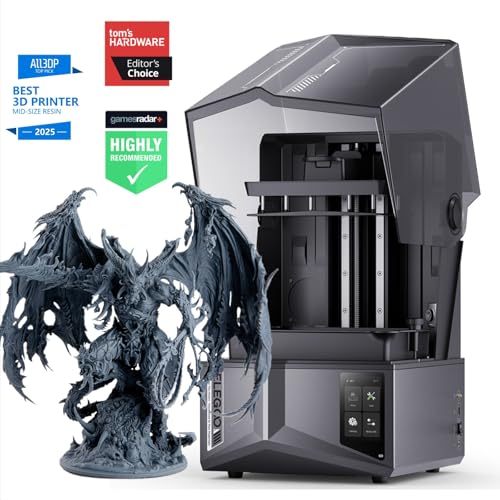
ELEGOO Saturn 4 Ultra 12K Resin Printer
Best for: High-detail resin printing with automated leveling
- Build Volume
- 8.62 × 4.84 × 8.66 Inch
- Print Speed
- 150 mm/h
- Printing Technology
- MSLA
- Leveling Type
- Auto-Leveling
- Resolution
- 12K
- Dimensions
- 12.9 × 21.6 × 13 inches
View on Amazon: ELEGOO Saturn 4 Ultra 12K Resin Printer Affiliate link
The ELEGOO Saturn 4 Ultra is an MSLA resin printer featuring a 10-inch 12K LCD screen with 19 x 24 μm XY resolution. It includes auto-leveling, inclined release technology, and a built-in AI camera for monitoring. Wi-Fi transfer supports 2.4G and 5G networks. This machine suits users seeking high detail and automated workflow features for resin printing.
Pros
- 10-inch 12K LCD screen with 19 x 24 μm XY resolution
- Auto-leveling build plate for reduced setup time
- Built-in AI camera for process monitoring and time-lapse
- Inclined release technology to reduce print force and speed
- Wi-Fi support for 2.4G and 5G network file transfer
Cons
- Heavy build at 32 pounds
- Large footprint measuring 21.6 x 12.9 x 13 inches
- No mention of mobile app control in specifications
Good fit if
- You need high-resolution detail for miniatures or jewelry
- You want automated leveling to simplify the printing process
- You require remote monitoring via a built-in camera
Skip if
- You have limited workspace for a large machine
- You prefer a lighter, more portable printer
- You rely on mobile app control for operation
Verdict: ELEGOO Saturn 4 Ultra 12K Resin Printer delivers high-resolution output with automated features like inclined release and auto-leveling. It fits users who prioritize detail and monitoring over compact size.
Specifications side by side
| Spec | ELEGOO Saturn 4 Ultra 12K Resin Printer |
|---|---|
| Build Volume | 8.62 × 4.84 × 8.66 Inch |
| Print Speed | 150 mm/h |
| Printing Technology | MSLA |
| Leveling Type | Auto-Leveling |
| Leveling | Auto Leveling |
| Resolution | 12K |
| Dimensions | 12.9 × 21.6 × 13 inches |
| Weight | 32 pounds |
| Size | Saturn 4 Ultra |
| Color | Saturn 4 Ultra |
| Model | Saturn 4 Ultra |
Frequently asked questions
Is the ELEGOO Saturn 4 Ultra 12K suitable for high-detail miniatures?
Yes, it is designed for high-detail output. The printer uses a 12K LCD screen with a 19 by 24 micrometer XY resolution. This fine resolution ensures that small features on miniatures appear sharp and smooth. It is ideal if you prioritize visual accuracy over compact footprint.
Does the Saturn 4 Ultra require manual leveling?
No, it features automated leveling. The system uses an auto-leveling function that allows the build plate to descend and adjust itself. This removes the need for manual adjustments, letting you start printing immediately after unboxing without tedious setup steps.
How much space does the ELEGOO Saturn 4 Ultra take up?
It is a substantial machine requiring significant desk space. The unit measures 21.6 inches wide, 12.9 inches long, and 13 inches high. You must ensure your workspace can accommodate these dimensions comfortably before purchasing or setting it up.
What printing technology does the Saturn 4 Ultra use?
It uses Resin printing technology, specifically MSLA. This method provides high-resolution output compared to filament printers. You must have proper ventilation and resin disposal methods ready, as the process involves liquid photopolymer resins rather than solid plastic spools.
Is the ELEGOO Saturn 4 Ultra heavy?
Yes, it weighs 32 pounds. This mass suggests the frame is built for stability. A heavy base helps dampen vibrations during the printing process, which contributes to consistent layer adhesion and overall print quality on large resin models.
What is the main advantage of the inclined release mechanism?
The inclined release mechanism aids in smoother print removal. It helps separate the cured resin layer from the LCD screen with less force. This feature reduces the risk of peeling errors and supports the automated leveling process for consistent first-layer adhesion.
Who is the target user for this printer?
It fits users who prioritize detail and monitoring over compact size. The combination of high resolution and automated features like inclined release makes it suitable for hobbyists and professionals focused on quality. It is less ideal if you have limited workspace or need a small footprint.