Creality K2 Pro Multicolor 3D Printer Review: Specs, Pros and Cons
As an Amazon Associate we earn from qualifying purchases. Links on this page are affiliate links.
This creality k2 pro combo review covers a machine built for speed and color. It features a 300×300×300mm build volume and reaches 600 mm/s print speeds. The package includes a CFS system for up to 16-color printing. You get a heated chamber that stabilizes temperatures for technical materials. Dual AI cameras monitor the process and adjust flow. This setup targets users who need fast, reliable output without constant manual intervention. It combines high performance with automated features to streamline your workflow.
What stands out
- 600 mm/s print speed with 20,000 mm/s² acceleration
- 300×300×300mm build volume for large prototypes
- Up to 16-color printing via CFS Smart Filament System
- Active chamber heating up to 60°C for stable prints
- Dual AI cameras for monitoring and real-time flow tuning
Who it fits
Good fit for
You should consider this printer if you print technical materials like ASA or PPA-CF. The heated chamber prevents warping on these filaments. It suits professionals who need to batch print multiple small parts efficiently. The large build volume helps reduce wait times. Users who want multi-color projects will benefit from the CFS system. It is also good for those who prefer automated leveling and remote monitoring via WiFi or LAN.
Who should skip it
You might want to look elsewhere if you only print simple PLA models. The advanced features like dual cameras and chamber heating add complexity you may not need. If you have limited space, note the dimensions are 20x17x18 inches. The 61.7-pound weight means it is not easily portable. Users who prefer manual bed leveling over smart probing might find the auto system unnecessary for their simpler setups.
Verdict: This printer offers high speed and multi-color capability for demanding users. It is a strong choice for those printing technical materials at scale.
Key specs for the K2 Pro
Print Speed: 600 mm/s
This speed rating indicates how fast the print head moves during operation. You will finish jobs faster than with standard 200 mm/s printers. The high acceleration of 20,000 mm/s² helps maintain precision at these velocities. This is ideal for prototyping or batch production where time matters. Compare this to entry-level models that prioritize quietness over speed.
Build Volume: 300×300×300mm
This cubic space allows you to print medium-sized objects without splitting them into parts. You can fit large prototypes or multiple small items on the bed at once. This volume suits hobbyists making functional parts and professionals creating detailed models. It is larger than basic 220mm printers but smaller than industrial beds, offering a practical middle ground for most users.
Multicolor Capacity: Up to 16-color
The CFS system supports up to sixteen distinct colors or materials in a single print. You can create complex, multi-hued models without manual filament swaps. This reduces setup time and minimizes waste compared to single-extruder methods. It is best for artists, educators, and designers who need vibrant, detailed prints. Compare this to dual-extruder systems that typically limit you to two colors.
Chamber Heating: Up to 60°C
An active heated chamber keeps the printing environment warm, reaching sixty degrees Celsius. This stability prevents warping and layer separation when using engineering materials like ASA or PPA. You get more reliable results with temperature-sensitive filaments. This feature is essential for professional-grade prints. Standard open-frame printers lack this control, often leading to failed prints with advanced materials.
Extruder Type: Direct drive, hardened steel gears
Hardened steel gears handle abrasive materials like carbon fiber composites without rapid wear. The direct drive design ensures precise filament pushing, which is crucial for high-speed printing. You can use flexible or rigid filaments with confidence. This setup reduces clogging and improves consistency. Compare this to Bowden extruders, which may struggle with high-speed or abrasive material feeding.
Design and Build Quality
The listing describes the Creality K2 Pro Combo as a black unit measuring 20 by 17 by 18 inches. It weighs 61.7 pounds. This mass suggests a rigid frame that resists vibration during high-speed movement. The substantial footprint requires a sturdy table or dedicated stand in your workspace. You need to account for this space when planning your maker area.
According to the listing, the printer uses a direct drive extruder with hardened steel gears. This design choice allows you to print abrasive materials like carbon fiber composites without rapid wear. The system supports a flow rate of 40mm³/s, which helps prevent clogs during fast extrusion. You will benefit from this durability if you frequently switch between standard filaments and reinforced types. The quick-swap hotend also simplifies maintenance when you change nozzles or materials.
The machine integrates a CFS Smart Filament System for up to 16-color printing. This setup includes auto filament identification and moisture-proof storage. You do not need to manually manage multiple spools for complex color jobs. The system handles intelligent feeding, which reduces setup time. You can focus on design rather than material logistics. The combination of a large 300×300×300mm build volume and these material capabilities makes it suitable for ambitious creators who need both size and versatility in one device.
Setup and Daily Use Guide
Setting up the Creality K2 Pro Combo begins with unpacking the listed components. You receive the printer, the CFS Smart Filament System, a 500g Hyper RFID filament spool, and a hardened steel nozzle. The auto-leveling feature probes only the specific areas where your model will print. This targeted approach reduces initial setup time while ensuring reliable first-layer adhesion. You do not need to manually adjust the bed across the entire surface.
Daily operation relies on the CFS system for multicolor tasks. It supports up to 16-color printing with auto filament identification and intelligent feeding. The system also provides moisture-proof storage, which helps maintain material quality over time. For high-speed printing, the direct drive extruder uses hardened steel gears. This handles abrasive materials like carbon fiber composites and achieves a flow rate of 40mm³/s. An integrated sensor cuts filament automatically, streamlining the workflow.
Monitoring is handled by two AI cameras. The chamber camera allows 24-hour surveillance, including print failure detection and time-lapse filming. The nozzle camera auto-tunes flow rate in real-time. It also detects waste chute blockages and optimizes pressure advance. You can manage the printer via WiFi or LAN using Creality Print or Cura software. The system supports OTA updates and includes power-loss recovery. The active chamber heating maintains temperatures up to 60°C, which prevents warping for materials like ASA and PPA. This combination of automation and monitoring simplifies complex prints.
Before You Buy This Printer
The K2 Pro Combo arrives with a CFS unit and one filament spool, but you will need extra spools for full 16-color projects. The CFS system manages up to sixteen colors, so ensure you have compatible RFID-tagged filaments ready. Storage matters, as the system offers moisture-proof storage, but you should still keep unused spools sealed in a dry environment. The heated chamber supports high-temperature materials like ASA and PPA-CF. You must verify that your workspace has adequate ventilation for these engineering plastics. The direct drive extruder handles carbon fiber composites, which can be abrasive. Regularly inspect the hardened steel gears and nozzle for wear. You should also check that your network supports the required WiFi or LAN connections for remote monitoring. This machine fits well among high-speed options in 1 3D Printers & Making Tools, offering professional-grade features for ambitious creators who need reliability and speed without constant manual intervention.
Check before you buy
- Verify filament RFID compatibility for the CFS system.
- Ensure your workspace has ventilation for high-temp materials.
- Check network stability for remote monitoring features.
- Confirm you have space for the 61.7-pound unit.
The product at a glance
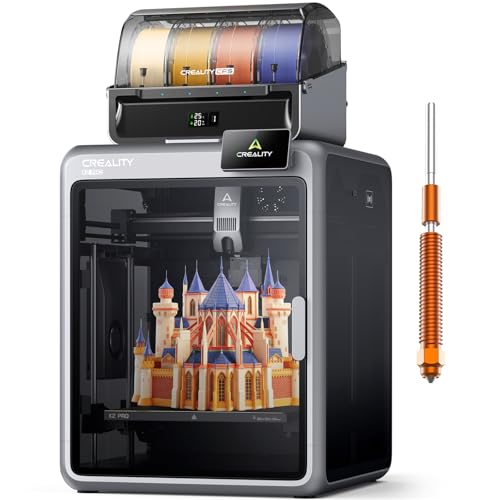
Creality K2 Pro Multicolor 3D Printer
Best for: large multi-color engineering prints
- Build Volume
- 300×300×300mm
- Print Speed
- 600 mm/s
- Multicolor Capacity
- Up to 16-color
- Leveling Type
- Auto leveling
- Extruder Type
- Direct drive, hardened steel gears
- Chamber Heating
- Up to 60°C
View on Amazon: Creality K2 Pro Multicolor 3D Printer Affiliate link
The Creality K2 Pro Combo delivers 300x300x300mm build volume and 600mm/s print speeds. It supports up to 16-color printing via the CFS system. Active chamber heating reaches 60°C for stable material performance. Dual AI cameras monitor prints and auto-tune flow. This setup suits professionals needing high-speed, multi-material output for large prototypes.
Pros
- 600mm/s print speed with 20,000 mm/s² acceleration
- 300x300x300mm large build volume for batch production
- Active chamber heating up to 60°C for technical materials
- Dual AI cameras for real-time flow tuning and monitoring
Cons
- Heavy 61.7-pound build requires a sturdy surface
- Large footprint at 20x17x18 inches needs dedicated space
- No mention of silent stepper drivers for quiet operation
Good fit if
- You need to print large parts or multiple small items at once
- You require multi-color output with up to 16 colors
- You print with engineering materials like ASA or PPA-CF
Skip if
- You have limited desk space for a 20-inch wide machine
- You only print small PLA models and need a compact printer
- You prioritize quiet operation over high-speed performance
Verdict: Creality K2 Pro 300mm 600mm/s is a high-speed workhorse for makers who need large build volume and multi-color capability. It fits professionals printing technical materials who can accommodate its size and weight.
Specifications side by side
| Spec | Creality K2 Pro Multicolor 3D Printer |
|---|---|
| Build Volume | 300×300×300mm |
| Print Speed | 600 mm/s |
| Multicolor Capacity | Up to 16-color |
| Leveling Type | Auto leveling |
| Extruder Type | Direct drive, hardened steel gears |
| Chamber Heating | Up to 60°C |
| Color Printing | Multi-Color |
| Leveling | Auto Leveling |
| Features | High Speed, Built-in Camera, Heated Chamber |
| Color | Black |
| Dimensions | 17 × 20 × 18 inches |
| Weight | 61.7 pounds |
| Model | K2 Pro Combo |
Frequently asked questions
What is the build volume of the Creality K2 Pro?
The Creality K2 Pro features a 300 by 300 by 300 millimeter build volume. This cubic space allows you to print medium-sized objects in a single piece. It is suitable for larger functional parts that exceed standard printer capacities. You can utilize the full volume for complex assemblies or large decorative items without needing to split designs.
Does the K2 Pro support multi-color printing?
Yes, the printer supports multi-color printing through its included CFS system. This setup enables up to 16-color capabilities for vibrant and detailed models. You do not need to manually swap filaments for color changes. The system automates the process, making it easier to create complex, multi-hued prints with high precision.
How fast can the Creality K2 Pro print?
The machine reaches print speeds of 600 mm/s. This high velocity significantly reduces production time for standard models. It also boasts an acceleration of 20,000 mm/s² to maintain accuracy during rapid movements. You get faster turnaround times without sacrificing the fine details required for professional-grade engineering or hobbyist projects.
Is auto-leveling included with the K2 Pro?
Auto-leveling is a standard feature on this printer. The system probes specific areas where your model will be placed to ensure a flat surface. This targeted approach saves time compared to full-bed scanning. You get consistent first layers, which is critical for adhesion and print quality, especially with technical materials.
What is the purpose of the heated chamber?
The heated chamber stabilizes internal temperatures during the printing process. This feature helps prevent warping, particularly when using materials like ABS or ASA. You get more reliable results with engineering-grade filaments that require consistent heat. The chamber maintains a steady environment, reducing stress on the model as it cools.
Does the printer come with a camera?
Yes, the unit includes a built-in camera. You can monitor your prints remotely through the interface. This feature allows you to check for issues like filament tangles or layer shifts without being in the room. It provides peace of mind for long-duration jobs, ensuring you can intervene if necessary.
What is the weight of the Creality K2 Pro Combo?
The printer weighs 61.7 pounds. This substantial mass helps dampen vibrations from high-speed movements. You get a stable platform that maintains print accuracy even at 600 mm/s. The weight also indicates a robust frame construction, which is essential for handling the thermal and mechanical stresses of large, multi-color prints.