What Is Compatible Material? A Guide for 3d Printers Buyers (2026)
As an Amazon Associate we earn from qualifying purchases. Links on this page are affiliate links.
Compatible Material Explained For Buyers
When you shop for a 3D printer, compatible material explained is the first spec you should check. This setting defines which filaments your machine can handle safely. It is not a suggestion. It is a hard limit based on hardware design. If you ignore this, your prints may fail or your printer could break.
The most common types are PLA, PETG, ABS, and TPU. PLA is the easiest to use. It prints at low temperatures and rarely warps. Most entry-level machines handle this well. PETG offers more strength than PLA. It requires slightly higher heat. It is good for functional parts that need to last.
ABS is strong but tricky. It shrinks as it cools. This causes warping. You need a heated bed and often an enclosed chamber to print ABS successfully. TPU is flexible. It behaves like rubber. Your printer needs a direct drive extruder to push this soft filament. Bowden setups often jam with TPU.
Manufacturers list these materials in the product specifications. Look for a section labeled "Supported Materials" or "Filament Compatibility." If a listing only says "PLA," assume it cannot handle the others. Do not guess. Check the nozzle temperature range. Check the bed temperature limits. Check the extruder type.
Why does this matter to you? Because buying the wrong printer wastes time. You might buy a machine that only prints PLA. Then you want to make a durable hinge. You cannot. You must buy a new printer. By checking the compatible material list first, you ensure your tool matches your projects. You avoid frustration. You get prints that work. Always verify the full list before you commit to a purchase.
Material Compatibility Options
PLA
PLA is the most common filament for beginners. It prints at low temperatures and does not require a heated bed for most models. The AOSEED AI Kids 3D Printer uses PLA for safe, single-color projects. It is easy to use but lacks heat resistance. Parts warp in warm cars. You get high detail and low warping. This material suits decorative items and simple prototypes. It is not for functional parts that face heat. Many enclosed printers prioritize PLA for its reliability. You avoid complex calibration. The trade-off is limited durability under stress or high temperatures.
PETG
PETG offers a balance between PLA ease and ABS strength. It resists water and chemicals better than PLA. The Voxelab AD5X supports PETG for multi-color engineering tasks. You need moderate heat settings. It is less brittle than PLA. Stringing can occur during printing. You must tune retraction settings. This material suits mechanical parts and outdoor use. It is stronger than PLA but harder to print cleanly. The Flashforge model handles it well for commercial workflows. You gain durability without extreme heat. The trade-off is potential stringing and slightly slower print speeds.
ABS
ABS requires higher temperatures and an enclosed chamber. The Monoprice Mini Delta v2 handles small ABS prints. It is strong and heat resistant. You need good ventilation due to fumes. Warping is a major risk without enclosure. The Original Prusa XL supports ABS-like materials for large professional prints. You get durable functional parts. It is not for beginners. The trade-off is complexity and smell. You must manage airflow carefully. Parts are less brittle than PLA. This suits mechanical assemblies. You avoid breakage under impact. The setup is more demanding than for PLA.
TPU
TPU is a flexible filament for rubber-like parts. The Portable Compact FDM Printer supports TPU for beginners. You need slow print speeds. Direct drive extruders help feed the soft material. It is durable and shock resistant. You get gaskets and phone cases. It is harder to print than rigid plastics. Stringing and clogging are common issues. The trade-off is print difficulty for flexibility. You sacrifice speed for elasticity. This material suits wearables and seals. You avoid rigid breakage. The setup requires patience. You must adjust acceleration settings. It is not for high-speed production.
Who Needs This Spec
Who needs it
You need this guide if you plan to print functional parts or flexible items. Printing with ABS requires higher temperatures and often a closed chamber to prevent warping. If you intend to make durable prototypes that withstand heat or stress, ABS compatibility is essential. TPU is a flexible filament used for phone cases, gaskets, and wearables. If your projects involve moving parts or items that need to bend, TPU support is critical. PETG offers a balance between strength and ease of use. It is ideal for mechanical parts that need more durability than PLA but less complexity than ABS. If your work involves outdoor use or items that need some flexibility and strength, PETG is a smart choice. These materials expand your printer's utility beyond simple models.
Who can skip it
You can ignore this detailed breakdown if you only print decorative items or simple toys. PLA is sufficient for most hobbyist projects. It is easy to print and does not require special ventilation or high temperatures. If you are buying your first printer for a child or a classroom, PLA is the standard. You do not need to worry about ABS or TPU capabilities right now. Focus on build volume and ease of use instead. These factors matter more for basic printing tasks. Advanced materials introduce complexity and potential safety concerns. You can always upgrade your filament list later. For now, stick to the basics. Your printer will handle PLA well. Do not let material specs overwhelm your initial purchase decision. Keep it simple.
Material Glossary
Filament
The spool of plastic wire fed into the printer. It melts to form layers. Common sizes are 1.75 mm or 2.85 mm diameter. You must match this size to your extruder.
Nozzle Temperature
The heat level of the extruder tip. PLA needs 190-220°C. ABS requires 230-250°C. Exceeding limits damages the heater block. Check your printer's maximum rating before buying specialty filaments.
Bed Temperature
The heat of the build plate. It helps plastic stick. PLA works at 50-60°C. ABS needs 100-110°C. Cold beds cause warping. Ensure your printer supports the required heat range.
Enclosure
A cover around the print area. It traps heat for materials like ABS. It prevents warping and cooling cracks. Open-frame printers lack this. You need an enclosure for high-temp plastics.
Extruder Type
The mechanism pushing filament. Direct extruders are close to the nozzle. Bowden types use a tube. Direct handles flexible filaments better. Bowden allows faster speeds but struggles with soft plastics.
Print Speed
How fast the nozzle moves. Higher speeds reduce time. Quality may drop at max speeds. PLA prints well at 60 mm/s. Complex shapes need slower rates. Check the manufacturer's recommended limits.
Color Printing
Using multiple filaments for one object. Dual extruders switch materials. Single extruders use manual swaps. Multi-color systems print complex parts. Check if your printer supports dual extrusion or single-color only.
Quick picks
| # | Product | Best for | Price |
|---|---|---|---|
| 1 | AOSEED Enclosed Kids 3D Printer | Safe, single-color PLA printing for kids | Check price of AOSEED Enclosed Kids 3D Printer on Amazon |
| 2 | Flashforge 220mm Multicolor 3D Printer | Multi-color printing with engineering materials | Check price of Flashforge 220mm Multicolor 3D Printer on Amazon |
| 3 | Monoprice Mini Delta v2 Wi-Fi 3D Printer | Small PLA/ABS prints in tight spaces | Check price of Monoprice Mini Delta v2 Wi-Fi 3D Printer on Amazon |
| 4 | Portable Compact FDM 3D Printer | small PLA and TPU prints for beginners | Check price of Portable Compact FDM 3D Printer on Amazon |
| 5 | Semdon 1kg Dual-Color Silk PLA Filament | Decorative gradient prints | Check price of Semdon 1kg Dual-Color Silk PLA Filament on Amazon |
| 6 | Original Prusa XL Large CoreXY | Large single-material professional prints | Check price of Original Prusa XL Large CoreXY on Amazon |
Our 6 picks

AOSEED Enclosed Kids 3D Printer
Best for: Safe, single-color PLA printing for kids
- Compatible Material
- PLA (what this guide is about)
- Print Speed
- 400 mm/s
- Multicolor Capacity
- Single-color
- Leveling Type
- Leveling-free
- Features
- Enclosed, Wi-Fi
- Target Audience
- Kids
View on Amazon: AOSEED Enclosed Kids 3D Printer Affiliate link
The AOSEED AI is an enclosed 3D printer built for kids. It prints PLA filament with speeds up to 400 mm/s and precision down to 0.05 mm. The leveling-free platform simplifies setup. You get access to 12,000+ models and AI tools for design. This unit supports single-color printing only. It includes a camera for real-time monitoring and comes with eight rolls of filament.
Pros
- Enclosed, pinch-resistant design for safety
- Leveling-free build plate for easy setup
- Print speeds up to 400 mm/s
- Built-in camera for real-time monitoring
- Includes eight rolls of PLA filament
Cons
- Supports single-color printing only
- No multi-color extruder capability
- Small build volume for large projects
Good fit if
- You want a safe, enclosed printer for children
- You need simple, leveling-free setup
- You print small, single-color PLA toys
Skip if
- You require multi-color printing
- You need to print large objects
- You prefer manual leveling control
Verdict: The AOSEED AI Kids 3D Printer is a safe, enclosed option for children. It suits families who want simple setup and single-color PLA projects. It is not for multi-color or large-scale printing.
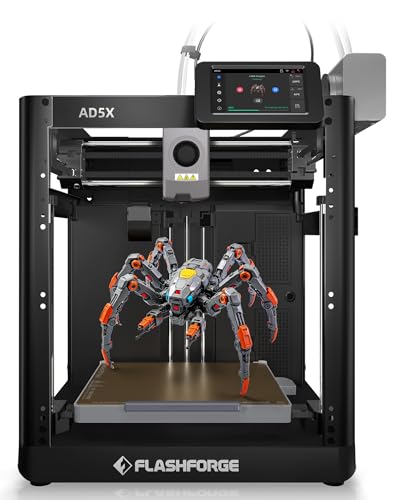
Flashforge 220mm Multicolor 3D Printer
Best for: Multi-color printing with engineering materials
- Compatible Material
- PLA, PETG (what this guide is about)
- Build Volume
- 220x220x220 mm
- Print Speed
- 600mm/s
- Multicolor Capacity
- 4 colors
- Leveling Type
- Fully auto leveling
- Motion Structure
- CoreXY
View on Amazon: Flashforge 220mm Multicolor 3D Printer Affiliate link
The Voxelab AD5X is a CoreXY 3D printer with a 220 x 220 x 220 mm build volume. It supports PLA and PETG, including carbon fiber variants. The system handles four-color printing with auto filament loading. You get 600 mm/s travel speed and 300°C nozzle heat. This unit suits users needing multi-material flexibility and high-speed output.
Pros
- 4-color multi-material printing capability
- 220 x 220 x 220 mm build volume
- 600 mm/s travel speed and 20m/s² acceleration
- One-click auto leveling and vibration compensation
- 300°C high-temperature nozzle for engineering filaments
Cons
- Build volume is smaller than large-scale competitors
- Remote monitoring requires an additional camera kit
- No mention of a built-in touchscreen display in specs
Good fit if
- You need multi-color prints without manual swaps
- You print with carbon fiber reinforced PLA or PETG
- You want fast travel speeds for shorter print times
Skip if
- You require a build volume larger than 220mm
- You need built-in remote monitoring without extra hardware
- You only print single-color PLA and ignore speed
Verdict: The Voxelab AD5X 220mm 4-Color FDM offers high-speed multi-material printing for users who value speed and color flexibility over large build sizes. It is ideal for commercial or industrial workflows requiring efficient filament management.

Monoprice Mini Delta v2 Wi-Fi 3D Printer
Best for: Small PLA/ABS prints in tight spaces
- Compatible Material
- PLA, ABS (what this guide is about)
- Build Volume
- 110 x 120 mm
- Leveling Type
- Advanced Gcode Auto Leveling
- Features
- Resume Printing, Open Source, Wi-Fi
- Color
- Black
- Dimensions
- 17.5 × 11.8 × 11 inches
View on Amazon: Monoprice Mini Delta v2 Wi-Fi 3D Printer Affiliate link
The Monoprice Mini Delta v2 is a fully assembled 3D printer with a 110 x 120 mm build volume. It supports PLA and ABS materials. The unit features a touchscreen, Wi-Fi connectivity via PoloPrint Pro, and auto leveling. It operates quietly at 30 dBA. This compact machine suits users with limited desk space who want a ready-to-print device.
Pros
- 110 x 120 mm build volume
- Supports PLA and ABS filaments
- Fully assembled out of the box
- Wi-Fi connectivity with PoloPrint Pro app
- Quiet operation at 30 dBA
Cons
- Small 110 x 120 mm build area
- Limited to PLA and ABS materials
- No mention of direct USB printing
Good fit if
- You need a small footprint printer
- You primarily print with PLA or ABS
- You want a fully assembled unit
Skip if
- You require large format prints
- You need to print with TPU or PETG
- You prefer manual leveling control
Verdict: Monoprice Mini Delta v2 is a compact, quiet option for small PLA and ABS projects. It fits users who value ease of setup and wireless control over large build sizes.

Portable Compact FDM 3D Printer
Best for: small PLA and TPU prints for beginners
- Compatible Material
- PLA, TPU (what this guide is about)
- Build Volume
- 100x100x100mm
- Printing Technology
- FDM
- Target Audience
- Beginners
- Color
- Black
- Nozzle Diameter
- 0.4mm
View on Amazon: Portable Compact FDM 3D Printer Affiliate link
This compact FDM printer offers a 100x100x100mm build volume and a 0.4mm nozzle. It supports PLA and flexible TPU filaments. The removable build plate simplifies model removal. It suits beginners and students needing small prints. The unit weighs 2.2 pounds and includes 10m of PLA filament. Video guides assist with setup.
Pros
- Supports PLA and flexible TPU materials
- Removable build plate for easy removal
- Compact 100x100x100mm build volume
- Includes 10m PLA filament and tools
- 0.4mm nozzle for detailed prints
Cons
- Small 100x100x100mm build volume limits part size
- No heated build plate listed in specifications
- No Wi-Fi or app connectivity mentioned
Good fit if
- You need to print small PLA or TPU items
- You want a lightweight printer for travel
- You are a beginner using video guides
Skip if
- You require large build volumes over 100mm
- You need to print ABS or high-temp materials
- You want remote monitoring or app control
Verdict: Portable FDM 3D Printer 100mm is a basic tool for small PLA and TPU prints. It fits beginners who prioritize portability and simple setup over large scale or smart features.

Semdon 1kg Dual-Color Silk PLA Filament
Best for: Decorative gradient prints
- Compatible Material
- PLA (what this guide is about)
- Size
- 1KG
- Color Effect
- Dual Color
- Dimensional Accuracy
- +/- 0.02mm
- Weight
- 2.2 pounds
View on Amazon: Semdon 1kg Dual-Color Silk PLA Filament Affiliate link
This is a 1.75mm PLA filament with a dual-color metallic finish. It blends yellow-green shades for gradient effects. The material offers high toughness and glossy silk texture. Dimensional accuracy is +/- 0.02mm. It prints at 200°C-230°C. This filament suits users seeking decorative prints. It works well for cosplay props or holiday decor. You get a vacuum-sealed spool for moisture protection.
Pros
- Dual-color yellow-green metallic gradient effect
- Dimensional accuracy of +/- 0.02mm
- Enhanced toughness compared to standard PLA
- Low-temperature printing range of 200°C-230°C
Cons
- Limited to PLA material compatibility
- Single colorway of gold-green gradient
- Requires standard FDM printer setup
Good fit if
- You want metallic gradient effects
- You print decorative models
- You need reliable dimensional accuracy
Skip if
- You require multi-color printing
- You print functional parts
- You use resin printers
Verdict: Semdon 1kg Metallic PLA delivers consistent flow and unique visual effects. It fits makers focused on aesthetic projects rather than mechanical durability.

Original Prusa XL Large CoreXY
Best for: Large single-material professional prints
- Compatible Material
- PLA, PETG, ASA (what this guide is about)
- Build Volume
- 360 × 360 × 360 mm
- Motion Structure
- CoreXY
- Color
- Black
- Dimensions
- 35.4 × 31.5 × 31.5 inches
- Weight
- 62 pounds
View on Amazon: Original Prusa XL Large CoreXY Affiliate link
This Original Prusa XL is a large-scale CoreXY 3D printer with a 360 × 360 × 360 mm build volume. It supports PLA, PETG, and ASA materials. The single toolhead design prioritizes stability and reliability for consistent prints. You get a segmented heated bed for better adhesion. This machine suits users who need professional-grade precision on large parts.
Pros
- 360 × 360 × 360 mm build volume
- CoreXY motion system for speed and accuracy
- Supports PLA, PETG, and ASA filaments
- Segmented heated bed reduces warping
- Includes 1kg Prusament PLA and print sheet
Cons
- Single toolhead limits multi-material printing
- 62-pound weight makes it bulky to move
- Requires final assembly of several components
Good fit if
- You need large, high-precision single-material prints
- You want a reliable CoreXY system
- You print with PLA, PETG, or ASA
Skip if
- You require multi-color printing capabilities
- You have limited workspace for a large machine
- You prefer a fully pre-assembled unit
Verdict: Original Prusa XL Large CoreXY is a robust choice for engineers and prototypers who need a large, stable platform for single-material projects. It fits users prioritizing dimensional accuracy and large build volumes over multi-toolhead flexibility.
Specifications side by side
| Spec | AOSEED Enclosed Kids 3D Printer | Flashforge 220mm Multicolor 3D Printer | Monoprice Mini Delta v2 Wi-Fi 3D Printer | Portable Compact FDM 3D Printer | Semdon 1kg Dual-Color Silk PLA Filament | Original Prusa XL Large CoreXY |
|---|---|---|---|---|---|---|
| Build Volume | not stated | 220x220x220 mm | 110 x 120 mm | 100x100x100mm | not stated | 360 × 360 × 360 mm |
| Print Speed | 400 mm/s | 600mm/s | not stated | not stated | not stated | not stated |
| Printing Technology | not stated | not stated | not stated | FDM | not stated | not stated |
| Multicolor Capacity | Single-color | 4 colors | not stated | not stated | not stated | not stated |
| Leveling Type | Leveling-free | Fully auto leveling | Advanced Gcode Auto Leveling | not stated | not stated | not stated |
| Motion Structure | not stated | CoreXY | not stated | not stated | not stated | CoreXY |
| Extruder Type | not stated | 300°C Direct Extruder | not stated | not stated | not stated | not stated |
| Color Printing | not stated | Multi-Color | not stated | not stated | not stated | not stated |
| Compatible Material | PLA | PLA, PETG | PLA, ABS | PLA, TPU | PLA | PLA, PETG, ASA |
| Structure | not stated | CoreXY | not stated | not stated | not stated | CoreXY |
| Leveling | not stated | Auto Leveling | Auto Leveling | not stated | not stated | not stated |
| Features | Enclosed, Wi-Fi | High Speed | Resume Printing, Open Source, Wi-Fi | not stated | not stated | not stated |
| Target Audience | Kids | not stated | not stated | Beginners | not stated | not stated |
| Color | White (JOY AI+) + 8 PLA | AD5X | Black | Black | Gold-green | Black |
| Size | not stated | Print Size 220x220x220mm | 110 x 120 mm | not stated | 1KG | not stated |
| Color Effect | not stated | not stated | not stated | not stated | Dual Color | not stated |
| Dimensional Accuracy | not stated | not stated | not stated | not stated | +/- 0.02mm | not stated |
| Nozzle Diameter | not stated | not stated | not stated | 0.4mm | not stated | not stated |
| Dimensions | 11.4 × 10.6 × 12.2 inches | 14.3 × 14.8 × 16.3 inches | 17.5 × 11.8 × 11 inches | 6.8 × 6.1 × 8.3 inches | not stated | 35.4 × 31.5 × 31.5 inches |
| Weight | 8.82 pounds | 24.3 pounds | 2.2 pounds | 2.2 pounds | 2.2 pounds | 62 pounds |
| Model | not stated | AD5X | 121666 | not stated | Yellow-Green 3D Printer | XL-COM-1T-SAT |
Frequently asked questions
Can I print ABS on any 3D printer?
No. You must check the compatible material list first. The Monoprice Mini Delta v2 supports ABS, but only for small prints in tight spaces. Other machines, like the AOSEED AI Kids Printer, are limited to PLA. Using unsupported materials can damage your extruder or create unsafe fumes. Always verify the manufacturer's specified range before buying filament.
What is the difference between PLA and PETG?
PLA is easier to print but less durable. PETG offers better strength and heat resistance. The Voxelab AD5X handles both, allowing you to switch between decorative and functional parts. The Original Prusa XL also supports PLA, PETG, and ASA for professional use. Choose PLA for simple models and PETG for items that need to last longer.
Is TPU flexible filament hard to use?
It requires slower print speeds and reliable extrusion. The Portable Compact FDM 3D Printer is designed for beginners using PLA and TPU. Its simple setup helps you manage flexible materials without complex tuning. The Semdon Dual-Color Silk PLA offers a different aesthetic for decorative projects. Stick to recommended materials to avoid clogging your nozzle.
Do I need a heated bed for PLA?
Most PLA prints do not require a heated bed. The AOSEED AI Kids Printer focuses on single-color PLA for safe, enclosed printing. This simplifies the process for new users. However, some printers like the Monoprice Mini Delta v2 include auto-leveling to ensure even adhesion. Check your specific model's specs to see if a heated bed is standard.
How does build volume affect material choice?
Large build volumes allow for bigger single-material prints. The Original Prusa XL offers a massive platform for PLA, PETG, and ASA. Smaller printers, like the Portable Compact FDM, limit you to small PLA and TPU items. If you need large functional parts, prioritize a machine with a larger footprint. Smaller printers are better for quick prototypes or toys.
Can I mix materials in one print?
Only if your printer supports multi-extrusion. The Voxelab AD5X features four-color printing for PLA and PETG. This allows you to combine colors and potentially different material properties in a single job. Single-extruder machines, like the AOSEED or Monoprice models, can only print one material at a time. Check the extruder count before assuming multi-material capability.