Color Printing Explained: What It Means for 3d Printers
As an Amazon Associate we earn from qualifying purchases. Links on this page are affiliate links.
Understanding Multi-Color 3D Printing Specs
Color printing explained helps you understand how 3D printers create vibrant objects. This spec refers to a printer’s ability to deposit more than one filament type during a single print job. Standard printers use one spool. Multi-color systems use two or more. This allows for detailed models, text, and complex geometries without manual intervention. The technology relies on specific hardware configurations. You will see terms like dual extrusion or single-extruder multi-filament systems. Dual extrusion uses two independent hotends. Each hotend holds one filament. The printer switches between them to change colors. Single-extruder systems use a mechanism to swap filaments. This mechanism is often called an automatic tool changer or a filament selector. These systems save space but may have slower print speeds. Listings label this feature clearly. Look for keywords like dual extruder, multi-material, or color capability. Some brands use proprietary names for their mixing systems. Always check the number of supported materials. Two-color printing is common. Four-color or six-color systems exist for higher fidelity. The resolution of color mixing depends on nozzle size and layer height. Smaller nozzles allow for finer color transitions. You care about this spec if you need visual variety. It eliminates the need for post-processing painting. It saves time on assembly for multi-part models. It also reduces waste from failed prints that require repainting. Verify the printer’s build volume compatibility with multi-color setups. Larger volumes may require more material management. Consider the filament types supported. Not all materials mix well. PLA is the most common choice. PETG and ABS have different requirements. Check the filament diameter. Most systems use 1.75mm. Some industrial units use 2.85mm. This spec impacts your workflow significantly. It changes how you slice your models. You need software that supports multi-color paths. This ensures the printer knows where to switch materials. Understanding this helps you choose the right machine for your creative needs.
Multi-Color 3D Printing Guide
Multi-Color
Multi-color printing lets you deposit different filaments in one job. You create vibrant objects without manual swaps. The Bambu Lab P1S Combo uses an AMS for four colors. This suits users who want speed and variety. You avoid print pauses. The trade-off is complexity. More parts mean more maintenance. You also need more storage for spools. The Snapmaker U1 4-Toolhead uses separate toolheads. This reduces waste but increases footprint. Choose this if you prioritize efficiency over build size. The ELEGOO Centauri 2 Combo targets beginners. It simplifies the process with automated calibration. You get reliable output with less setup effort. The Anycubic Kobra X provides native four-color support. It expands easily for more colors later. This fits makers who need high-speed results. The Flashforge AD5X delivers CoreXY performance in a compact frame. It suits rapid prototyping with vibrant results. Each option balances speed, size, and ease of use differently. Pick the one that matches your workspace and project needs.
4-Color
Four-color systems offer a balanced range of hues. You get primary colors plus black or white for shading. The Snapmaker U1 supports four toolheads for mixed materials. This fits makers who prioritize speed and material variety. You get efficient multi-color output with minimal waste. The ELEGOO Centauri 2 Combo delivers reliable four-color output at high speeds. It suits users who want vibrant prints with automated calibration. The Flashforge AD5X offers four-color support in a compact 220mm build volume. It fits users who value speed and multi-color capability over a larger print area. The Anycubic Kobra X features native four-color printing with a 260mm build volume. It is ideal for makers willing to add modules for more colors. Four colors provide enough variety for most projects. You can create detailed models without excessive complexity. This level of color is practical for both hobbyists and professionals.
Is Multi-Color Worth Your Money
Who needs it
You should prioritize multi-color printing if your projects require visual distinction without post-processing. This feature allows you to deposit different filaments in a single job. You create vibrant objects without manual swaps. This is essential for prototyping parts where color indicates function. It is also valuable for artistic models that rely on complex gradients or distinct zones. If you want speed and variety, this system suits you. You avoid print pauses that occur with single-extruder manual changes. The ability to use two or more spools simultaneously streamlines your workflow. You get professional-looking results directly from the machine. This spec matters most when aesthetics or functional coding are critical to your final output. You save time on painting and assembly.
Who can skip it
You can ignore this spec if you focus on pure mechanical performance. Multi-color systems often add complexity and cost. If you only need strong, single-material parts, a standard single-extruder printer is better. You prioritize strength and reliability over vibrant visuals. Single-material prints are generally faster and more consistent. There are fewer points of failure. You do not need to manage multiple filament spools or complex switching mechanisms. Focus on build volume and print speed instead. These factors impact your productivity more than color options. If you plan to paint your models anyway, the built-in color capability is redundant. Stick to a simpler machine. It offers better value for functional parts. You avoid unnecessary maintenance associated with multi-extrusion systems.
Color Printing Glossary
Multi-color printing
The ability to deposit multiple filament types in a single job. This creates vibrant objects without manual swaps or post-processing steps for your models.
Print speed
How fast the extruder moves, measured in millimeters per second. Higher speeds reduce print time but may affect surface quality on detailed parts.
Extruder type
The mechanism that pushes filament into the hotend. Direct drive types offer better control with flexible materials, while Bowden setups suit rigid plastics.
Compatible material
Filaments the printer accepts, such as PLA, ABS, or PETG. Checking compatibility ensures proper adhesion and prevents clogs during multi-color prints.
Auto-leveling
A feature that automatically adjusts the bed height. This ensures even first layers, reducing the need for manual calibration before each print job.
Build volume
The maximum dimensions of the printable area. Larger volumes allow you to create bigger objects, while smaller ones suit detailed miniatures.
Layer height
The thickness of each printed layer, measured in millimeters. Lower values increase detail but extend print time, while higher values speed up production.
Quick picks
| # | Product | Best for | Price |
|---|---|---|---|
| 1 | Bambu Lab P1S Combo Multicolor 3D Printer | Fast multi-color printing with advanced materials | Check price of Bambu Lab P1S Combo Multicolor 3D Printer on Amazon |
| 2 | Snapmaker U1 4-Toolhead 3D Printer | Fast multi-color and mixed-material prints | Check price of Snapmaker U1 4-Toolhead 3D Printer on Amazon |
| 3 | Bambu Lab A1 Mini Combo Multi-Color 3D Printer | Compact multi-color printing with automated setup | Check price of Bambu Lab A1 Mini Combo Multi-Color 3D Printer on Amazon |
| 4 | ELEGOO Centauri 2 Combo Multi-Color 3D Printer | Beginners seeking easy multi-color printing | Check price of ELEGOO Centauri 2 Combo Multi-Color 3D Printer on Amazon |
| 5 | FLASHFORGE High-Speed Multi-Color 3D Printer | compact multi-color rapid prototyping | Check price of FLASHFORGE High-Speed Multi-Color 3D Printer on Amazon |
| 6 | Anycubic Kobra X Multicolor 3D Printer | Native 4-color printing with expansion potential | Check price of Anycubic Kobra X Multicolor 3D Printer on Amazon |
Our 6 picks
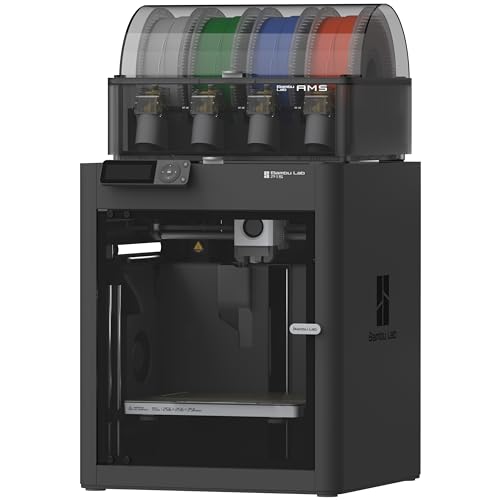
Bambu Lab P1S Combo Multicolor 3D Printer
Best for: Fast multi-color printing with advanced materials
- Color Printing
- Multi-Color (what this guide is about)
- Print Speed
- 500mm/s
- Multicolor Capacity
- Up to 16 Colors
- Leveling Type
- Auto Bed Leveling
- Motion Structure
- CoreXY
- Features
- High Speed
View on Amazon: Bambu Lab P1S Combo Multicolor 3D Printer Affiliate link
The Bambu Lab P1S Combo delivers multi-color printing with up to 16 colors using the included AMS. It features a print speed of 500mm/s and 20,000 mm/s² acceleration for fast results. The enclosed design supports advanced filaments like PETG and ABS. Automatic bed leveling simplifies setup. You get a reliable machine for vibrant projects without complex calibration.
Pros
- Up to 16 colors with AMS
- 500mm/s print speed
- Enclosed design for advanced materials
- Automatic bed leveling
Cons
- Not recommended for carbon fiber reinforced polymers
- 40.9 pounds weight
- Requires AMS for multi-color function
Good fit if
- You want vibrant multi-color prints
- You need fast print speeds
- You print with advanced filaments
Skip if
- You only print with basic PLA
- You prefer open-frame printers
- You need carbon fiber support
Verdict: The Bambu Lab P1S Combo 3D Printer suits users who prioritize speed and color variety. It is a solid choice for those ready to use the AMS for complex multi-material projects.

Snapmaker U1 4-Toolhead 3D Printer
Best for: Fast multi-color and mixed-material prints
- Color Printing
- Multi-Color (what this guide is about)
- Build Volume
- 270 X 270 X 270 mm
- Print Speed
- 500 mm/s
- Multicolor Capacity
- 4-Toolhead
- Motion Structure
- CoreXY
- Target Audience
- Beginners
View on Amazon: Snapmaker U1 4-Toolhead 3D Printer Affiliate link
The Snapmaker U1 uses a 4-toolhead system with a 5-second tool changer for true multi-color printing. It features a 270 x 270 x 270 mm build volume and prints at speeds up to 500 mm/s. You get mixed-material capability for rigid and flexible filaments. This CoreXY printer includes automatic calibration and app control. It suits makers who want fast, waste-free multi-color results.
Pros
- 5-second tool change time with 4 independent toolheads
- Reduces filament waste by up to 5X
- Supports mixed materials like TPU and PVA
- 500 mm/s print speed on CoreXY frame
- 270 x 270 x 270 mm build volume
Cons
- Smaller build volume than competitors
- Heavier and bulkier chassis
- Limited to 4 colors per print
Good fit if
- You need fast multi-color prints
- You want to mix rigid and flexible materials
- You value low filament waste
Skip if
- You require more than 4 colors
- You need a larger build volume
- You prefer a lighter machine
Verdict: The Snapmaker U1 4-Toolhead 3D Printer fits makers who prioritize speed and material variety over maximum build size. You get efficient multi-color output with minimal waste.

Bambu Lab A1 Mini Combo Multi-Color 3D Printer
Best for: Compact multi-color printing with automated setup
- Color Printing
- Multi-Color (what this guide is about)
- Multicolor Capacity
- Multi-Color
- Leveling Type
- Full-Auto Calibration
- Extruder Type
- 1-Clip quick swap nozzle
- Features
- High Speed
- Target Audience
- Beginners
View on Amazon: Bambu Lab A1 Mini Combo Multi-Color 3D Printer Affiliate link
The Bambu Lab A1 Mini Combo delivers multi-color printing in a compact footprint. It features 10,000 mm/s² acceleration for high-speed precision and includes AMS lite for vibrant, multi-colored results. Full-auto calibration handles Z-offset and bed-leveling automatically. Active flow rate compensation ensures smooth extrusion. The pre-assembled design allows setup in 20 minutes. It is ideal for users who want reliable color printing without manual tuning hassles.
Pros
- 10,000 mm/s² acceleration for high-speed precision
- Includes AMS lite for multi-color printing
- Full-auto calibration for Z-offset and bed-leveling
- Active flow rate compensation for smooth prints
- Pre-assembled setup takes 20 minutes
Cons
- Smaller build volume than standard A1 models
- AMS lite lacks the filament tray of the full AMS
- No display mentioned in specifications
Good fit if
- You want multi-color printing in a compact size
- You prefer automated calibration to save time
- You need high-speed printing with good detail
Skip if
- You require a large build volume for big parts
- You need the full AMS with a filament tray
- You prefer manual calibration control
Verdict: The Bambu Lab A1 Mini Combo with AMS lite is a compact solution for users who want reliable multi-color printing without manual calibration. It fits well in smaller spaces and delivers high-speed precision for detailed projects.

ELEGOO Centauri 2 Combo Multi-Color 3D Printer
Best for: Beginners seeking easy multi-color printing
- Color Printing
- Multi-Color (what this guide is about)
- Print Speed
- 500mm/s
- Multicolor Capacity
- 4-color
- Leveling Type
- Auto Leveling
- Motion Structure
- CoreXY
- Features
- High Speed
View on Amazon: ELEGOO Centauri 2 Combo Multi-Color 3D Printer Affiliate link
The ELEGOO Centauri 2 Combo is a CoreXY 3D printer designed for multi-color printing. It supports 4-color output using the CANVAS system with instant switching. The machine reaches 500 mm/s print speed and 20,000 mm/s² acceleration. It includes a 5-inch touchscreen and remote control via the ELEGOO Matrix app. This model suits beginners and experienced makers who want vibrant prints with less manual adjustment.
Pros
- 4-color CANVAS system with instant switching
- 500 mm/s print speed and 20,000 mm/s² acceleration
- Remote control via ELEGOO Matrix app
- Full auto calibration and 22 intelligent sensors
Cons
- 4-color capacity is lower than 6-color competitors
- 5-inch touchscreen is smaller than larger displays
- Semi-automatic belt tensioner requires manual input
Good fit if
- You want multi-color prints without complex setup
- You value high speed and acceleration for faster builds
- You prefer remote management via a dedicated app
Skip if
- You need more than 4 colors for your projects
- You require a fully automatic belt tensioning system
- You prefer a larger touchscreen interface
Verdict: ELEGOO Centauri 2 Combo 4-Color Printer delivers reliable multi-color output at high speeds. It fits users who want vibrant prints with automated calibration and remote control.

FLASHFORGE High-Speed Multi-Color 3D Printer
Best for: compact multi-color rapid prototyping
- Color Printing
- Multi-Color (what this guide is about)
- Build Volume
- 220x220x220mm
- Print Speed
- Up to 600mm/s
- Multicolor Capacity
- Up to 4 colors
- Leveling Type
- 1-Click Auto Leveling
- Motion Structure
- CoreXY
View on Amazon: FLASHFORGE High-Speed Multi-Color 3D Printer Affiliate link
The Flashforge AD5X is a CoreXY 3D printer supporting up to four colors simultaneously. It features a 220x220x220mm build volume and reaches speeds of 600mm/s with 20,000mm/s² acceleration. You get 1-click auto leveling and a direct drive extruder. The machine includes a mobile app for remote monitoring. This setup suits users who need rapid prototyping with multi-color capabilities in a compact footprint.
Pros
- Supports up to 4 colors for multi-color printing
- CoreXY structure with 600mm/s print speed
- 1-click auto leveling for consistent first layers
- Direct drive extruder with 300°C max temperature
Cons
- 220mm build volume is smaller than many competitors
- No built-in display mentioned in specifications
- Requires separate AMS for multi-color workflow
Good fit if
- You need vibrant multi-color prints without a large footprint
- You prioritize high speed for rapid prototyping
- You want auto leveling to simplify setup
Skip if
- You require a build volume larger than 220mm
- You prefer a printer with a built-in touchscreen
- You want a fully integrated multi-color system out of the box
Verdict: Flashforge AD5X 220mm 4-Color offers high-speed CoreXY performance and 4-color support in a compact 220mm build volume. It fits users who value speed and multi-color capability over a larger print area.

Anycubic Kobra X Multicolor 3D Printer
Best for: Native 4-color printing with expansion potential
- Color Printing
- Multi-Color (what this guide is about)
- Build Volume
- 260mm x 260mm x 260mm
- Print Speed
- 600mm/s
- Printing Technology
- FDM
- Multicolor Capacity
- Native 4-color, up to 19-color
- Leveling Type
- LeviQ 3.0 auto-leveling
View on Amazon: Anycubic Kobra X Multicolor 3D Printer Affiliate link
The Anycubic Kobra X offers native 4-color printing with a 260mm cubic build volume. It reaches speeds of 600mm/s and supports mixed materials like TPU and ASA. You can expand to 19 colors using ACE 2 Pro units. The printer includes a hardened steel nozzle and 49-point auto bed leveling. It fits makers who want multi-color output without external palette systems.
Pros
- Native 4-color multi-color printing capability
- Expandable to 19 colors with ACE 2 Pro modules
- 600mm/s maximum print speed
- 260mm x 260mm x 260mm build volume
- Supports rigid and flexible filaments up to 300°C
Cons
- Maximum native color count is 4 without add-ons
- No display screen mentioned in specifications
- Filament spools are not included in the package
Good fit if
- You want native multi-color printing without external palettes
- You need to print flexible materials like TPU alongside rigid plastics
- You plan to expand your color range with additional ACE modules
Skip if
- You require more than 4 colors out of the box
- You need a built-in display screen for operation
- You want filament included with the printer
Verdict: The Anycubic Kobra X Native 4-Color 3D Printer suits users who need native multi-color output with a 260mm build volume and high-speed printing. It is ideal for makers willing to add modules for more colors.
Specifications side by side
| Spec | Bambu Lab P1S Combo Multicolor 3D Printer | Snapmaker U1 4-Toolhead 3D Printer | Bambu Lab A1 Mini Combo Multi-Color 3D Printer | ELEGOO Centauri 2 Combo Multi-Color 3D Printer | FLASHFORGE High-Speed Multi-Color 3D Printer | Anycubic Kobra X Multicolor 3D Printer |
|---|---|---|---|---|---|---|
| Build Volume | not stated | 270 X 270 X 270 mm | not stated | not stated | 220x220x220mm | 260mm x 260mm x 260mm |
| Print Speed | 500mm/s | 500 mm/s | not stated | 500mm/s | Up to 600mm/s | 600mm/s |
| Printing Technology | not stated | not stated | not stated | not stated | not stated | FDM |
| Multicolor Capacity | Up to 16 Colors | 4-Toolhead | Multi-Color | 4-color | Up to 4 colors | Native 4-color, up to 19-color |
| Leveling Type | Auto Bed Leveling | not stated | Full-Auto Calibration | Auto Leveling | 1-Click Auto Leveling | LeviQ 3.0 auto-leveling |
| Motion Structure | CoreXY | CoreXY | not stated | CoreXY | CoreXY | not stated |
| Extruder Type | not stated | not stated | 1-Clip quick swap nozzle | not stated | Direct drive | Hardened steel nozzle |
| Color Printing | Multi-Color | Multi-Color | Multi-Color | Multi-Color | Multi-Color | Multi-Color |
| Structure | CoreXY | not stated | not stated | CoreXY | CoreXY | not stated |
| Leveling | not stated | not stated | not stated | Auto Leveling | Auto Leveling | not stated |
| Features | High Speed | not stated | High Speed | High Speed | High Speed | Built-in Camera |
| Target Audience | not stated | Beginners | Beginners | Beginners | not stated | Beginners |
| Color | Black | not stated | Silver | not stated | Black | Grey |
| Dimensions | 15.3 × 18 × 15.3 inches | 22.6 × 13 × 14.2 inches | 16.8 × 14.8 × 19.5 inches | 19.7 × 18.9 × 23.2 inches | 16 × 14 × 18 inches | 23 × 13 × 22 inches |
| Weight | 47.5 pounds | 59.1 pounds | 22 pounds | 33.1 pounds | 24.3 pounds | 20.9 pounds |
| Size | P1S Combo (With AMS) | not stated | A1 mini Combo (with AMS lite) | Centauri 2 Combo | not stated | not stated |
| Model | P1S Combo | not stated | PF002-M+SA005-AU | Centauri 2 Combo | AD5X | not stated |
Frequently asked questions
How does multi-color printing work on these machines?
Multi-color systems deposit different filament types in a single job. You create vibrant objects without manual swaps or post-processing steps. For example, the Bambu Lab P1S Combo uses an AMS for four colors. This setup suits users who want speed and variety while avoiding print pauses.
Which printer is best for beginners seeking easy multi-color printing?
The ELEGOO Centauri 2 Combo is designed for beginners. It delivers reliable multi-color output at high speeds. You get vibrant prints with automated calibration and remote control. This machine fits users who want straightforward operation without complex manual adjustments during their first color projects.
Does the Anycubic Kobra X support native 4-color printing?
Yes, the Anycubic Kobra X supports native 4-color printing. It offers a 260mm build volume and high-speed capabilities. You can also add modules for more colors later. This printer suits makers who need immediate multi-color output with expansion potential for future needs.
What is the build volume of the Flashforge AD5X?
The Flashforge AD5X features a 220mm build volume. It combines high-speed CoreXY performance with 4-color support in a compact design. This fits users who value speed and multi-color capability over a larger print area. The direct drive extruder ensures reliable filament feeding.
Is the Bambu Lab A1 Mini Combo suitable for small spaces?
Yes, the Bambu Lab A1 Mini Combo is a compact solution. It fits well in smaller spaces while delivering high-speed precision. You get reliable multi-color printing without manual calibration thanks to the AMS lite. This model is ideal for detailed projects in limited areas.
How does the Snapmaker U1 handle material variety?
The Snapmaker U1 uses a 4-toolhead system for fast multi-color and mixed-material prints. You get efficient output with minimal waste. This printer fits makers who prioritize speed and material variety over maximum build size. It is a solid choice for complex projects requiring diverse filaments.
What size is the Bambu Lab P1S Combo?
The Bambu Lab P1S Combo measures 18 inches wide, 15.3 inches high, and 15.3 inches long. It weighs 40.9 pounds. This robust size supports advanced materials and complex multi-material projects. It is a solid choice for users prioritizing speed and color variety in their workflow.