CAIDAQC Portable Mini FDM 3D Printer Review (2026): A Spec-Based Look
As an Amazon Associate we earn from qualifying purchases. Links on this page are affiliate links.
This caidaqc mini 3d printer review covers a compact FDM device designed for beginners. The unit measures 7.4 by 7.4 by 7.8 inches and weighs 3.3 pounds. It uses a 0.4mm nozzle for precise layer deposition. The printer supports 1.75mm PLA and wood filaments. It includes eight colors of filament for immediate use. Setup is straightforward with plug-and-play functionality. You can connect via TF card or USB. The system works with standard slicing software on Windows or macOS. This makes it a practical entry point for new makers.
What stands out
- FDM printing technology with a 0.4mm nozzle
- Compact dimensions of 7.4 x 7.4 x 7.8 inches
- Includes eight 200g spools of PLA filament
- Supports TF card and USB connectivity
- Compatible with Cura, Easyware, or ORCA slicers
Who it fits
Good fit for
This printer suits beginners, students, and hobbyists who want a simple start. Its small footprint fits easily on any desk or workspace. The included filament and tools remove initial setup barriers. If you want to print small, detailed items with PLA or wood, this fits your needs. It is ideal for learning slicing software and basic FDM mechanics without complex calibration. You get a complete kit to start printing immediately.
Who should skip it
Skip this if you need large build volumes or high-speed production. The compact size limits print dimensions significantly. It is not designed for engineering plastics like ABS or Nylon. If you require advanced features like auto-leveling or touchscreen interfaces, this basic model lacks them. Professionals needing consistent, high-volume output should look elsewhere. This is a starter tool, not a professional workstation.
Verdict: The CAIDAQC Portable Mini FDM 3D Printer offers a simple, all-in-one entry point for beginners. Its compact size and included materials make it easy to start printing right away.
Key Specs Explained For Beginners
Printing Technology: FDM
Fused Deposition Modeling melts thermoplastic filament and deposits it layer by layer to build your object. This is the most common and affordable 3D printing method. It offers a wide range of material options, including PLA and wood. You get reliable, durable prints suitable for prototypes, educational projects, and hobbyist creations. It is easier to maintain than resin printers.
Nozzle Diameter: 0.4mm
A 0.4mm nozzle is the industry standard for general-purpose printing. It balances speed and detail effectively for most models. You can achieve smooth surface finishes while maintaining reasonable print times. This size works well with standard 1.75mm filament. It is ideal for beginners who want versatile results without needing to swap nozzles for different detail levels or wall thicknesses.
Compatible Material: PLA
Polylactic Acid (PLA) is a biodegradable plastic derived from renewable resources like corn starch. It prints at lower temperatures, reducing warping and fumes. This makes it safe for home and school use. You get strong, rigid parts with good dimensional stability. It is the easiest material to print with, making it the perfect choice for your first projects and learning the basics of additive manufacturing.
Color: White
The printer chassis is finished in white. This neutral color helps the device blend into most home, office, or classroom environments. It does not distract from the printed objects. A clean aesthetic is often preferred for desktop setups. This color choice suggests a focus on clarity and simplicity, aligning with the device's target audience of students and entry-level users seeking a tidy workspace.
Compact Design and Build Quality
According to the listing, the CAIDAQC Portable Mini FDM 3D Printer features a white finish that keeps the aesthetic clean and unobtrusive for home or office environments. The unit measures 7.4 inches in width and length, with a height of 7.8 inches. This compact footprint allows it to sit comfortably on standard desks without consuming excessive workspace. You can place it in schools, hobby rooms, or small apartments where space is at a premium. The device weighs 3.3 pounds, making it lightweight enough to move easily between locations if needed.
The printer is constructed for portability and ease of use. It includes a US power adapter and a filament holder, ensuring you have the necessary components for immediate setup. The design supports TF card and USB connections, which simplifies file transfer without requiring constant computer linkage. This layout reduces clutter on your desk. The white casing helps hide minor dust or marks that might appear during regular printing sessions. The materials listed suggest a focus on beginner-friendly durability rather than industrial-grade heavy construction. You get a straightforward, no-frills exterior that prioritizes function over form. The inclusion of a clear manual indicates the manufacturer expects users to assemble or configure the unit with minimal technical background. This approach aligns with the target audience of kids, teens, and adults starting their 3D printing journey. The build quality supports the claim of being an all-in-one starter kit, providing a reliable foundation for learning without complex mechanical adjustments.
Setup And Daily Operation
The listing describes a setup process that requires minimal technical skill. You do not need to perform complex calibration routines before starting. The unit is designed for plug-and-print operation, which simplifies the initial configuration for new users. You connect the printer using either a TF card or a USB interface. This dual connectivity option allows you to load models from different sources without needing a direct computer link for every print.
For software, the device works with standard slicing programs including CURA, Easyware, and ORCA. It supports both Windows and macOS operating systems. This compatibility means you can use tools you are already familiar with rather than learning a proprietary system. The included TF card and reader provide an immediate way to transfer files if you prefer that method.
Daily use involves handling 1.75mm PLA filament and wood-based materials. The 0.4mm nozzle deposits material with an accuracy range of 0.05 to 0.2mm. You can choose from eight different colors for your prints. The package includes a filament holder and a screwdriver, which helps you manage materials and make minor adjustments. The compact footprint fits on most desks, allowing you to keep the printer in your workspace without taking up significant room. You load the filament, select your file, and start the print. The all-in-one kit provides the necessary components to begin printing right away, reducing the need for additional purchases.
Before You Buy This Mini Printer
You should verify your computer’s compatibility with CURA, Easyware, or ORCA slicing software before purchasing. The listing notes support for Windows and macOS, but you must ensure your specific version works with these tools. Since the kit includes a TF card and reader, you need to check if your workflow relies on direct USB printing or file transfer. You will also need to consider filament storage, as the included eight 200g spools are small. Keeping PLA and wood filaments dry is essential for consistent print quality. This compact unit fits well on desks in schools or home offices. It serves as a gentle introduction to FDM printing for beginners. However, its small build volume limits larger projects. If you need high-volume production, this device may not suit your needs. It is best for learning the basics of layer deposition and material handling.
Check before you buy
- Check if your OS supports CURA, Easyware, or ORCA software.
- Ensure you have space for additional filament storage.
- Verify your workspace can accommodate the 7.4-inch footprint.
- Confirm you are comfortable with basic maintenance tasks.
The product at a glance
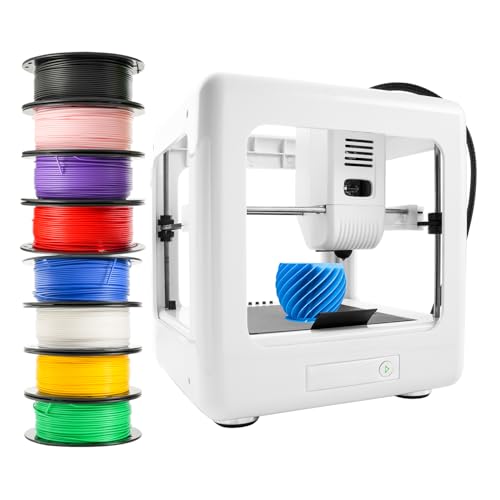
CAIDAQC Portable Mini FDM 3D Printer
Best for: Beginners needing small, portable prints
- Printing Technology
- FDM
- Extruder Type
- 0.4mm nozzle
- Compatible Material
- PLA
- Target Audience
- Beginners
- Color
- White
- Dimensions
- 7.4 × 7.4 × 7.8 inches
View on Amazon: CAIDAQC Portable Mini FDM 3D Printer Affiliate link
This compact FDM printer measures 7.4 x 7.4 x 7.8 inches and weighs 3.3 pounds. It features a 0.4mm nozzle with 0.05-0.2mm accuracy. The kit includes eight 200g PLA spools and supports wood filament. It connects via TF card or USB to Windows or macOS. The design targets beginners seeking an easy, plug-and-print experience for small desktop spaces.
Pros
- Includes eight 200g PLA filament colors
- Supports TF card and USB connections
- Compatible with CURA, Easyware, and ORCA software
- Compact 7.4-inch footprint fits small desks
- Prints with 0.05-0.2mm accuracy
Cons
- Small 7.4-inch build volume limits print size
- Only supports PLA and wood filaments
- No automatic bed leveling mentioned in specs
Good fit if
- You need a portable printer for school or travel
- You want a complete starter kit with multiple filament colors
- You are a beginner looking for easy setup
Skip if
- You require printing with ABS or high-temperature materials
- You need to produce large objects exceeding 7.4 inches
- You want automatic bed leveling features
Verdict: CAIDAQC Mini Portable FDM Printer is a compact starter kit for beginners who need small, detailed prints. It suits users who value portability and included materials over large build volumes.
Specifications side by side
| Spec | CAIDAQC Portable Mini FDM 3D Printer |
|---|---|
| Printing Technology | FDM |
| Extruder Type | 0.4mm nozzle |
| Compatible Material | PLA |
| Target Audience | Beginners |
| Color | White |
| Nozzle Diameter | 0.4mm |
| Dimensions | 7.4 × 7.4 × 7.8 inches |
| Weight | 3.3 pounds |
Frequently asked questions
Is the CAIDAQC Mini suitable for absolute beginners?
Yes, this printer is designed specifically for beginners who need small, portable prints. It features a compact footprint that fits easily on a desk. The listing notes that setup requires minimal technical skill, allowing you to start printing with plug-and-print simplicity without complex calibration routines.
What materials can I use with this FDM printer?
The CAIDAQC Mini supports PLA filament and wood filaments. It uses a 0.4mm nozzle to deposit the melted thermoplastic layer by layer. The included materials in the kit allow you to begin printing immediately after unboxing, making it a convenient starter option for new users.
How large is the build volume on this mini printer?
The overall unit dimensions are 7.4 inches in width and length, with a height of 7.8 inches. While the exact build volume is not listed, the compact external size indicates it is intended for small, detailed prints rather than large-scale projects. It is ideal for desktop use.
Does this printer require a computer to operate?
You can connect the printer using a TF card for file transfer. This allows you to print without keeping a computer permanently attached. You should verify your computer’s compatibility with slicing software like CURA or ORCA to prepare your files before transferring them to the TF card.
What is the weight and portability of this device?
The printer weighs 3.3 pounds, making it lightweight and easy to move. Its small dimensions of 7.4 by 7.4 by 7.8 inches allow it to fit in tight spaces. This portability makes it suitable for users who value mobility or need a printer that does not take up much room.
Is the nozzle size fixed or adjustable?
The CAIDAQC Mini comes with a 0.4mm nozzle. This standard size is common for FDM printers and offers a good balance between print speed and detail. It is well-suited for the PLA and wood filaments included in the kit, providing precise layer deposition for beginners.