Best FDM 3d Printers in 2026: 15 Picks Ranked by Specs
As an Amazon Associate we earn from qualifying purchases. Links on this page are affiliate links.
Selecting the best FDM 3d printer requires evaluating core mechanical features against your specific printing needs. We compared 15 models based strictly on the specifications published on their product listings. The Bambu Lab P1S Enclosed 3D Printer takes the top spot because its enclosed chassis and 500 mm/s speed support engineering filaments effectively.
Use this breakdown to compare motion structures, build dimensions, and leveling systems. This guide helps you decide which machine delivers the exact speed and material handling you need.
Quick picks
The best fit for you
- You want enclosed high-speed printing for engineering filaments Bambu Lab P1S Enclosed 3D Printer Its enclosed chassis and 500 mm/s print speed support standard and engineering plastics.
- You need multi-material printing with fast toolhead swapping Flashforge Creator 5 4-Toolhead 3D Printer Four independent toolheads and 7-second tool swaps enable multi-material printing.
- You want the lightest portable printer on the list Portable Compact FDM 3D Printer A 2.2-pound weight makes it the lightest model on the list.
Our 15 picks

Bambu Lab P1S Enclosed 3D Printer
Best for: high-speed enclosed printing with engineering filaments
- Printing Technology
- FDM
- Print Speed
- 500mm/s
- Multicolor Capacity
- Up to 16 Colors
- Leveling Type
- Automatic Bed Leveling
- Color
- Black
- Dimensions
- 15.3 × 18 × 15.3 inches
View on Amazon: Bambu Lab P1S Enclosed 3D Printer (paid link)
The Bambu Lab P1S is a high-speed enclosed FDM 3D printer designed for diverse filament support. You get maximum print speeds of 500 mm/s, an acceleration of 20000 mm/s², and standard automatic bed leveling. Its fully enclosed design handles temperature-sensitive materials like ABS and ASA alongside standard PLA and PETG. This machine suits you if you want rapid fabrication and reliable baseline calibration.
Pros
- 500 mm/s printing speed with 20000 mm/s² acceleration
- Fully enclosed chassis supports ABS, ASA, PA, and PC filaments
- Automatic bed leveling system
- 15-minute out-of-the-box setup
Cons
- Requires separate Bambu Lab AMS purchase for multi-color printing
- Not recommended for carbon or glass fiber reinforced filaments
- Heavy frame weighing 39.02 pounds
Good fit if
- You need print speeds reaching 500 mm/s paired with automated leveling.
- You want an enclosed chamber for filaments such as ABS and ASA.
- You prefer a fast initial hardware setup completed in 15 minutes.
Skip if
- You require multi-color printing straight out of the box without additional hardware.
- You intend to print carbon fiber or glass fiber reinforced composites.
Verdict: Bambu Lab P1S Enclosed FDM 3D Printer delivers 500 mm/s speeds and reliable automatic leveling in an enclosed chassis. It provides broad filament flexibility for standard and engineering plastics without extended setup times.

Bambu Lab P2S High-Speed FDM Printer
Best for: Fast, automated single-material desktop 3D printing
- Printing Technology
- FDM
- Print Speed
- 600 mm/s
- Extruder Type
- PMSM Servo Extruder
- Chamber Heating
- 50 °C
- Target Audience
- Beginners
- Color
- Grey
View on Amazon: Bambu Lab P2S High-Speed FDM Printer (paid link)
The Bambu Lab P2S is a ready-to-use FDM 3D printer designed for beginners. It delivers print speeds up to 600 mm/s using a PMSM Servo Extruder and Active Flowrate Compensation. You get automatic calibration, AI failure detection, and quick-swap nozzles out of the box. Its integrated chamber reaches up to 50 °C with an adaptive airflow system and carbon filter. You can start printing within 15 minutes.
Pros
- Print speeds up to 600 mm/s with Active Flowrate Compensation
- Automatic calibration and AI failure detection
- Chamber maintains up to 50 °C with built-in carbon filtration
- Quick-swap nozzle system and PMSM Servo Extruder
Cons
- Base unit does not support multi-color printing without the Combo upgrade
- Chamber heating is capped at 50 °C
Good fit if
- You want high-speed printing up to 600 mm/s with minimal manual tuning.
- You prefer a 15-minute setup with automatic bed calibration.
- You print materials that benefit from a 50 °C chamber and carbon filter.
Skip if
- You require multi-color printing without purchasing additional hardware.
- You print engineering filaments that need chamber temperatures over 50 °C.
Verdict: Bambu Lab P2S High-Speed FDM 3D Printer delivers 600 mm/s output with automated calibration and AI monitoring in a straightforward format. It provides reliable single-material performance if you do not need immediate multi-color capabilities.

Bambu Lab A1 FDM 3D Printer
Best for: Beginners wanting automated calibration and quiet printing
- Printing Technology
- FDM
- Leveling Type
- Full-Auto Calibration
- Target Audience
- Beginners, Kids
- Color
- Grey
- Dimensions
- 21.8 × 20.8 × 12.9 inches
- Weight
- 22 pounds
View on Amazon: Bambu Lab A1 FDM 3D Printer (paid link)
The Bambu Lab A1 is an FDM 3D printer designed for beginners and kids. It features an acceleration rate of 10,000 mm/s² alongside active flow rate compensation and automated calibration for Z-offset and bed leveling. You control prints through a simplified touchscreen, while motor noise canceling keeps operation quiet. You can also expand to multi-color printing by adding a separate AMS lite unit.
Pros
- Acceleration reaches up to 10,000 mm/s²
- Full-auto calibration handles Z-offset and bed leveling
- Active flow rate compensation maintains extrusion consistency
- 1-Clip quick swap nozzle design
- Active motor noise canceling reduces operating sound
Cons
- Multi-color capability requires buying the AMS lite unit separately
- Requires a wide desk footprint of 21.76 by 20.83 inches
Good fit if
- You want automated bed leveling and Z-offset calibration without manual adjustment.
- You prioritize quiet operation using active motor noise canceling.
- You want simple maintenance using a 1-clip quick swap nozzle system.
Skip if
- You plan to print multi-color models immediately without purchasing extra hardware.
- You have limited workspace to accommodate its 21.76 by 20.83 inch footprint.
Verdict: Bambu Lab A1 FDM 3D Printer pairs 10,000 mm/s² acceleration with full-auto calibration for an accessible setup. It is a solid choice if you want automated calibration and straightforward single-spool desktop printing.

Flashforge Creator 5 4-Toolhead 3D Printer
Best for: multi-material and multi-color FDM printing
- Printing Technology
- FDM
- Print Speed
- 600mm/s
- Multicolor Capacity
- 4-color
- Leveling Type
- Auto Calibration
- Motion Structure
- CoreXY
- Color Printing
- Multi-Color
View on Amazon: Flashforge Creator 5 4-Toolhead 3D Printer (paid link)
The Flashforge Creator 5 is an FDM CoreXY 3D printer engineered with four independent toolheads. It reaches print speeds up to 600mm/s and completes toolhead swaps in 7 seconds using background preheating. The system includes fully automatic calibration, active vibration compensation, and flow calibration. Measuring 16 by 14 by 18 inches and weighing 30.8 pounds, it suits you if you regularly run multi-material prints using PLA, PETG, TPU, and dedicated support filaments.
Pros
- Four independent toolheads with 7-second background preheated swaps
- CoreXY motion system supporting print speeds up to 600mm/s
- Handles PLA, PETG, TPU, PETG-CF, and specialized support filament in one job
- Fully automatic calibration with active vibration compensation and flow calibration
Cons
- Internal build volume dimensions are not listed in the specifications
- Heavy 30.8-pound frame requires a dedicated, sturdy workspace
Good fit if
- You want multi-material printing that mixes rigid materials and flexible TPU.
- You need rapid 7-second toolhead swaps to avoid single-nozzle purge waste.
- You prefer automated setup with built-in vibration and flow calibration.
Skip if
- You need confirmed internal build volume measurements before buying.
- You want a lightweight, portable printer rather than a 30.8-pound machine.
Verdict: Flashforge Creator 5 4-Toolhead 3D Printer delivers high-speed multi-material fabrication through four independent toolheads and a 600mm/s CoreXY structure. It simplifies complex jobs with automatic calibration and fast 7-second tool swaps.
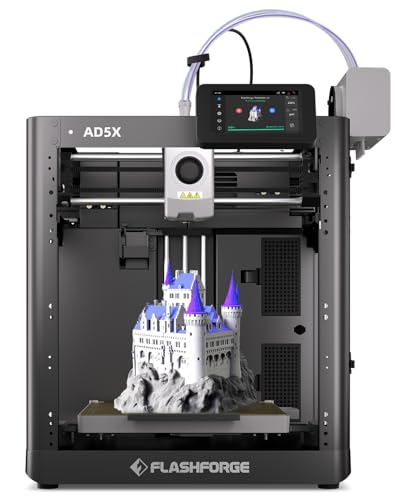
Flashforge High-Speed Multi-Color 3D Printer
Best for: fast multi-color printing with automated leveling
- Printing Technology
- FDM
- Build Volume
- 220 * 220 * 220mm
- Print Speed
- 600mm/s
- Leveling Type
- Fully Automatic Leveling
- Color Printing
- Multi-Color
- Features
- High Speed
View on Amazon: Flashforge High-Speed Multi-Color 3D Printer (paid link)
The Flashforge High-Speed Multi-Color 3D Printer is a desktop FDM machine built for rapid fabrication and multi-material projects. You get print speeds reaching up to 600mm/s, Intelligent Filament Switching for multi-color output, and a 300°C high-temperature nozzle capable of running PLA, ABS, and PETG. Fully automatic leveling takes care of bed calibration. This unit suits you if you want multi-color printing without manual leveling adjustments.
Pros
- Intelligent Filament Switching supports multi-color printing in one job
- Maximum print speed reaches up to 600mm/s
- Nozzle reaches up to 300°C for PLA, ABS, and PETG compatibility
- Fully automatic leveling system for bed setup
Cons
- Specific build volume dimensions are omitted from specifications
- Machine weight is 23.8 pounds, limiting portability
Good fit if
- You need print speeds reaching up to 600mm/s.
- You want multi-color prints handled by automated filament switching.
- You work with filaments requiring nozzle temperatures up to 300°C.
Skip if
- You need a lightweight machine under 20 pounds for easy travel.
- You require explicit build volume measurements before purchasing.
Verdict: Flashforge High-Speed Multi-Color 3D Printer delivers 600mm/s print rates alongside multi-filament switching and a 300°C nozzle. It is a solid FDM choice if you prioritize automated bed leveling and multi-color capability.

Flashforge Multi-Color Core XY 3D Printer
Best for: high-speed four-color desktop printing
- Printing Technology
- FDM
- Build Volume
- 220 * 220 * 220mm
- Print Speed
- 600mm/s
- Multicolor Capacity
- 4 Colors
- Leveling Type
- Fully Auto Leveling
- Motion Structure
- Core XY
View on Amazon: Flashforge Multi-Color Core XY 3D Printer (paid link)
This Flashforge unit is a high-speed FDM printer built around an all-metal CoreXY frame. You get a 220 x 220 x 220 mm build volume, auto leveling, and the ability to print four colors simultaneously using the Intelligent Filament System. It prints at speeds up to 600 mm/s with 20,000 mm/s² acceleration. It suits you if you need multi-color capability alongside flexible TPU support.
Pros
- Four-color printing via Intelligent Filament System
- Maximum print speed of 600 mm/s with 20,000 mm/s² acceleration
- All-metal CoreXY motion structure
- Fully auto leveling system
- Supports flexible TPU filament
Cons
- Build volume limited to 220 x 220 x 220 mm
- Total machine weight exceeds 24 pounds
Good fit if
- You want multi-color printing with up to four filaments.
- You need high print speeds up to 600 mm/s.
- You plan to print flexible filaments like TPU.
Skip if
- You need a build envelope larger than 220 x 220 x 220 mm.
- You require a lightweight printer under 24 pounds.
Verdict: Flashforge 4-Color CoreXY 3D Printer combines high-speed CoreXY motion with automated four-color filament handling. It provides fast, automated multi-color production for prints fitting within its 220 mm cube volume.

Portable Compact FDM 3D Printer
Best for: beginners needing a compact, portable FDM printer
- Printing Technology
- FDM
- Build Volume
- 100x100x100mm
- Compatible Material
- PLA, TPU
- Target Audience
- Beginners
- Color
- Black
- Nozzle Diameter
- 0.4mm
View on Amazon: Portable Compact FDM 3D Printer (paid link)
This compact FDM 3D printer offers a 100x100x100mm build volume and weighs 2.2 pounds. It features a 0.4mm nozzle supporting layer heights between 0.05mm and 0.3mm. You can print using 1.75mm PLA and flexible TPU filaments. It includes a removable build plate and powers via a 12V Type-C adapter. This setup suits beginners and students needing a small machine for desktop spaces or classrooms.
Pros
- Compact 100x100x100mm build volume and 2.2-pound weight
- Supports both 1.75mm PLA and flexible TPU filaments
- Includes removable build plate for part removal
- Layer thickness adjustable from 0.05mm to 0.3mm
Cons
- Small 100x100x100mm print volume limits model size
- Requires modular assembly and manual bed leveling
Good fit if
- You need a lightweight machine for compact spaces or classrooms.
- You plan to print small items using PLA or TPU.
Skip if
- You require a print volume larger than 100x100x100mm.
- You want a fully assembled printer without modular setup.
Verdict: Portable Compact FDM 3D Printer delivers basic desktop printing with PLA and TPU support in an ultra-small footprint. It provides an entry-level platform for students and beginners with modest build size needs.

Anycubic Kobra S1 Max Combo 3D Printer
Best for: large multi-color and engineering-grade prints
- Printing Technology
- FDM
- Build Volume
- 350×350×350mm³
- Print Speed
- 600mm/s
- Multicolor Capacity
- 4-color, up to 16 colors
- Leveling Type
- LeviQ 3.0 auto-leveling
- Motion Structure
- CoreXY
View on Amazon: Anycubic Kobra S1 Max Combo 3D Printer (paid link)
This enclosed CoreXY FDM 3D printer provides a large 350x350x350 mm build volume and prints at speeds up to 600 mm/s. It includes the ACE 2 Pro unit for four-color printing out of the box, expandable up to 16 colors. With a 350°C hotend and a 65°C heated chamber, you can print high-temperature materials like ABS and ASA alongside standard filaments. It suits engineers and makers creating large single-piece models or batch parts.
Pros
- Large 350x350x350 mm build volume supports single-piece printing and batch jobs
- Enclosed CoreXY motion system achieves speeds up to 600 mm/s with vibration compensation
- Comes with ACE 2 Pro unit for 4-color printing, expandable up to 16 colors
- Handles engineering filaments using a 350°C hotend and a 65°C heated chamber
- Durable extrusion setup with hardened steel gears and a titanium alloy throat tube
Cons
- Substantial physical dimensions measuring 23 inches wide and 21 inches deep demand significant desk space
- Scaling to 16 colors requires acquiring three additional ACE 2 Pro units
Good fit if
- You need to print large objects up to 350x350x350 mm in one piece.
- You require multi-color printing with out-of-the-box support for four filaments.
- You work with engineering materials like ABS or ASA that benefit from an enclosed, heated chamber.
Skip if
- You have limited workspace and cannot accommodate a 23-inch wide footprint.
- You only print basic PLA models and do not need multi-color or high-temperature capabilities.
Verdict: Anycubic Kobra S1 Max Combo 3D Printer pairs a 350 mm build cube with enclosed high-temperature capabilities and 4-color printing. It provides the scale and thermal specifications needed for multi-color engineering projects.

Longer LK5 Pro Large Open-Source 3D Printer
Best for: large prints needing power-loss protection
- Printing Technology
- FDM
- Build Volume
- 300*300*400mm
- Print Speed
- 180mm/s
- Features
- Resume Printing, Open Source
- Target Audience
- Beginners
- Color
- Black
View on Amazon: Longer LK5 Pro Large Open-Source 3D Printer (paid link)
The Longer LK5 Pro is an open-frame FDM 3D printer featuring a 300 x 300 x 400 mm build volume. You get print speeds reaching 180 mm/s, a reinforced triangular frame, and a silicon carbide lattice glass build plate. The system includes power-loss recovery and filament runout sensors. It suits you if you want a large-format platform with open-source firmware for home projects and modifications.
Pros
- Large 300 x 300 x 400 mm build volume
- Power-loss resume and filament depletion detection
- Quiet TMC2209 stepper motor drivers
- Reinforced triangular frame with inclined support rods
- Carborundum lattice glass platform
Cons
- Requires final assembly from a 90 percent pre-built state
- Open-frame structure lacks an enclosure
Good fit if
- You need a 300 x 300 x 400 mm build area for tall models.
- You want automatic resume functionality to safeguard against power cuts.
- You want open-source firmware to customize G-code routines.
Skip if
- You want a fully enclosed build chamber for temperature control.
- You prefer a fully factory-assembled machine with zero setup steps.
Verdict: Longer LK5 Pro Large Open-Source 3D Printer provides expansive print volume backed by power-outage recovery and quiet motor drivers. It offers a solid hardware foundation if you want open firmware access for large parts.

Curenoxium Compact Blue FDM 3D Printer
Best for: compact desktop printing of small PLA parts
- Printing Technology
- FDM
- Build Volume
- 100x100x100mm
- Print Speed
- 40mm/s
- Compatible Material
- PLA, TPU
- Color
- Blue
- Nozzle Diameter
- 0.4mm
View on Amazon: Curenoxium Compact Blue FDM 3D Printer (paid link)
The Curenoxium Compact Blue FDM 3D Printer is a small desktop machine designed for basic fabrication projects. It features a 100x100x100mm build volume, a 0.4mm nozzle, and a printing speed of 40mm/s. Weighing 2.6 pounds, it runs via TF card offline printing and supports 1.75mm PLA and TPU filaments. This setup suits you if you need a lightweight tool that includes four starter filament spools.
Pros
- Weighs 2.6 pounds with a 6.9 by 6.1 by 8.3-inch footprint
- Includes four 200g spools of PLA filament
- Adjustable layer thickness from 0.05mm to 0.3mm
- Removable platform for model removal
Cons
- Build volume is limited to 100x100x100mm
- Printing speed is limited to 40mm/s
- Nozzle temperature tops out at 230 C
Good fit if
- You need a lightweight 3D printer under 3 pounds for small workspaces.
- You print compact models within 100x100x100mm using PLA or TPU.
- You prefer offline printing via a TF card.
Skip if
- You need to produce prints larger than 100x100x100mm.
- You require print speeds exceeding 40mm/s.
- You use filaments requiring nozzle temperatures above 230 C.
Verdict: Curenoxium Compact Blue FDM 3D Printer delivers a 100x100x100mm build space and offline printing for PLA and TPU filaments. Its 2.6-pound frame and included filament spools make it a practical choice for small, basic prints.
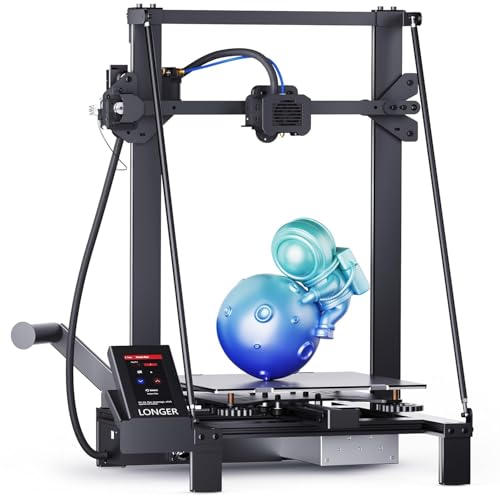
Longer LK5 Pro Large-Format 3D Printer
Best for: large-format projects requiring open-source firmware customization
- Printing Technology
- FDM
- Build Volume
- 11.8 x 11.8x 15.7in. / 300*300*400mm
- Print Speed
- 180mm/s
- Features
- Resume Printing, Open Source
- Target Audience
- Beginners
- Color
- Black
View on Amazon: Longer LK5 Pro Large-Format 3D Printer (paid link)
The Longer LK5 Pro is an open-frame FDM 3D printer built for large projects. It gives you a 300 x 300 x 400 mm build volume supported by a reinforced triangular frame and a silicon carbide lattice glass bed. It runs at speeds up to 180 mm/s on open-source firmware with quiet TMC2209 drivers. This machine suits you if you need tall prints, basic filament sensors, and accessible firmware customization.
Pros
- Generous 300 x 300 x 400 mm build volume
- Reinforced triangular frame with inclined support rods
- Open-source firmware running on quiet TMC2209 drivers
- Silicon carbide lattice glass bed for even heating
- Integrated filament runout detection and power-loss resume
Cons
- Requires final setup because it arrives 90% pre-assembled
- Print speed tops out at 180 mm/s
- Open frame lacks an enclosed build chamber
Good fit if
- You need a 400 mm vertical build height for large single-piece prints.
- You want open-source firmware compatibility for custom G-code modifications.
- You prefer printing on a rigid silicon carbide glass platform.
Skip if
- You want a fully assembled printer ready immediately out of the box.
- You need printing speeds higher than 180 mm/s.
- You require an enclosed print chamber for high-temperature materials.
Verdict: Longer LK5 Pro Large Format FDM 3D Printer delivers a spacious 300 x 300 x 400 mm build area with steady triangular bracing and open-source control. It is a solid choice if you prioritize vertical build capacity and firmware flexibility over high-speed printing.

HEPHI3D 1.75mm PLA Filament Bundle (4x250g)
Best for: low-volume multicolor PLA printing projects
- Printing Technology
- FDM
- Compatible Material
- PLA
- Size
- 1.75Mm
- Weight
- 2.2 pounds
View on Amazon: HEPHI3D 1.75mm PLA Filament Bundle (4x250g) (paid link)
This HEPHI3D package supplies four 250g spools of 1.75mm PLA filament in pink, purple, orange, and gold, totaling 1kg of material. It features a dimensional tolerance of ±0.02mm and operates within a 190°C to 210°C nozzle temperature range alongside a 0°C to 60°C print bed. You get multi-color utility suited for small DIY models on standard FDM 3D printers.
Pros
- Tight dimensional tolerance of ±0.02mm
- Includes four distinct colors in one 1kg bundle
- Vacuum-packed and pre-dried against ambient moisture
- Broad 190°C to 210°C print temperature range
Cons
- Spools are limited to 250g each rather than standard 1kg rolls
- Represents printing consumable material rather than a 3D printer unit
Good fit if
- You need small quantities of several PLA colors without buying full-size spools.
- You operate an FDM printer calibrated for 1.75mm filament with hotends up to 210°C.
Skip if
- You need an actual 3D printer machine rather than filament material.
- You run large, single-color prints exceeding 250g in continuous material demand.
Verdict: HEPHI3D 1.75mm PLA Filament Bundle (4x250g) delivers four compact color spools with a strict ±0.02mm tolerance for everyday FDM printing. It works well if you want color variety in small batches rather than a full 1kg single roll.

Longer LK10 Plus Large 3D Printer
Best for: high-speed large-format single-piece prints
- Printing Technology
- FDM
- Build Volume
- 320×320×400mm
- Print Speed
- 500mm/s
- Leveling Type
- Auto bed leveling
- Extruder Type
- Dual-gear direct drive
- Features
- High Speed
View on Amazon: Longer LK10 Plus Large 3D Printer (paid link)
The Longer LK10 Plus High-Speed FDM Printer is a large-format machine running Klipper firmware. It delivers print speeds up to 500mm/s with 10,000mm/s² acceleration across a 320×320×400mm build volume. With its dual-gear direct-drive extruder handling materials from PLA to Nylon, eddy-current auto-leveling, and dual Z-axis motors, you get high-throughput capacity designed for rapid prototyping and large-scale parts without manual bed calibration.
Pros
- 500mm/s maximum print speed with 10,000mm/s² acceleration
- Generous 320×320×400mm build envelope
- Dual-gear direct drive extruder compatible with TPU and Nylon
- Eddy current sensor for automated bed leveling and Z-offset
- Dual-band 2.4GHz and 5GHz Wi-Fi connectivity
Cons
- Substantial desktop footprint measuring 24.8 inches wide and 30.9 pounds
- Open-frame construction lacks an integrated heated enclosure
Good fit if
- You need a large 320×320×400mm build area for big single-piece prints.
- You want Klipper-driven speeds up to 500mm/s out of the box.
- You work with flexible materials like TPU using a direct-drive extruder.
Skip if
- You have limited workspace for a machine measuring over 24 inches wide.
- You require a fully enclosed build chamber for temperature-sensitive filaments.
Verdict: Longer LK10 Plus High-Speed FDM Printer pairs high-speed Klipper motion up to 500mm/s with a spacious 320×320×400mm volume. It is a capable choice if you need rapid turnaround on large direct-drive prints.

Original Prusa MK4S 3D Printer
Best for: reliable open-source prototyping and workshop production
- Printing Technology
- FDM
- Build Volume
- 9.84 x 8.3 x 8.6 in.
- Features
- High Speed, Fully Assembled
- Dimensions
- 19.6 × 15.7 × 21.6 inches
- Weight
- 15.4 pounds
View on Amazon: Original Prusa MK4S 3D Printer (paid link)
The Original Prusa MK4S Assembled 3D Printer is a pre-built open-source FDM machine designed for production and prototyping. You get a build volume of 9.84 x 8.3 x 8.6 inches, high-speed input shaping motion compensation, and an included 1 kg spool of PLA. Its upgradeable hardware design and long-term firmware support make it a dependable fit if you need consistent day-to-day part fabrication in workshops or desktop studio setups.
Pros
- Input shaping motion compensation reduces vibration artifacts
- Open-source architecture supports continuous hardware upgrades
- Pre-assembled setup removes manual assembly requirements
- Bundled with a 1 kg spool of Prusament PLA
Cons
- Open desktop architecture lacks an enclosed build chamber
- Build area limited to 9.84 x 8.3 x 8.6 inches
Good fit if
- You want a fully assembled machine backed by long-term firmware updates.
- You need input shaping to maintain surface quality at higher speeds.
- You prefer an open-source hardware platform with upgrade paths.
Skip if
- You require an enclosed chamber for specialized materials.
- You need a print volume larger than 9.84 x 8.3 x 8.6 inches.
Verdict: Original Prusa MK4S Assembled 3D Printer delivers dependable open-source fabrication and high-speed motion compensation in a ready-to-run package.
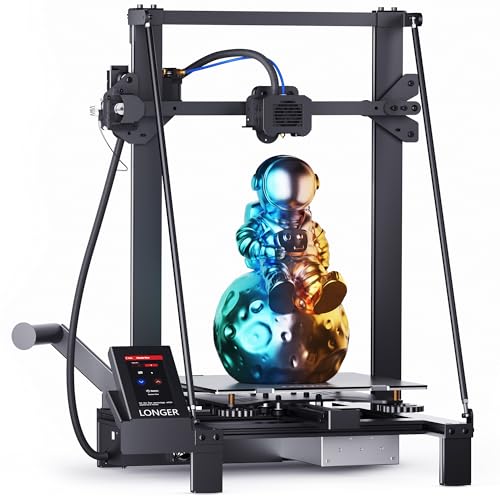
Longer LK5 Pro Large-Format 3D Printer
Best for: large-format open-source PLA printing
- Printing Technology
- FDM
- Build Volume
- 300*300*400mm
- Print Speed
- 180mm/s
- Compatible Material
- PLA
- Features
- Open Source
- Color
- Black
View on Amazon: Longer LK5 Pro Large-Format 3D Printer (paid link)
The Longer LK5 Pro is an open-frame FDM 3D printer built for oversized parts. You get a generous 300 x 300 x 400 mm build volume, stabilized by dual diagonal reinforcement bars. It runs up to 180 mm/s using silent TMC2209 stepper drivers and features an open-source motherboard with a lattice glass plate. If you need a spacious build area for PLA prints without building from scratch, this fits.
Pros
- Large 300 x 300 x 400 mm build volume
- Triangular frame reinforced with diagonal support bars
- Silent TMC2209 stepper motor drivers
- Open-source motherboard for firmware adjustments
- Filament runout sensor and power-loss resume printing
Cons
- Only lists PLA under compatible materials
- Requires final 10 percent assembly before first use
- Maximum print speed is limited to 180 mm/s
Good fit if
- You need a large 300 x 300 x 400 mm envelope for tall PLA models.
- You want quiet operation driven by TMC2209 stepper drivers.
- You prefer an open-source motherboard for custom firmware and G-code tweaks.
Skip if
- You want a fully assembled machine ready right out of the box.
- You require factory-certified support for materials beyond PLA.
Verdict: Longer LK5 Pro Large-Format 3D Printer delivers a spacious build volume supported by stabilizing diagonal rods and silent stepper drivers. It offers a practical open-source platform if you prioritize large PLA printing capacity over high-speed enclosure setups.
Specifications side by side
| Spec | Bambu Lab P1S Enclosed 3D Printer | Bambu Lab P2S High-Speed FDM Printer | Bambu Lab A1 FDM 3D Printer | Flashforge Creator 5 4-Toolhead 3D Printer | Flashforge High-Speed Multi-Color 3D Printer | Flashforge Multi-Color Core XY 3D Printer | Portable Compact FDM 3D Printer | Anycubic Kobra S1 Max Combo 3D Printer | Longer LK5 Pro Large Open-Source 3D Printer | Curenoxium Compact Blue FDM 3D Printer | Longer LK5 Pro Large-Format 3D Printer | HEPHI3D 1.75mm PLA Filament Bundle (4x250g) | Longer LK10 Plus Large 3D Printer | Original Prusa MK4S 3D Printer | Longer LK5 Pro Large-Format 3D Printer |
|---|---|---|---|---|---|---|---|---|---|---|---|---|---|---|---|
| Build Volume | not specified | not specified | not specified | not specified | 220 * 220 * 220mm | 220 * 220 * 220mm | 100x100x100mm | 350×350×350mm³ | 300*300*400mm | 100x100x100mm | 11.8 x 11.8x 15.7in. / 300*300*400mm | not specified | 320×320×400mm | 9.84 x 8.3 x 8.6 in. | 300*300*400mm |
| Print Speed | 500mm/s | 600 mm/s | not specified | 600mm/s | 600mm/s | 600mm/s | not specified | 600mm/s | 180mm/s | 40mm/s | 180mm/s | not specified | 500mm/s | not specified | 180mm/s |
| Printing Technology | FDM | FDM | FDM | FDM | FDM | FDM | FDM | FDM | FDM | FDM | FDM | not specified | FDM | FDM | FDM |
| Multicolor Capacity | Up to 16 Colors | not specified | not specified | 4-color | not specified | 4 Colors | not specified | 4-color, up to 16 colors | not specified | not specified | not specified | not specified | not specified | not specified | not specified |
| Leveling Type | Automatic Bed Leveling | not specified | Full-Auto Calibration | Auto Calibration | Fully Automatic Leveling | Fully Auto Leveling | not specified | LeviQ 3.0 auto-leveling | not specified | not specified | not specified | not specified | Auto bed leveling | not specified | not specified |
| Motion Structure | not specified | not specified | not specified | CoreXY | not specified | Core XY | not specified | CoreXY | not specified | not specified | not specified | not specified | not specified | not specified | not specified |
| Extruder Type | not specified | PMSM Servo Extruder | not specified | not specified | not specified | not specified | not specified | Hardened steel gears and nozzle | not specified | not specified | not specified | not specified | Dual-gear direct drive | not specified | not specified |
| Chamber Heating | not specified | 50 °C | not specified | not specified | not specified | not specified | not specified | 65°C | not specified | not specified | not specified | not specified | not specified | not specified | not specified |
| Color Printing | not specified | not specified | not specified | Multi-Color | Multi-Color | Multi-Color | not specified | not specified | not specified | not specified | not specified | not specified | not specified | not specified | not specified |
| Compatible Material | not specified | not specified | not specified | not specified | not specified | not specified | PLA, TPU | not specified | not specified | PLA, TPU | not specified | PLA | not specified | not specified | PLA |
| Structure | not specified | not specified | not specified | CoreXY | not specified | not specified | not specified | not specified | not specified | not specified | not specified | not specified | not specified | not specified | not specified |
| Leveling | not specified | not specified | not specified | not specified | Auto Leveling | Auto Leveling | not specified | not specified | not specified | not specified | not specified | not specified | Auto Leveling | not specified | not specified |
| Features | not specified | not specified | not specified | not specified | High Speed | High Speed | not specified | not specified | Resume Printing, Open Source | not specified | Resume Printing, Open Source | not specified | High Speed | High Speed, Fully Assembled | Open Source |
| Target Audience | not specified | Beginners | Beginners, Kids | not specified | not specified | not specified | Beginners | not specified | Beginners | not specified | Beginners | not specified | not specified | not specified | not specified |
| Color | Black | Grey | Grey | not specified | Black | Black | Black | not specified | Black | Blue | Black | Pink/Purple/Orange/Gold | not specified | Black Orange | Black |
| Size | P1S (Without AMS) | P2S | A1 | not specified | not specified | not specified | not specified | not specified | Longer-LK5 Pro | not specified | not specified | 1.75Mm | LK10 Plus | not specified | 11.8x11.8x15.7 Inch |
| Nozzle Diameter | not specified | not specified | not specified | not specified | not specified | not specified | 0.4mm | not specified | not specified | 0.4mm | not specified | not specified | not specified | not specified | not specified |
| Dimensions | 15.3 × 18 × 15.3 inches | 18 × 21 × 18 inches | 21.8 × 20.8 × 12.9 inches | 16 × 14 × 18 inches | 14.3 × 14.8 × 16.3 inches | 14.3 × 16.3 × 14.8 inches | 6.8 × 6.1 × 8.3 inches | 21 × 23 × 19 inches | 20 × 20 × 15 inches | 6.9 × 6.1 × 8.3 inches | 11.8 × 15.7 × 11.8 inches | not specified | 20.7 × 24.8 × 21.6 inches | 19.6 × 15.7 × 21.6 inches | 24.4 × 7.68 × 23.4 inches |
| Weight | 39 pounds | not specified | 22 pounds | 30.8 pounds | 23.8 pounds | 24.3 pounds | 2.2 pounds | not specified | not specified | 2.6 pounds | not specified | 2.2 pounds | 30.9 pounds | 15.4 pounds | 27 pounds |
| Model | P1S | PF004-U-AU | PF002-A | Creator 5 | AD5X | AD5X | not specified | not specified | LK5 Pro | not specified | LK5 Pro-B1 | not specified | not specified | MK4S-COM-PEI | not specified |
Is an FDM 3D printer worth it for you?
FDM technology melts solid filament spools through a heated nozzle, building objects layer by layer on a print bed. In daily operation, this gives you direct access to spool-fed materials like standard PLA and flexible TPU. Current FDM hardware provides print speeds up to 600 mm/s across open-frame and enclosed chassis designs. Extruders pair with 0.4mm nozzles and hotends reaching 300°C. You also gain hardware configurations ranging from ultra-compact 2.2-pound desktop units up to 350 mm build cubes that support multi-color filament feeding.
Worth it if
- You want to fabricate parts using spool-fed filaments like PLA or flexible TPU.
- You need print speeds reaching up to 600 mm/s paired with automated calibration.
- You require multi-color output through multi-filament switching or multiple toolheads.
Skip it if
- You do not plan to use spool-based thermoplastic materials like PLA or TPU.
- You need print dimensions larger than a 350 mm build cube.
If you are setting up a workspace for your printer, you can compare switch specifications and layout dimensions for a mechanical keyboard under 50.
How We Chose FDM Printers
We identified each model by checking published Amazon listings for FDM printing technology in the title or feature list. To give you clear options, we include only one size or variant per product family. All details come directly from published manufacturer specifications, and products are not physically handled.
For this 2026 guide, we order the 15 featured models with products in stock first, then by Amazon sales rank (better-selling products first). We also evaluate how published specifications match our technical criteria. Availability updates at least daily on the page so you can compare active equipment.
How to Choose the Right FDM Printer
-
Check Acceleration and Print Speed
Evaluate print speed ratings alongside acceleration values when comparing production times. Standard speeds range from basic desktop pacing up to 600 mm/s on high-speed hardware. However, maximum velocity matters little on smaller parts without high acceleration to reach those speeds quickly. If you want faster print completion on detailed models, look for acceleration specifications reaching 10,000 mm/s². The Bambu Lab A1 specifies 10,000 mm/s² acceleration to maintain rapid movements across intricate toolpaths without requiring manual speed tuning.
-
Inspect Chamber Temperature Control
Examine whether a printer features a passive enclosure or an active heated chamber. Open-frame models work reliably for basic materials like PLA and TPU. In contrast, technical engineering plastics warp and split if ambient air fluctuates during deposition. When you plan to build structural parts from advanced materials, verify chamber thermal specifications on the product data sheet. The Anycubic Kobra Enclosed CoreXY provides an enclosed environment with a dedicated 65°C heated chamber, which maintains stable internal air temperatures throughout lengthy print jobs.
-
Verify Out of Box Assembly
Review assembly requirements before buying to match your setup preferences. Some desktop printers ship as modular kits requiring frame alignment, belt tensioning, and wiring connections. If you prefer to bypass mechanical assembly and begin calibration immediately, look for models marked as fully assembled in their product specifications. Pre-assembled machines ensure factory-calibrated frame squareness directly out of the box. For example, the MALYAN Mini arrives fully assembled with its heated bed and touchscreen ready for immediate desktop placement and direct printing without kit construction.
-
Look for Power Outage Recovery
Check for resume printing functionality if you run large, multi-hour print files. Power cuts or accidental disconnections can interrupt a print midway, ruining tall models and wasting filament. Printers with resume printing features store the current coordinates and nozzle state to flash memory, letting you restart the layer once power returns. This feature is especially critical on large-format beds where prints take days to complete. The Longer LK5 Pro includes built-in resume printing to protect expansive fabrication projects against unexpected electrical cutoffs.
-
Check Maximum Nozzle Temperature
Look at the maximum nozzle temperature specification to confirm filament compatibility. Standard desktop nozzles cap out around 240°C to 260°C, which handles standard PLA and flexible TPU materials without difficulty. However, engineering filaments require higher thermal limits to achieve proper layer adhesion and complete flow through the hotend. If you want to print higher-grade materials, select a machine rated for at least 300°C. The Flashforge High-Speed Multi-Color 3D Printer features a 300°C nozzle alongside automatic bed leveling, giving you the thermal range required for advanced thermoplastic filaments.
-
Compare Machine Dimensions and Weight
Measure your workspace carefully against the outer physical dimensions and machine weight. High-volume printers offer wide build plates but often measure over 20 inches in width and weigh upwards of 30 pounds, requiring a dedicated sturdy workbench. If you have limited desk space or need a portable setup for classroom use, look for compact frames weighing under five pounds. The Curenoxium Compact Blue FDM 3D Printer occupies a 6.1 by 6.9-inch footprint and weighs just 2.6 pounds, fitting tight work areas while handling small 100x100x100mm PLA parts.
Frequently asked questions
What nozzle size do standard desktop FDM 3D printers use?
Standard desktop FDM models commonly feature a 0.4mm nozzle diameter. Units like the Portable Compact FDM printer and the Curenoxium Compact Blue specify a 0.4mm nozzle for laying down molten filament. This dimension balances detailed layer lines against steady material extrusion speeds when you print standard parts using PLA or flexible TPU filaments on desktop workbenches.
What is the benefit of a heated chamber on an enclosed FDM printer?
An active heated chamber maintains steady elevated temperatures to keep technical filaments from warping. The Anycubic Kobra Enclosed CoreXY model specifies an enclosed structure featuring a 65°C heated chamber around its 350x350x350mm envelope. Managing interior ambient heat helps you produce large-scale functional prints cleanly, especially when working with temperature-sensitive engineering materials that contract unevenly during standard open-air cooling cycles.
How does power outage recovery work on an FDM printer?
Resume printing functions safeguard ongoing jobs by storing the current z-height coordinate and print status when power unexpectedly cuts out. Models such as the Longer LK5 Pro feature resume printing capabilities to restart jobs right where they halted. This prevents you from wasting entire filament rolls during long builds, as the hardware reactivates heating components and continues extruding along the exact previous perimeter path.
Can you use flexible TPU filament on entry-level FDM printers?
Yes, certain compact entry-level FDM printers list direct material compatibility for flexible TPU alongside standard PLA. For instance, the Portable Compact FDM 3D Printer and the Curenoxium Compact Blue officially support TPU filament out of the box. You can fabricate pliable gaskets, grips, or dampers on smaller build plates, provided your sliced print profiles match the material extrusion limits of the stock assembly.
What is the difference between fully assembled and kit FDM printers?
Fully assembled FDM printers arrive pre-built from the factory, letting you avoid frame alignment and wiring steps. Units like the Original Prusa MK4S and MALYAN M320 ship fully assembled for immediate desktop placement. In contrast, unbuilt kits require you to square extrusions, route stepper cables, and tighten drive belts manually before you can start leveling the build surface and loading your first spool.
Why does nozzle temperature matter when selecting an FDM printer?
Maximum nozzle temperature dictates which filament types your printer hotend can melt successfully. A model equipped with a 300°C nozzle, such as the Flashforge High-Speed Multi-Color printer, accommodates higher-temperature filaments beyond standard PLA. Hotends limited to lower thermal thresholds cannot process advanced engineering materials cleanly, so verifying nozzle temperature ratings ensures the extruder matches the thermal specifications of the specific filaments you intend to feed.
What does open source mean on an FDM 3D printer?
Open source indicates that the manufacturer shares hardware designs, circuit board layouts, or control firmware openly with the community. Machines such as the Longer LK5 Pro and Original Prusa MK4S advertise open-source architecture. This allows you to inspect machine firmware, compile customized motor parameters, install alternative community controller boards, and adapt physical mounting brackets freely without encountering manufacturer software lockouts on your printing setup.