Best 3d Printers Under $1000: 4 Spec-Based Picks
As an Amazon Associate we earn from qualifying purchases. Links on this page are affiliate links.
Finding the right 3d printer under 1000 requires comparing verified factory hardware specs directly. This guide compares 4 models based strictly on the specifications published on their official listings.
The Snapmaker U1 4-Toolhead 3D Printer leads the list because it swaps four preheated toolheads in five seconds across a 500 mm/s CoreXY frame for waste-free multi-material printing. You can assess each platform by its verified speed, build dimensions, and thermal capabilities. This comparison helps you decide which motion system, enclosure type, and toolhead setup fit your daily fabrication workflow.
Quick picks
| # | Product | Best for | Price |
|---|---|---|---|
| 1 | Snapmaker U1 4-Toolhead 3D Printer Also great | waste-free multi-material and soluble support printing | Check price of Snapmaker U1 4-Toolhead 3D Printer on Amazon (paid link) |
| 2 | FLASHFORGE Creator 5 Pro 4-Toolhead 3D Printer Best premium | waste-free multi-material and high-temperature engineering prints | Check price of FLASHFORGE Creator 5 Pro 4-Toolhead 3D Printer on Amazon (paid link) |
| 3 | Creality K2 Pro Multicolor 3D Printer Also great | large multicolor and composite filament printing | Check price of Creality K2 Pro Multicolor 3D Printer on Amazon (paid link) |
| 4 | FLASHFORGE Creator 4-Toolhead 3D Printer Also great | waste-free multi-material and flexible filament printing | Check price of FLASHFORGE Creator 4-Toolhead 3D Printer on Amazon (paid link) |
The best fit for you
- You want fast multi-material printing with minimal filament waste Snapmaker U1 4-Toolhead 3D Printer Four preheated toolheads swap in five seconds on a 270 x 270 x 270 mm CoreXY frame.
- You need active chamber heating for high-temperature engineering filaments FLASHFORGE Creator 5 Pro 4-Toolhead 3D Printer Its enclosed CoreXY frame includes a 65°C heated chamber and runs at 600 mm/s.
- You want the largest build volume for technical projects Creality K2 Pro Multicolor 3D Printer You get a 300 mm cubic build volume with a 60°C heated chamber and auto leveling.
- You want the lightest multi-toolhead printer on this list FLASHFORGE Creator 4-Toolhead 3D Printer It weighs 30.9 pounds while providing an independent four-toolhead CoreXY system reaching 600 mm/s.
Our 4 picks

Snapmaker U1 4-Toolhead 3D Printer
Best for: waste-free multi-material and soluble support printing
- Build Volume
- 270 x 270 x 270 mm
- Print Speed
- Up to 500 mm/s
- Multicolor Capacity
- 4-toolhead
- Motion Structure
- CoreXY
- Color Printing
- Multi-Color
- Dimensions
- 22.6 × 13 × 14.2 inches
View on Amazon: Snapmaker U1 4-Toolhead 3D Printer (paid link)
The Snapmaker U1 is a CoreXY 3D printer equipped with an independent four-toolhead changer and a 270 x 270 x 270 mm build volume. Instead of purging filament through a single nozzle, it switches between dedicated toolheads in five seconds at speeds up to 500 mm/s. This setup suits you if you frequently combine distinct materials like rigid plastics, soluble supports, and TPU without wasting filament on lengthy purge cycles.
Pros
- Four independent toolheads with 5-second automatic switching
- 270 x 270 x 270 mm build volume
- CoreXY motion system reaching speeds up to 500 mm/s
- Eliminates filament purge waste during multi-material prints
Cons
- Heavy total weight at over 59 pounds
- Relatively compact 3.5-inch touchscreen interface
Good fit if
- You print multi-material models combining rigid plastics with flexible TPU or soluble supports.
- You want fast multi-color toolhead changes without filament purging waste.
- You need a CoreXY platform capable of print speeds up to 500 mm/s.
Skip if
- You need a lightweight machine that is easy to move around your workspace.
- You prefer a larger touchscreen display than 3.5 inches for manual controls.
Verdict: Snapmaker U1 4-Toolhead 3D Printer delivers fast multi-material printing by swapping four preheated toolheads in five seconds rather than purging filament through a single nozzle. Its 500 mm/s CoreXY frame and 270 x 270 x 270 mm volume make it a capable tool for complex functional builds.

FLASHFORGE Creator 5 Pro 4-Toolhead 3D Printer
Best for: waste-free multi-material and high-temperature engineering prints
- Print Speed
- 600mm/s
- Multicolor Capacity
- 4 independent toolheads
- Motion Structure
- CoreXY
- Chamber Heating
- 65°C
- Features
- Heated Chamber
- Dimensions
- 16 × 14 × 18 inches
View on Amazon: FLASHFORGE Creator 5 Pro 4-Toolhead 3D Printer (paid link)
The FLASHFORGE Creator 5 Pro provides multi-material printing using four independent toolheads with a seven-second toolchanger. Its fully enclosed CoreXY frame reaches print speeds up to 600mm/s and includes an active heated chamber reaching 65°C for engineering filaments like ABS, PC, and PA. With dual HEPA 13 and activated carbon filtration plus an integrated HD camera, you get a clean, monitored setup for technical parts.
Pros
- Four independent toolheads with 7-second nozzle changes and zero purge waste
- Active heated chamber reaches up to 65°C for ABS, PC, and PA filaments
- CoreXY motion system with linear rails and print speeds up to 600mm/s
- Dual HEPA 13 and activated carbon air filtration system
- Automated toolhead calibration, vibration compensation, and HD chamber camera
Cons
- Internal printable build dimensions are not specified in the specs
- Heavy 39-pound total weight requires dedicated bench space
Good fit if
- You print technical filaments like ABS, PC, or PA that require an actively heated 65°C chamber.
- You want multi-material printing without filament waste from purge blocks.
- You need remote monitoring via an integrated HD camera and automated first-layer calibrations.
Skip if
- You need verified build volume dimensions before purchasing.
- You require a lightweight or compact printer that is easy to move.
Verdict: FLASHFORGE Creator 5 Pro 4-Toolhead 3D Printer delivers fast multi-material fabrication with its four-toolhead changer and 65°C active chamber heating. It provides an enclosed, high-speed CoreXY platform designed for advanced engineering materials.

Creality K2 Pro Multicolor 3D Printer
Best for: large multicolor and composite filament printing
- Build Volume
- 300×300×300mm
- Print Speed
- 600 mm/s
- Multicolor Capacity
- Up to 16-color
- Leveling Type
- Auto leveling
- Extruder Type
- Direct drive, hardened steel gears
- Chamber Heating
- Up to 60°C
View on Amazon: Creality K2 Pro Multicolor 3D Printer (paid link)
The Creality K2 Pro Combo combines an enclosed printer with the CFS filament system for multicolor printing. You get a 300×300×300mm build volume, print speeds up to 600mm/s, and an active chamber heater reaching 60°C for materials like ASA and carbon-fiber composites. Dual AI cameras monitor prints and calibrate flow in real time. It suits you if you need fast production, multicolor handling, and reliable thermal stability for demanding filaments.
Pros
- 300×300×300mm build volume supports large prints and batch production.
- Active heated chamber maintains up to 60°C to reduce warping on ASA and composites.
- CFS system provides multi-color printing, automated feeding, and moisture-proof storage.
- Dual AI cameras monitor print failures and auto-tune extrusion flow in real time.
Cons
- Substantial total weight of 61.7 pounds requires a heavy-duty workspace.
- Package includes only a 500g starter spool rather than a standard 1kg roll.
Good fit if
- You need a 300×300×300mm build volume for large parts or multi-item batches.
- You work with engineering materials like ASA or carbon composites that require a 60°C heated chamber.
- You want automated multi-color printing up to 16 colors using the CFS system.
Skip if
- You need a lightweight, portable machine rather than a 61.7-pound setup.
- You strictly print standard PLA items and do not require active chamber heating or multi-filament hardware.
Verdict: Creality K2 Pro Multicolor 3D Printer delivers high-speed multicolor capability and a 60°C heated chamber across an expansive 300mm cubic build volume. It provides the automated leveling, dual-camera monitoring, and thermal control required for technical composite printing.
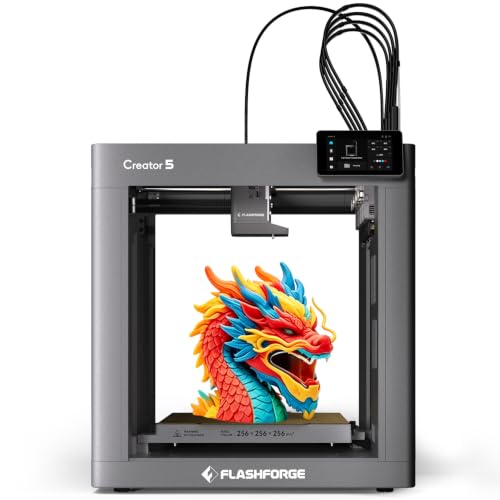
FLASHFORGE Creator 4-Toolhead 3D Printer
Best for: waste-free multi-material and flexible filament printing
- Build Volume
- 256x256x256mm
- Print Speed
- 600mm/s
- Multicolor Capacity
- 4 Independent Toolheads
- Leveling Type
- One tap bed leveling
- Motion Structure
- CoreXY
- Color Printing
- Multi-Color
View on Amazon: FLASHFORGE Creator 4-Toolhead 3D Printer (paid link)
Flashforge Creator 5 is a high-speed multi-material 3D printer built on a CoreXY frame. You get four independent toolheads with a seven-second tool switch, reaching print speeds up to 600mm/s across a 256x256x256mm build area. Dedicated hotends eliminate purge waste between swaps. It suits you if you frequently combine distinct filaments like rigid and flexible materials without color bleed or waste blocks.
Pros
- Four independent toolheads with 7-second FlashSwap switching
- CoreXY motion system with print speeds up to 600mm/s
- Quick-change nozzle system swappable in 30 seconds
- Automated bed leveling with auto XYZ offset calibration
Cons
- Build volume capped at 256x256x256mm
- Multi-material capacity limited to four filaments
Good fit if
- You want to combine rigid and flexible filaments in a single print.
- You need multi-material printing without filament waste or color bleed.
- You prefer fast toolhead swaps over single-nozzle purge towers.
Skip if
- You need a build volume larger than 256x256x256mm.
- You want to print with more than four colors in one setup.
Verdict: Flashforge Creator 5 4-Toolhead 3D Printer delivers true multi-material versatility and zero-waste switching through its independent four-toolhead CoreXY setup. It is a capable choice for fast multi-filament jobs within a standard 256mm cubic volume.
Specifications side by side
| Spec | Snapmaker U1 4-Toolhead 3D Printer | FLASHFORGE Creator 5 Pro 4-Toolhead 3D Printer | Creality K2 Pro Multicolor 3D Printer | FLASHFORGE Creator 4-Toolhead 3D Printer |
|---|---|---|---|---|
| Build Volume | 270 x 270 x 270 mm | not specified | 300×300×300mm | 256x256x256mm |
| Print Speed | Up to 500 mm/s | 600mm/s | 600 mm/s | 600mm/s |
| Multicolor Capacity | 4-toolhead | 4 independent toolheads | Up to 16-color | 4 Independent Toolheads |
| Leveling Type | not specified | not specified | Auto leveling | One tap bed leveling |
| Motion Structure | CoreXY | CoreXY | not specified | CoreXY |
| Extruder Type | not specified | not specified | Direct drive, hardened steel gears | not specified |
| Chamber Heating | not specified | 65°C | Up to 60°C | not specified |
| Color Printing | Multi-Color | not specified | Multi-Color | Multi-Color |
| Structure | not specified | CoreXY | not specified | not specified |
| Leveling | not specified | not specified | Auto Leveling | not specified |
| Features | not specified | Heated Chamber | High Speed, Built-in Camera, Heated Chamber | High Speed |
| Color | not specified | not specified | Black | C5 |
| Dimensions | 22.6 × 13 × 14.2 inches | 16 × 14 × 18 inches | 17 × 20 × 18 inches | 16.1 × 17.2 × 18.3 inches |
| Weight | 59.1 pounds | 39 pounds | 61.7 pounds | 30.9 pounds |
| Model | not specified | not specified | K2 Pro Combo | C5 |
Hardware Trade-Offs Under $1000
Printers in this selection offer CoreXY structures, multi-color capabilities, and print speeds between 500 mm/s and 600 mm/s. However, hardware boundaries remain clear. You will find build volumes reach a maximum of 300 mm cubic, with other options constrained to 256 mm or 270 mm. Your multi-material options top out at four toolheads. In addition, you must accommodate heavy footprints ranging up to 61.7 pounds. Hardware extras like built-in cameras and auto leveling are also not standard across every model.
- Build volume: Build space caps at 300 mm cubic, with smaller options down to 256 mm cubic.
- Toolhead count: Multi-material setups max out at four independent toolheads.
- Machine weight: Total unit weight spans from 30.9 pounds up to 61.7 pounds.
If you also need kitchen hardware specifications, the reference guide for a blender under 1000 lists motor ratings and container capacities side by side.
How We Selected These Printers
This guide features 4 models matching the Under $1000 range. You see items chosen strictly from published specifications and feature lists on Amazon listings. We do not physically handle these machines. Only one variant per product family appears on the page. Models enter or leave this guide whenever their catalog status shifts.
Items are ordered with products in stock first, then by Amazon sales rank, showing better-selling products first. Live stock updates at least daily. Because catalog data and availability change regularly, this page updates automatically so you always see current options.
How to Choose the Right 3D Printer
-
Extruder Switching System
Compare multi-toolhead changers against single-nozzle purge systems for multi-color tasks. Multi-toolhead architectures swap independent nozzles rather than purging melted material through a shared tip. The Snapmaker U1 4-Toolhead 3D Printer completes toolhead swaps in five seconds, avoiding purge towers and filament waste. If you run frequent multi-material prints or soluble supports, multi-toolhead setups save build time and raw filament. For simple single-material jobs, standard toolheads avoid complex mechanical docking.
-
Build Volume Dimensions
Check the printable volume specifications to ensure your models fit on the build plate. Cubic volumes in this range span from 256 mm up to 300 mm per axis. The Creality K2 Pro Multicolor 3D Printer provides a 300 mm cubic build area for large single-piece fabrications. If you produce mechanical assemblies or large enclosures, prioritize taller and wider bed dimensions. Smaller build volumes reduce external printer dimensions and keep motion components compact for standard-sized functional parts.
-
Print Speed Ratings
Review maximum print speed ratings measured in millimeters per second. Motion systems operating at 500 mm/s to 600 mm/s complete rapid prototype iterations faster than standard platforms. The FLASHFORGE Creator 4-Toolhead 3D Printer reaches 600 mm/s on its CoreXY motion frame. Choose 600 mm/s ratings if rapid concept verification drives your production workflow. Ensure your workspace accommodates the mechanical acceleration required to hit these velocities without sacrificing dimensional accuracy across your finished parts.
-
Bed Leveling Automation
Examine the leveling system specifications before deciding on a machine. Automated bed leveling utilizes onboard sensors to map platform imperfections and compensate for surface height discrepancies dynamically. You eliminate manual thumbwheel adjustments and maintain consistent first-layer squish across broad build surfaces. If you print frequently or operate multiple jobs daily, automated leveling minimizes calibration overhead. Look for full sensor-driven bed compensation to avoid manual height tuning before every run.
-
Machine Footprint and Weight
Check the physical dimensions and overall mass against your bench space. Heavy machines minimize resonance during rapid motion but demand rigid mounting tables. The FLASHFORGE Creator 5 Pro 4-Toolhead 3D Printer weighs 39 pounds with a footprint measuring 16 inches long by 14 inches wide. Choose lighter frames if you need to relocate the hardware between workspaces. Select heavier structures if high-speed CoreXY directional shifts require anchored stability on your workshop table.
-
Integrated Camera Monitoring
Inspect the hardware specifications for factory-installed cameras. Integrated camera monitoring lets you observe print progress and detect layer detachment without remaining physically stationed at the machine. If you run overnight prints or multi-hour production cycles, built-in optical sensors provide remote verification. Choosing a model with pre-installed cameras removes the need for aftermarket mounting brackets, independent power supplies, or separate network configurations. Verify optical hardware inclusion if remote tracking matters for your setup.
Frequently asked questions
Which 3D printer provides the largest build volume?
The Creality K2 Pro provides the largest build volume among these options, measuring 300 mm cubic. In comparison, the Snapmaker U1 offers a 270 x 270 x 270 mm envelope, and the Flashforge Creator 5 provides 256 mm cubic. A larger build volume allows you to produce full-scale functional prototypes or batch-print multiple smaller components in a single job.
What print speeds do CoreXY 3D printers reach?
Most CoreXY models in this selection reach maximum print speeds of 600 mm/s. The FLASHFORGE Creator 5 Pro, Creality K2 Pro, and Flashforge Creator 5 are all rated for 600 mm/s operation. The Snapmaker U1 operates at a maximum speed of 500 mm/s. These high speeds help you reduce fabrication times on tall objects and dense mechanical parts.
How much physical space and desk support do these printers require?
These machines require sturdy furniture because machine weights range between 30.9 and 61.7 pounds. The Flashforge Creator 5 is the lightest unit at 30.9 pounds, while the Creality K2 Pro is the heaviest at 61.7 pounds. The Snapmaker U1 weighs 59.1 pounds, and the FLASHFORGE Creator 5 Pro weighs 39 pounds. You should reserve a stable, dedicated workbench to support this mass.
What are the outer dimensions of these desktop 3D printers?
Footprints vary significantly depending on frame style. The Snapmaker U1 measures 13 inches wide, 14.2 inches high, and 22.6 inches long. The Creality K2 Pro spans 20 inches wide, 18 inches high, and 17 inches long. FLASHFORGE models measure roughly 14 to 17.2 inches wide and 18 inches tall. You need to measure your work area before positioning these enclosures.
Which printer includes built-in camera monitoring?
The Creality K2 Pro includes integrated dual-camera monitoring as an official hardware feature. This setup allows you to observe builds directly and verify mechanical progress without lifting the enclosure lid. Combined with its automated bed leveling and high-speed motion system, the integrated camera hardware helps you supervise long print cycles remotely. You do not need to install third-party webcam mounts or extra hardware.
Do all of these printers support multi-material printing?
Yes, all 4 listed printers support multi-color or multi-material capabilities directly. The Snapmaker U1, FLASHFORGE Creator 5 Pro, and Flashforge Creator 5 utilize physical four-toolhead assemblies to swap filaments during a job. The Creality K2 Pro utilizes a multi-color feeder system. Both design paths let you create multi-shade prints or combine structural materials with dedicated soluble support filaments.