Best 3d Printers for Kids in 2026: 15 Picks Ranked by Specs
As an Amazon Associate we earn from qualifying purchases. Links on this page are affiliate links.
Finding the right 3d printer for kids depends on choosing manageable dimensions, automated calibration, and reliable operation. To help you find the right match, we compared 15 models based strictly on the specifications published on their product listings.
The Bambu Lab A1 FDM 3D Printer leads the list because its automated calibration system streamlines setup for young operators. This guide helps you decide between compact enclosed units and larger open-frame printers to find the ideal machine for your maker space.
Quick picks
The best fit for you
- You want automated calibration on a full-size starter machine Bambu Lab A1 FDM 3D Printer It provides automated calibration across a frame measuring 20.83 by 12.87 by 21.76 inches.
- You want an enclosed printer dedicated to PLA models AOSEED Enclosed Kids 3D Printer It features a fully enclosed chassis and prints PLA filament at speeds up to 400 mm/s.
- You need a larger build volume for bigger prints Flashforge Adventurer 5M CoreXY 3D Printer It provides a 220 mm cube build area and operates at 600 mm/s travel speeds.
- You want high-speed direct drive extrusion for your prints Flashforge Adventurer Direct Drive 3D Printer It pairs a direct drive extruder with a 600mm/s print speed and auto-leveling.
Our 15 picks

Bambu Lab A1 FDM 3D Printer
Best for: kids wanting fast and automated printing
- Target Audience
- Beginners, Kids
- Printing Technology
- FDM
- Leveling Type
- Full-Auto Calibration
- Color
- Grey
- Dimensions
- 21.8 × 20.8 × 12.9 inches
- Weight
- 22 pounds
View on Amazon: Bambu Lab A1 FDM 3D Printer (paid link)
The Bambu Lab A1 FDM 3D Printer provides automated setup tools for young users learning 3D printing. It features full-auto calibration for bed leveling and Z-offset, along with active flow rate compensation and a quick-swap nozzle. It operates with motor noise canceling and delivers up to 10,000 mm/s² acceleration. You get an accessible machine suitable for beginners and kids who want fast, automated operation without manual bed adjustments.
Pros
- Full-auto calibration handles bed-leveling and Z-offset automatically
- 10,000 mm/s² acceleration for high-speed printing
- Active flow rate compensation and motor noise canceling
- 1-Clip quick swap nozzle design
Cons
- Multi-color printing requires purchasing AMS lite separately
- Weighs 22 pounds with a footprint exceeding 21 inches
Good fit if
- You want automated bed leveling and Z-offset calibration without manual adjustments.
- You need a quiet machine with quick-swap nozzle hardware.
- You want the option to add multi-color printing via AMS lite later.
Skip if
- You require multi-color printing straight out of the box without add-ons.
- You have limited workspace for a 22-pound machine measuring over 21 inches wide.
Verdict: Bambu Lab A1 FDM 3D Printer delivers fast printing and automated calibration, making it an capable starting platform for kids.

AOSEED Enclosed Kids 3D Printer
Best for: safe, enclosed high-speed PLA printing for kids
- Target Audience
- Kids
- Print Speed
- Up to 400 mm/s
- Multicolor Capacity
- Single-color only
- Leveling Type
- Leveling-free
- Extruder Type
- Quick-release nozzle
- Compatible Material
- PLA
View on Amazon: AOSEED Enclosed Kids 3D Printer (paid link)
The AOSEED Enclosed Kids 3D Printer provides a fully enclosed, pinch-resistant build chamber suited for younger users. You get print speeds reaching up to 400 mm/s, a leveling-free platform, and 0.05 mm layer precision. A built-in camera allows you to monitor jobs remotely and record time-lapses. Operating strictly with PLA filament, it suits households seeking an enclosed, single-color machine that runs right out of the box.
Pros
- Fully enclosed, pinch-resistant frame with leveling-free platform
- Print speeds up to 400 mm/s with 0.05 mm precision
- Built-in camera for live monitoring and time-lapse capture
- Includes 8 PLA filament spools and magnetic build plate
Cons
- Only prints in a single color per print job
- Compatible only with PLA filament
Good fit if
- You want an enclosed printer designed with pinch resistance for children.
- You need fast print speeds up to 400 mm/s with a leveling-free setup.
- You want remote video monitoring and automated time-lapse creation.
Skip if
- You require multi-color printing in a single pass.
- You plan to print materials other than PLA.
Verdict: AOSEED Enclosed Kids 3D Printer delivers high speeds up to 400 mm/s inside a secure, fully enclosed chassis. It is a capable choice if you want monitored single-color PLA printing for beginners.

Entina Tina2C Mini 3D Printer
Best for: first-time kid makers printing small PLA projects
- Target Audience
- Beginners, Kids
- Build Volume
- 3.9" x 3.9" x 3.9"
- Leveling Type
- Auto Leveling
- Compatible Material
- PLA
- Features
- Wi-Fi, Fully Assembled
- Dimensions
- 11.4 × 8.6 × 8.6 inches
View on Amazon: Entina Tina2C Mini 3D Printer (paid link)
The Entina Tina2C Mini 3D Printer is a fully assembled compact desktop machine designed for young beginners. It features a 3.9 x 3.9 x 3.9-inch build volume, automatic bed leveling, and built-in Wi-Fi connectivity managed through a mobile app. The bundle includes four spools of PLA filament totaling roughly one kilogram. If you want a small, low-noise unit that requires zero mechanical assembly before starting basic prints, this model fits your space.
Pros
- Arrives fully assembled with automated bed leveling
- Includes four colors of PLA filament totaling roughly one kilogram
- Flexible magnetic build plate enables simple print removal
- Integrated Wi-Fi supports model selection via the Poloprint app
Cons
- Compact 3.9 x 3.9 x 3.9-inch build volume limits maximum project dimensions
- Material compatibility is limited strictly to PLA filament
Good fit if
- You want an out-of-the-box machine with zero mechanical assembly required.
- You need a compact footprint with built-in Wi-Fi and app controls.
- You plan to print small starter projects using PLA filament.
Skip if
- You need to print objects larger than 3.9 x 3.9 x 3.9 inches.
- You want to print with filament types other than PLA.
Verdict: Entina Tina2C Mini 3D Printer provides an accessible starting point with its pre-assembled frame, auto-leveling sensor, and included filament spools. Its compact 3.9-inch cubic build area keeps operation simple for first-time builders who focus on small PLA models.

Entina Tina2 Basic Mini 3D Printer
Best for: entry-level kids wanting a compact starter machine
- Target Audience
- Beginners, Kids
- Build Volume
- 100x105x100mm
- Printing Technology
- FDM
- Leveling Type
- Auto Leveling
- Features
- Fully Assembled
- Color
- Grey
View on Amazon: Entina Tina2 Basic Mini 3D Printer (paid link)
The Entina Tina2 Basic Mini 3D Printer is a compact, fully assembled desktop machine built for beginners and kids. It provides a 100 x 105 x 100 mm build volume, automatic bed leveling, and dual Z-axis rails for stable motion. You operate it through a 2.4-inch screen with knob controls and print offline using the included MicroSD card. It suits you if you need a simple starter setup.
Pros
- Fully assembled out of the box with auto leveling
- Dual Z-axis rails provide stable platform motion
- Removable flexible magnetic build plate for easy part removal
- Power-loss resume printing support
Cons
- Build volume is limited to 100 x 105 x 100 mm
- Offline file transfer via MicroSD card without wireless connectivity
Good fit if
- You want a ready-to-use printer with factory assembly and automatic bed leveling.
- You need a lightweight desktop unit weighing 6 pounds for small spaces.
- You prefer straightforward offline printing using MicroSD cards.
Skip if
- You need to produce objects larger than 100 x 105 x 100 mm.
- You prefer touchscreen controls over a 2.4-inch screen with knob operation.
Verdict: Entina Tina2 Basic Mini 3D Printer delivers automated bed leveling and dual Z-axis stability in a lightweight desktop format. It is a practical entry machine if you only need small print dimensions.

HEPHI3D Tina2C Compact 3D Printer
Best for: kids starting with compact desktop 3D printing
- Target Audience
- Beginners, Kids
- Printing Technology
- FDM
- Leveling Type
- Auto leveling
- Dimensions
- 8.27 × 6.7 × 9.84 inches
- Weight
- 8.27 pounds
View on Amazon: HEPHI3D Tina2C Compact 3D Printer (paid link)
The HEPHI3D Tina2C is a compact FDM printer designed for beginners and younger makers. It measures 8.27 by 6.7 by 9.84 inches and weighs 8.27 pounds, making it easy to fit on a child's desk. The setup includes factory auto-leveling, Wi-Fi connectivity, app control, and a quick-swap hotend. If you want a small machine that works directly out of the box with minimal calibration, this setup fits your home.
Pros
- Factory preset auto-leveling and fully assembled chassis
- Wi-Fi, USB-C, and TF card file transfer support
- Comes with a 4-color PLA filament starter pack
- Three-second fast-release hotend replacement design
Cons
- Compact machine footprint limits build volume
- No enclosed printing chamber listed in specifications
- Lacks a heated print bed specification
Good fit if
- You want an out-of-the-box machine requiring no manual leveling.
- You need a lightweight unit under 9 pounds for small workspaces.
- You prefer sending prints wirelessly from a phone or tablet.
Skip if
- You need to produce large-scale models exceeding compact dimensions.
- You require a fully enclosed unit to block moving parts.
Verdict: HEPHI3D Tina2C Compact 3D Printer provides an accessible starting point with factory auto-leveling and multi-platform file support. Its lightweight 8.27-pound frame makes it an easy fit for younger users learning digital fabrication.

Asani Mini 3D Printer with Auto-Leveling
Best for: beginners wanting a lightweight, pre-assembled green printer
- Target Audience
- Beginners, Kids
- Leveling Type
- auto-leveling
- Color
- Green
- Dimensions
- 8.3 × 8.3 × 11.4 inches
- Weight
- 6.4 pounds
View on Amazon: Asani Mini 3D Printer with Auto-Leveling (paid link)
The Asani Compact Mini 3D Printer Green comes fully assembled with a 6.4-pound frame measuring 8.3 by 8.3 by 11.4 inches. You get assisted setup with built-in auto leveling, dual Z-axis rails, and one-touch filament loading. It connects via Wi-Fi or microSD card and handles standard 1.75 mm PLA and TPU. This compact setup fits small desks and suits beginners who need a ready-to-run machine without manual calibration.
Pros
- Dual Z-axis rail and auto-leveling system
- Flexible magnetic build plate for print removal
- Wi-Fi connectivity and open-source slicer support
- One-touch filament loading and retraction
Cons
- Requires metal magnetic plates for the proximity sensor to function
- Includes only 10 meters of starter filament
Good fit if
- You want a fully assembled, 6.4-pound printer for a small workspace.
- You prefer auto-leveling and push-button filament loading.
- You want to print over Wi-Fi using standard 1.75 mm PLA or TPU.
Skip if
- You plan to swap to non-metal print surfaces.
- You need a machine with a large exterior footprint.
Verdict: Asani Compact Mini 3D Printer Green delivers out-of-the-box printing with auto leveling, Wi-Fi connectivity, and a lightweight 6.4-pound build. It provides a simple entry point for young makers without demanding manual mechanical assembly.

Magic Jimmy Enclosed Kids 3D Printer
Best for: young beginners seeking safe, high-speed PLA printing
- Target Audience
- Kids
- Print Speed
- Up to 400mm/s
- Features
- Fully Assembled
- Dimensions
- 13.7 × 13.2 × 15.5 inches
- Weight
- 8.8 pounds
View on Amazon: Magic Jimmy Enclosed Kids 3D Printer (paid link)
The Magic Jimmy Enclosed Kids 3D Printer is a fully assembled machine built for young makers. It features an enclosed print chamber and a magnetic build plate to keep heated components out of reach. With print speeds up to 400mm/s, built-in Wi-Fi, and an integrated camera for time-lapse recording, you get fast, monitored output. It suits children and beginners who want quick, app-guided PLA printing straight out of the box.
Pros
- Fully enclosed build chamber with cool-touch exterior
- Print speeds reach up to 400mm/s
- Integrated camera records time-lapse footage
- Fully assembled with Wi-Fi connectivity and magnetic build plate
Cons
- Compatible only with PLA filament
- Exact build volume dimensions are not specified
Good fit if
- You want a fully enclosed unit that isolates moving and heated components.
- You prefer high-speed printing up to 400mm/s with camera monitoring.
- You plan to print exclusively with PLA filament.
Skip if
- You need to print with high-temperature materials like PETG or ABS.
- You need verified build volume dimensions before purchasing.
Verdict: Magic Jimmy Enclosed Kids 3D Printer pairs an enclosed safety shell and 400mm/s speeds with a time-lapse camera for streamlined entry-level printing. It provides a structured, PLA-only platform designed for young operators.

SUNLU Enclosed Mini 3D Printer
Best for: enclosed high-speed printing with door safety pauses
- Target Audience
- Kids
- Print Speed
- Up to 600mm/s
- Features
- Wi-Fi
- Dimensions
- 10.8 × 7.6 × 10.6 inches
- Weight
- 5.51 pounds
View on Amazon: SUNLU Enclosed Mini 3D Printer (paid link)
The SUNLU Kidoodle Enclosed Mini 3D Printer is a compact, pre-assembled machine designed for children and beginners. It features a fully enclosed design that automatically halts prints and cools the nozzle when the door opens. With rated speeds up to 600 mm/s, a 5-inch touchscreen, and integrated Wi-Fi app connectivity, you get quick results and modern navigation. It suits families seeking an accessible, safety-oriented desktop tool for small creative models.
Pros
- Fully enclosed structure with auto-pause and nozzle cooldown on door open
- Maximum print speed up to 600 mm/s
- 5-inch touchscreen interface
- Detachable nozzle paired with a flexible PEI build plate
- Wi-Fi, app control, and Cura software compatibility
Cons
- Compact 7.6 by 10.8 by 10.6-inch footprint restricts print capacity
- Comes with a smaller 250 g starter spool of filament
- Includes paper leveling rather than a fully sensor-automated setup
Good fit if
- You want an enclosed unit with an automatic door-pause safety shutoff.
- You prefer running prints via a 5-inch touchscreen or mobile Wi-Fi app.
- You need print speeds reaching up to 600 mm/s.
Skip if
- You need to print large, full-sized functional objects.
- You prefer an open-gantry design without protective door enclosures.
Verdict: SUNLU Kidoodle Enclosed Mini 3D Printer pairs rapid 600 mm/s print speeds with an enclosed auto-pausing safety frame. It gives younger operators straightforward app and touchscreen controls in a compact desktop form factor.

SainSmart PrintyGo High-Speed Mini 3D Printer
Best for: kids wanting fast, enclosed standalone printing
- Target Audience
- Beginners, Kids
- Print Speed
- 600mm/s
- Leveling Type
- Auto Leveling
- Features
- Wi-Fi
- Color
- White
- Dimensions
- 3.54 × 3.94 × 3.94 inches
View on Amazon: SainSmart PrintyGo High-Speed Mini 3D Printer (paid link)
The SainSmart PrintyGo is a compact, fully enclosed white 3D printer made for young creators. It features a print speed up to 600mm/s, automatic bed leveling, and a built-in five-inch touchscreen for standalone operation. Safety features pause printing if the door opens. If you want a fast, contained desktop machine that lets kids start printing without needing a computer or phone, this provides a straightforward entry point.
Pros
- Maximum print speed of 600mm/s
- Fully enclosed chassis with door safety sensor
- Built-in 5-inch interactive touch screen
- Integrated auto-leveling bed
Cons
- Compact exterior dimensions under four inches
- Comes with only a 250g starter filament spool
Good fit if
- You want a fully enclosed printer that pauses when opened
- You prefer standalone touchscreen control without a computer
- You want print speeds up to 600mm/s
Skip if
- You need to print objects larger than roughly three to four inches
- You want a full 1kg spool included in the box
Verdict: SainSmart PrintyGo Enclosed Mini 3D Printer combines 600mm/s print speeds with enclosed safety sensors for children. Its standalone touchscreen and auto-leveling let kids run prints without external computers.

UGEE Funbox Enclosed Kids 3D Printer
Best for: bedroom-safe printing with built-in air filtration
- Target Audience
- Kids
- Print Speed
- Up to 500 mm/s
- Multicolor Capacity
- Single-color
- Leveling Type
- Leveling-free
- Color
- Blue
- Dimensions
- 10.6 × 10.8 × 12 inches
View on Amazon: UGEE Funbox Enclosed Kids 3D Printer (paid link)
The UGEE Funbox is an enclosed 3D printer tailored for children aged eight and older. It comes fully assembled with factory calibration, eliminating manual bed leveling. Print speeds range from 220 to 300 mm/s with peaks at 500 mm/s, while an internal H12 HEPA and carbon filter captures airborne particles. You get a built-in monitoring camera and quiet operation under 46 dB, making it suitable for bedrooms and shared study spaces.
Pros
- Built-in H12 HEPA and activated carbon filtration
- Fully enclosed frame with anti-pinch door and under 46 dB noise level
- Print speeds up to 500 mm/s with zero manual leveling required
- Integrated HD camera for live monitoring and time-lapse recording
Cons
- Limited to single-color extrusion
- Supports only standard 1.75 mm PLA filament
- Not rated for children under eight years old
Good fit if
- You need an enclosed printer with built-in air filtration for a bedroom or classroom.
- You want plug-and-play setup without manual bed leveling or hardware assembly.
- You prefer remote print monitoring via a built-in camera and companion app.
Skip if
- You want multi-color printing from a single nozzle setup.
- You plan to print materials other than standard 1.75 mm PLA.
- You need a printer certified for unsupervised children under eight.
Verdict: UGEE Funbox Enclosed Kids 3D Printer combines high-speed PLA printing with enclosed safety features and active HEPA filtration. It provides a quiet, zero-calibration option for young creators working within shared living areas.

Flashforge Adventurer 5M CoreXY 3D Printer
Best for: older kids wanting speed and larger prints
- Target Audience
- Beginners, Kids
- Build Volume
- 220x220x220 mm
- Print Speed
- 600mm/s
- Leveling Type
- One-click Automatic Leveling
- Motion Structure
- Core XY
- Extruder Type
- Direct drives
View on Amazon: Flashforge Adventurer 5M CoreXY 3D Printer (paid link)
The Flashforge Adventurer 5M is a high-speed desktop 3D printer built with a CoreXY structure and one-click automatic bed leveling. It offers a 220x220x220 mm build volume, reaches travel speeds up to 600 mm/s, and includes a direct drive extruder that heats to 200°C in 35 seconds. If you want a larger, faster workspace for older kids and beginners needing quick model turnaround without manual calibration, this setup fits your needs.
Pros
- One-click automatic bed leveling system
- High travel speed reaching up to 600 mm/s with 20000 mm/s² acceleration
- Roomy 220x220x220 mm build volume
- Quick-heating direct drive extruder reaches 200°C in 35 seconds
- Flexible dual-sided PEI build plate for print removal
Cons
- Real-time video monitoring requires buying a separate camera kit
- Weighs 23.8 pounds, making it less portable than mini toy printers
Good fit if
- You want a spacious 220x220x220 mm build area for larger models
- You need fast print speeds up to 600 mm/s to finish prints quickly
- You prefer automated first-layer calibration without manual bed adjustment
Skip if
- You need integrated camera monitoring out of the box
- You want an ultra-compact, lightweight printer for small play areas
Verdict: Flashforge Adventurer 5M Fast 3D Printer pairs rapid 600 mm/s travel speeds with automated leveling and a roomy 220 mm cube build area. It offers older kids and beginners a dependable platform for larger designs.
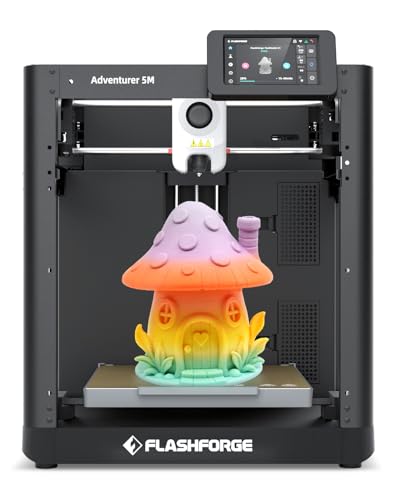
Flashforge Adventurer Direct Drive 3D Printer
Best for: fast direct drive printing for beginners
- Target Audience
- Beginners, Kids
- Build Volume
- 220×220×220mm
- Print Speed
- 600mm/s
- Leveling Type
- Auto Bed Leveling
- Motion Structure
- CoreXY
- Extruder Type
- Direct Drive
View on Amazon: Flashforge Adventurer Direct Drive 3D Printer (paid link)
The Flashforge Adventurer Direct Drive 3D Printer provides a 220 by 220 mm print area with a direct drive extruder and maximum speed of 600 mm/s. It features automatic bed leveling, CoreXY motion, and a 4.3-inch touchscreen. This machine suits older children and beginners seeking fast turnaround times and automated bed calibration on an open-frame platform.
Pros
- Direct drive extruder with maximum speed of 600 mm/s
- One-click automatic bed leveling eliminates manual Z-offset calibration
- Rapid heating hotend reaches 200°C in 35 seconds with 3-second swaps
- Includes filament runout sensor and power failure resume
Cons
- Open-frame design requires printing a DIY kit for an enclosure
- Weighs 20 pounds, requiring a dedicated sturdy surface
Good fit if
- You want a high-speed direct drive printer reaching up to 600 mm/s.
- You prefer hands-off automatic bed leveling and a 4.3-inch touchscreen.
Skip if
- You need a fully enclosed chamber included out of the box.
- You prefer a compact, lightweight unit that weighs under 20 pounds.
Verdict: Flashforge Adventurer Direct Drive 3D Printer delivers high-speed printing and reliable one-click auto-leveling for learning spaces. Its open CoreXY design prioritizes fast setup and quick nozzle changes over an enclosed chassis.

HEPHI3D Tina2 Plus Compact 3D Printer
Best for: quick out-of-the-box wireless printing for kids
- Target Audience
- Kids
- Print Speed
- 250mm/s
- Leveling Type
- Auto bed leveling
- Features
- Fully Assembled
- Dimensions
- 8.27 × 8.72 × 11.4 inches
- Weight
- 5.69 pounds
View on Amazon: HEPHI3D Tina2 Plus Compact 3D Printer (paid link)
The HEPHI3D Tina2 Plus Compact 3D Printer is a fully assembled entry unit for young creators. You get auto bed leveling, a heated bed reaching 80°C, and print speeds up to 250 mm/s with a 150 mm/s recommended baseline. It connects over Wi-Fi via the Poloprint Cloud app, giving you access to 3,000 models. This machine suits kids and beginners who want quick wireless printing without manual hardware calibration.
Pros
- Reaches print speeds up to 250 mm/s with a 150 mm/s recommended speed
- Equipped with auto bed leveling and an 80°C adjustable heated bed
- Pre-assembled out of the box with a 3-second quick-release hotend
- Supports Wi-Fi printing through the Poloprint Cloud mobile app
Cons
- Heated print bed reaches a maximum temperature of 80°C
- Compact 8.27 by 8.72 inch footprint limits overall build area
Good fit if
- You want a fully assembled printer that operates without manual leveling.
- You prefer sending prints wirelessly from a phone or tablet.
- You need open-source slicing software support alongside app printing.
Skip if
- You need a print bed that exceeds 80°C for high-temp filaments.
- You require an enclosed print chamber for temperature containment.
Verdict: HEPHI3D Tina2 Plus Compact 3D Printer delivers fast out-of-the-box printing with auto leveling, Wi-Fi controls, and an 80°C heated bed. It gives kids an accessible entry point to 3D creation without complicated manual assembly.
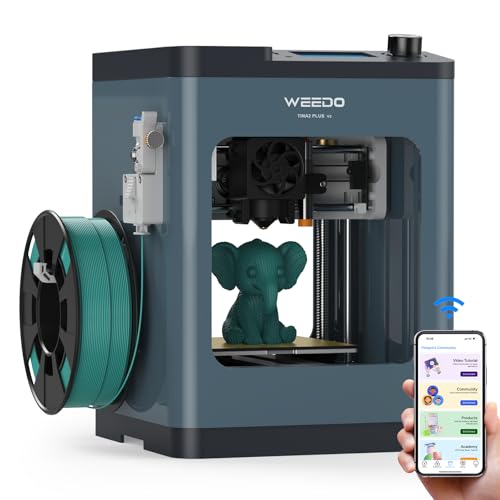
WEEDO Tina2 Plus Semi-Enclosed 3D Printer
Best for: kids wanting fast wireless prints safely
- Target Audience
- Beginners, Kids
- Print Speed
- 250mm/s
- Printing Technology
- FDM
- Leveling Type
- 16-point Auto Leveling
- Features
- High Speed, Wi-Fi, Fully Assembled
- Build Plate Material
- PEI
View on Amazon: WEEDO Tina2 Plus Semi-Enclosed 3D Printer (paid link)
The WEEDO Tina2 Plus Semi-Enclosed 3D Printer is a compact, fully assembled FDM machine designed for beginners and young makers. You get print speeds reaching up to 250mm/s, 16-point automatic bed leveling, and a heated PEI build plate reaching 80°C. Its semi-enclosed shell restricts access to the hotend during operation. Filament runout detection and 2.4GHz Wi-Fi app controls make running print jobs straightforward for child-friendly workflows.
Pros
- Prints at speeds up to 250mm/s with high-speed filament
- 16-point auto-leveling paired with an 80°C heated PEI plate
- Touch-proof semi-enclosed frame blocks hand access to the hotend
- Filament runout sensor with automated self-feeding mechanism
Cons
- Only connects to 2.4GHz Wi-Fi networks
- Includes only 100g of starter filament in the box
Good fit if
- You want a fully assembled printer that is ready within 15 minutes.
- You need print speeds up to 250mm/s with automated filament runout protection.
- You prefer slicing and starting prints directly from a smartphone or tablet.
Skip if
- You only have a 5GHz Wi-Fi network for wireless connectivity.
- You need print surfaces heated beyond 80°C for high-temperature plastics.
Verdict: WEEDO Tina2 Plus Semi-Enclosed 3D Printer delivers 250mm/s printing, 16-point auto leveling, and physical nozzle shielding in a compact 6.6-pound frame. It gives beginners a dependable, automated platform for small-scale projects.

MALYAN Mini Fully Assembled 3D Printer
Best for: compact metal-frame desktop printing for beginners
- Target Audience
- Beginners, Kids
- Build Volume
- 150x150x150mm
- Printing Technology
- FDM
- Compatible Material
- PLA
- Features
- Fully Assembled
- Color
- Black
View on Amazon: MALYAN Mini Fully Assembled 3D Printer (paid link)
The MALYAN Mini Black FDM 3D Printer is a fully assembled desktop machine built with a full-metal frame for beginners and kids. It provides a 150 by 150 by 150 mm build volume alongside a heated bed and touchscreen controls. You can run 1.75 mm PLA or PETG filament directly onto the flexible magnetic build plate. This compact setup suits you if you want a pre-calibrated black unit for small creative projects.
Pros
- 150 x 150 x 150 mm build volume with heated bed
- Sturdy full-metal frame design
- Removable flexible magnetic build plate
- Factory-calibrated and fully assembled
- Touchscreen controls for setup and printing
Cons
- 150 x 150 x 150 mm capacity limits print dimensions
- Open frame lacks an enclosed build chamber
Good fit if
- You want a fully assembled metal-frame printer with touchscreen navigation.
- You need a heated bed capable of printing 1.75 mm PLA and PETG.
- You prefer removing completed prints by bending a magnetic plate.
Skip if
- You need a build envelope larger than 150 x 150 x 150 mm.
- You want a fully enclosed unit to cover operating components.
Verdict: MALYAN Mini Black FDM 3D Printer provides a rigid metal chassis, heated bed, and simple touchscreen navigation right out of the box. It handles everyday compact prints without requiring manual frame assembly.
Specifications side by side
| Spec | Bambu Lab A1 FDM 3D Printer | AOSEED Enclosed Kids 3D Printer | Entina Tina2C Mini 3D Printer | Entina Tina2 Basic Mini 3D Printer | HEPHI3D Tina2C Compact 3D Printer | Asani Mini 3D Printer with Auto-Leveling | Magic Jimmy Enclosed Kids 3D Printer | SUNLU Enclosed Mini 3D Printer | SainSmart PrintyGo High-Speed Mini 3D Printer | UGEE Funbox Enclosed Kids 3D Printer | Flashforge Adventurer 5M CoreXY 3D Printer | Flashforge Adventurer Direct Drive 3D Printer | HEPHI3D Tina2 Plus Compact 3D Printer | WEEDO Tina2 Plus Semi-Enclosed 3D Printer | MALYAN Mini Fully Assembled 3D Printer |
|---|---|---|---|---|---|---|---|---|---|---|---|---|---|---|---|
| Build Volume | not specified | not specified | 3.9" x 3.9" x 3.9" | 100x105x100mm | not specified | not specified | not specified | not specified | not specified | not specified | 220x220x220 mm | 220×220×220mm | not specified | not specified | 150x150x150mm |
| Print Speed | not specified | Up to 400 mm/s | not specified | not specified | not specified | not specified | Up to 400mm/s | Up to 600mm/s | 600mm/s | Up to 500 mm/s | 600mm/s | 600mm/s | 250mm/s | 250mm/s | not specified |
| Printing Technology | FDM | not specified | not specified | FDM | FDM | not specified | not specified | not specified | not specified | not specified | not specified | not specified | not specified | FDM | FDM |
| Multicolor Capacity | not specified | Single-color only | not specified | not specified | not specified | not specified | not specified | not specified | not specified | Single-color | not specified | not specified | not specified | not specified | not specified |
| Leveling Type | Full-Auto Calibration | Leveling-free | Auto Leveling | Auto Leveling | Auto leveling | auto-leveling | not specified | not specified | Auto Leveling | Leveling-free | One-click Automatic Leveling | Auto Bed Leveling | Auto bed leveling | 16-point Auto Leveling | not specified |
| Motion Structure | not specified | not specified | not specified | not specified | not specified | not specified | not specified | not specified | not specified | not specified | Core XY | CoreXY | not specified | not specified | not specified |
| Extruder Type | not specified | Quick-release nozzle | not specified | not specified | not specified | not specified | not specified | not specified | not specified | not specified | Direct drives | Direct Drive | not specified | not specified | not specified |
| Compatible Material | not specified | PLA | PLA | not specified | not specified | not specified | not specified | not specified | not specified | not specified | not specified | not specified | not specified | not specified | PLA |
| Leveling | not specified | not specified | Auto Leveling | Auto Leveling | not specified | not specified | not specified | not specified | Auto Leveling | not specified | not specified | Auto Leveling | not specified | Auto Leveling | not specified |
| Features | not specified | Enclosed | Wi-Fi, Fully Assembled | Fully Assembled | not specified | not specified | Fully Assembled | Wi-Fi | Wi-Fi | not specified | not specified | not specified | Fully Assembled | High Speed, Wi-Fi, Fully Assembled | Fully Assembled |
| Target Audience | Beginners, Kids | Kids | Beginners, Kids | Beginners, Kids | Beginners, Kids | Beginners, Kids | Kids | Kids | Beginners, Kids | Kids | Beginners, Kids | Beginners, Kids | Kids | Beginners, Kids | Beginners, Kids |
| Color | Grey | White (JOY AI+) + 8 PLA | Orange/Yellow/Pink/Purple | Grey | Blue/Green/White/Red | Green | A-Purple | Orange + 1 PLAFilament | White | Blue | Adventurer 5M | AD5M | DarkBlue | Deep Blue | Black |
| Build Plate Material | not specified | not specified | not specified | not specified | not specified | not specified | not specified | not specified | not specified | not specified | not specified | not specified | not specified | PEI | not specified |
| Dimensions | 21.8 × 20.8 × 12.9 inches | 11.4 × 10.6 × 12.2 inches | 11.4 × 8.6 × 8.6 inches | 11.4 × 8.6 × 8.6 inches | 8.27 × 6.7 × 9.84 inches | 8.3 × 8.3 × 11.4 inches | 13.7 × 13.2 × 15.5 inches | 10.8 × 7.6 × 10.6 inches | 3.54 × 3.94 × 3.94 inches | 10.6 × 10.8 × 12 inches | 14.3 × 14.8 × 16.3 inches | 14.8 × 14.3 × 16.3 inches | 8.27 × 8.72 × 11.4 inches | 8.2 × 8.2 × 11.4 inches | 8.66 × 12.6 × 14 inches |
| Weight | 22 pounds | 8.82 pounds | not specified | 6 pounds | 8.27 pounds | 6.4 pounds | 8.8 pounds | 5.51 pounds | 9.1 pounds | 8.91 pounds | 23.8 pounds | 20 pounds | 5.69 pounds | 6.6 pounds | 11.7 pounds |
| Size | A1 | not specified | not specified | not specified | not specified | Compact | not specified | not specified | not specified | Funbox-A-Blue | not specified | not specified | not specified | not specified | not specified |
| Model | PF002-A | not specified | not specified | TINA2 BAISC-TF Card | not specified | TINA2S | not specified | 3D Printer for Kids | PrintyGo | Funbox | Adventurer 5M | not specified | not specified | TINA2-Deep Blue | M320 |
Is a 3D printer for kids worth it?
Printers designated for kids prioritize pre-assembled hardware and automated leveling over complex user configuration. Choosing a machine in this category typically gives you a factory-built unit under ten pounds, such as the 5.5-pound SUNLU or 6.4-pound Asani, running dedicated PLA filament profiles. These units frequently feature smaller footprints and simplified touchscreen or Wi-Fi controls rather than manual assembly kits. However, machines focused strictly on younger audiences often restrict your material compatibility to standard PLA and feature compact physical footprints, leaving larger builds and advanced setups to general desktop platforms.
Worth it if
- You want a fully assembled machine with factory auto-leveling out of the box.
- You need a lightweight machine weighing under ten pounds for compact spaces.
- You plan to print exclusively with PLA filament using simple touchscreen or wireless controls.
Skip it if
- You require a large build volume beyond compact desktop dimensions.
- You need compatibility with materials beyond standard PLA filament.
If you want durable hardware for a workstation, specifications for a mechanical keyboard under 50 focus on switch actuation types and rollover support.
How We Picked These Printers
To choose the 15 printers for 2026, you evaluate published manufacturer specifications from Amazon listings. A model qualifies when its title or feature list explicitly states kids as the target audience. Only one size or variant from each product family appears on the list. No printers are physically tested, and all details come strictly from published data.
The guide lists products in stock first, then by Amazon sales rank (better-selling products first). You can compare published specifications like auto-leveling, print speed, and enclosed frames to find the right fit. Current stock updates on the page daily.
How to Choose a Kids 3D Printer
-
Compare Print Speed Ratings
Print speed dictates how quickly a machine deposits material per layer. Listed speeds in this category range from 250 mm/s up to 600 mm/s. Fast rates reduce wait times for finished models, which helps keep younger users engaged during projects. However, higher velocity demands rigid frames to avoid layer shifting. The SainSmart PrintyGo High-Speed Mini 3D Printer specifies a 600mm/s maximum print speed. Check whether the listed speed matches the default profile or requires specific acceleration settings before you select a high-speed unit.
-
Evaluate Extruder Drive Systems
The extruder type determines how filament feeds toward the heated nozzle. Direct drive extruders place the motor directly above the hotend, which shortens the travel distance and improves filament grip. This setup reduces feeding jams and manages flexible or soft filaments more consistently than remote feeders. The Flashforge Adventurer Direct Drive 3D Printer specifies a direct drive extruder configuration. You should verify the extruder type on the spec sheet if you want simpler filament loading with fewer mechanical parts along the feed tube.
-
Inspect Build Plate Materials
The build surface affects how securely prints stick during operation and how easily they release once cool. Smooth sticker sheets often require scrapers that can pose handling hazards for younger operators. Flexible steel plates coated with PEI allow you to bend the sheet to pop finished objects off cleanly without sharp tools. The WEEDO Tina2 Plus Semi-Enclosed 3D Printer lists a PEI build plate in its specifications. Check the build plate material attribute to ensure part removal does not require prying tools.
-
Review Data Connectivity Options
How you send print files to the machine affects daily convenience for kids. Basic units rely on manual TF memory cards, which require transferring files using a computer card reader. Models with integrated Wi-Fi networking let you transfer sliced files directly over your home network from a computer or mobile application. The Entina Tina2C Mini 3D Printer lists Wi-Fi among its primary features. Check the interface and network specifications if you want to run prints remotely without swapping physical memory cards back and forth.
-
Verify Automated Leveling Sensors
Print bed leveling aligns the distance between the nozzle and build surface. Manual leveling requires turning thumbscrews under the bed while checking clearance with paper, which can frustrate younger users. Automated bed leveling utilizes electronic sensors to map the surface height and compensate for uneven spots digitally. The Entina Tina2 Basic Mini 3D Printer lists auto leveling in its attributes. Review the leveling specification to confirm the printer handles calibration on its own before every print run without requiring mechanical adjustment.
-
Check Compatible Filament Materials
3D printers process different thermoplastic filaments depending on hotend temperature limits and bed heating. Polylactic acid, or PLA, is standard for beginners because it extrudes at lower temperatures and produces minimal odor compared to technical plastics. Some dedicated kid models explicitly list PLA as their sole compatible material, avoiding hotter materials that require advanced ventilation. The MALYAN Mini Fully Assembled 3D Printer specifies PLA compatibility in its attributes. Confirm the supported filament specs match the materials you intend to purchase and store at home.
Frequently asked questions
What filament types work best with kids 3D printers?
Polylactic acid, known as PLA, is the primary material compatible with dedicated kids 3D printers. Listed machines such as the AOSEED Enclosed Kids 3D Printer and Magic Jimmy Enclosed Kids 3D Printer specify PLA compatibility for their hardware. PLA melts at lower extrusion temperatures than industrial plastics. This allows units to run without specialized high-temperature enclosures while keeping material management simple for young operators.
Do kids 3D printers require assembly out of the box?
Most 3D printers designed for kids come fully assembled from the factory. Models like the Entina Tina2 Basic, WEEDO Tina2 Plus, and MALYAN Mini arrive ready to operate without requiring manual frame bolting or wiring. You only need to unpack the unit, load the filament, and connect power. Skipping mechanical assembly eliminates setup errors and lets beginners start printing immediately.
Can kids safely use a 3D printer inside a bedroom?
Operating inside a bedroom requires proper ventilation or specialized filtration systems. For indoor shared spaces, models like the UGEE Funbox include built-in active HEPA air filtration within an enclosed frame. Enclosed printers also help contain warm airflow and mechanical sounds during operation. Choosing a unit with an integrated filter keeps your printing environment cleaner when running long PLA jobs in personal living areas.
Why is auto-leveling important on a 3D printer for kids?
Automated bed leveling replaces manual adjustment screws with electronic sensors to ensure proper first-layer adhesion. Printers like the WEEDO Tina2 Plus use 16-point automatic leveling, while the SainSmart PrintyGo and Entina Tina2C integrate automatic sensors directly into the print head. You do not need to slide paper under the nozzle or turn corner knobs, which removes the most frequent point of failure for beginners.
Does a child need a dedicated computer to run a 3D printer?
A child does not necessarily need a computer tethered to the printer. Several models feature standalone controls, such as the SainSmart PrintyGo with its onboard touchscreen, or the Entina Tina2 Basic with TF card storage. In addition, machines like the Asani Mini, SUNLU Mini, and WEEDO Tina2 Plus feature Wi-Fi connectivity. These features allow you to send files or start prints directly from wireless apps or memory cards.
How do door safety sensors protect young operators during prints?
Door safety sensors automatically pause active print jobs if an enclosure door opens. The SUNLU Enclosed Mini 3D Printer uses an auto-pausing safety frame to halt motion whenever someone accesses the chamber. This feature prevents hands from contacting hot nozzles or moving belts during a print cycle. Once you close the door securely, the system resumes the print without ruining the progress of the model.
Do kids 3D printers require a heated print bed?
Kids 3D printers do not strictly require a heated bed for standard PLA, but heated platforms improve print adhesion. Units like the MALYAN Mini include heated beds, and the HEPHI3D Tina2 Plus features an 80°C heated bed paired with automated leveling. Other designs use unheated removable beds or textured PEI build surfaces, as seen on the WEEDO Tina2 Plus, to keep parts stuck firmly during printing.