Best 3d Printers Under $200: 11 Spec-Based Picks
As an Amazon Associate we earn from qualifying purchases. Links on this page are affiliate links.
Finding a capable 3d printer under 200 requires balancing build volume, assembly needs, and automated hardware features. We compared 11 products, and our picks are based on the specifications published on the listings. The Entina Tina2C Mini 3D Printer takes the top spot because it combines factory assembly, auto leveling, and Wi-Fi into a 5.29-pound frame.
Physical dimensions and motion components directly impact your desk space and daily workflow. This guide helps you decide whether a compact filament model or a high-detail resin unit fits your workspace and projects.
Quick picks
The best fit for you
- You need a pre-assembled wireless desktop printer Entina Tina2C Mini 3D Printer Factory assembly, auto leveling, and Wi-Fi connectivity provide simple operation in a 5.29-pound chassis.
- You need high-detail resin printing for small models ELEGOO Mars 5 4K Resin 3D Printer Dedicated resin technology and 4K screen resolution capture fine details on complex parts.
- You want maximum print speed in a compact footprint SainSmart PrintyGo High-Speed Mini 3D Printer A 600mm/s maximum print speed produces parts quickly with automated leveling and Wi-Fi support.
Our 11 picks

Entina Tina2C Mini 3D Printer
Best for: beginners seeking compact wireless 3D printing
- Build Volume
- 3.9 × 3.9 × 3.9 inch
- Printing Technology
- FDM
- Leveling Type
- Intelligent auto-leveling
- Extruder Type
- Quick-swap printhead
- Features
- Wi-Fi, Fully Assembled
- Target Audience
- Beginners
View on Amazon: Entina Tina2C Mini 3D Printer (paid link)
The Entina Tina2C is a compact, fully assembled FDM 3D printer designed for beginners and home workspaces. It features a 3.9 × 3.9 × 3.9-inch build volume, automated bed leveling, and power-loss recovery to handle unexpected interruptions. You can send jobs via 2.4G Wi-Fi using the Poloprint Cloud mobile application or print offline using a TF card. Its small 8 × 6.5 × 10-inch footprint fits easily on standard desks.
Pros
- Comes fully assembled with automated bed leveling
- Flexible magnetic build plate enables straightforward part removal
- Supports both 2.4G Wi-Fi and offline TF card workflows
- Integrated power-loss recovery protects against unexpected interruptions
Cons
- Compact 3.9 × 3.9 × 3.9 inch build volume restricts model size
- Wireless connectivity supports 2.4G Wi-Fi networks only
Good fit if
- You need a printer that works out of the box with zero assembly
- You want wireless print setup via 2.4G Wi-Fi or mobile app
- You primarily print small items within a 3.9-inch cube
Skip if
- You plan to fabricate parts larger than 3.9 × 3.9 × 3.9 inches
- You require 5G Wi-Fi network support for wireless transfers
Verdict: Entina Tina2C Mini 3D Printer delivers accessible desktop printing through factory assembly, automatic leveling, and wireless connectivity. Its compact dimensions make it a practical choice for smaller household and educational projects.

ELEGOO Mars 5 4K Resin 3D Printer
Best for: automated setup and detailed resin printing
- Leveling Type
- Automatic Leveling
- Printing Technology
- Resin
- Color
- Green
- Dimensions
- 15.7 × 18.5 × 9.06 inches
- Weight
- 14.6 pounds
View on Amazon: ELEGOO Mars 5 4K Resin 3D Printer (paid link)
The ELEGOO Mars 5 is a desktop resin 3D printer built around a 4K mono LCD and a COB light source. It includes one-click automatic leveling, mechanical sensor alerts for resin shortages, and an automated component self-check. You also get overheat protection that halts operation at 80°C. This unit suits you if you need detailed resin prints with automated setup routines and active hardware monitoring.
Pros
- 4K monochrome LCD with COB light source
- One-click automatic bed leveling
- Mechanical sensor detects residue and resin shortages
- Overheat protection halts printing if LED reaches 80°C
- One-click automated component self-check
Cons
- Shorter 9.06-inch height compared to the 22-inch variation in the series
- Substantial desktop footprint at 18.5 inches wide and 14.55 pounds
Good fit if
- You want automated leveling and self-testing features on a resin printer.
- You need a 4K monochrome LCD for detailed prints.
- You want built-in sensor alarms for resin shortages and residue detection.
Skip if
- You prefer standard filament printing instead of liquid resin.
- You need the larger 22-inch machine height offered by alternative variations.
Verdict: ELEGOO Mars 5 4K Resin 3D Printer delivers high-detail output backed by automated leveling, smart sensor warnings, and hardware overheat safeguards. It provides a reliable resin workflow if you prioritize ease of setup and built-in error prevention.

Entina Tina2 Basic Mini 3D Printer
Best for: beginners wanting a compact, ready-to-use desktop printer
- Build Volume
- 100x105x100mm
- Printing Technology
- FDM
- Leveling Type
- Auto Leveling
- Features
- Fully Assembled
- Target Audience
- Beginners, Kids
- Color
- Grey
View on Amazon: Entina Tina2 Basic Mini 3D Printer (paid link)
The Entina Tina2 Basic is a fully assembled desktop 3D printer designed for beginners and kids. It provides a compact 100 x 105 x 100 mm build volume, dual Z-axis rails for print stability, and automatic bed leveling. You control offline prints via a 2.4-inch LCD screen using a MicroSD card. Its light 6-pound frame fits small desks, making it a practical choice if you need a straightforward starter machine.
Pros
- Dual Z-axis rails for stable print movement
- Automated bed leveling requires no manual adjustment
- Flexible and removable magnetic build plate
- Comes fully assembled for quick setup
Cons
- Compact 100 x 105 x 100 mm build volume limits model size
- Relies on MicroSD card transfer with no wireless networking listed
Good fit if
- You want an out-of-the-box machine that requires zero assembly.
- You have limited workspace and need a lightweight desktop footprint.
- You prefer automated bed leveling over manual adjustment screws.
Skip if
- You need to print items larger than 100 x 105 x 100 mm.
- You require wireless file transfer instead of MicroSD card loading.
Verdict: Entina Tina2 Basic Mini 3D Printer provides an accessible entry point with factory assembly, dual Z-axis support, and automatic bed leveling. Its small build envelope limits part size but keeps desk space clear.
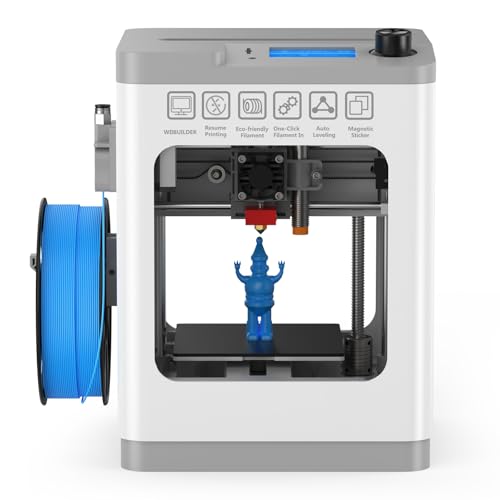
HEPHI3D TINA2 Mini 3D Printer
Best for: beginners seeking a compact, fully assembled printer
- Leveling Type
- Auto-leveling
- Features
- Fully Assembled
- Target Audience
- Beginners
- Color
- Grey
- Dimensions
- 8.27 × 8.27 × 11.4 inches
- Weight
- 5.69 pounds
View on Amazon: HEPHI3D TINA2 Mini 3D Printer (paid link)
The HEPHI3D TINA2 is a fully assembled desktop mini 3D printer designed for beginners. Its compact frame measures 8.27 by 8.27 by 11.42 inches and weighs under six pounds, making it easy to fit into tight desk spaces. You get one-touch auto bed leveling, dual Z-axis and dual Y-axis rails, and a flexible magnetic build plate. It prints PLA, PLA Pro, and TPU directly from a Micro SD card or USB connection.
Pros
- Fully assembled construction ready to print immediately
- Dual Z-axis and dual Y-axis guide rail system
- One-touch automatic bed leveling
- Removable and flexible magnetic build surface
Cons
- Offline printing relies strictly on Micro SD cards or USB cable transfer
- Material compatibility is limited to PLA, PLA Pro, and TPU
Good fit if
- You want a ready-to-run unit with no manual leveling steps.
- You need a small 5.69-pound machine that occupies minimal desk space.
- You plan to build models using PLA, PLA Pro, or TPU filaments.
Skip if
- You require built-in wireless file transfer options.
- You intend to print using high-temperature filaments outside of PLA and TPU.
Verdict: HEPHI3D TINA2 Mini 3D Printer provides automated leveling, dual Z and Y rails, and out-of-the-box readiness in a lightweight package. It serves well if you prioritize simple desktop setup and support for standard PLA and TPU filaments.

Asani Mini 3D Printer with Auto-Leveling
Best for: beginners seeking compact Wi-Fi printing
- Leveling Type
- auto-leveling
- Target Audience
- Beginners, Kids
- Color
- Green
- Dimensions
- 8.3 × 8.3 × 11.4 inches
- Weight
- 6.4 pounds
View on Amazon: Asani Mini 3D Printer with Auto-Leveling (paid link)
This compact unit from Asani arrives fully assembled with an 8.3 by 8.3 by 11.4-inch footprint and weighs 6.4 pounds. It features auto-leveling, a dual z-axis rail, and built-in Wi-Fi connectivity. The system supports 1.75mm PLA and TPU filaments via one-touch feeding, operated through a 2.4-inch LCD screen. It suits you if you need an out-of-the-box machine for small spaces, classrooms, or introductory makers.
Pros
- Dual z-axis rail design with automated bed leveling
- Integrated Wi-Fi connectivity and microSD card support
- Compatible with 1.75mm PLA, PLA pro, and TPU filaments
- Compact 8.3 x 8.3 x 11.4-inch footprint weighing 6.4 pounds
Cons
- Proximity sensor only functions with magnetic metal build plates
- Included starter filament supply is limited to 10 meters
Good fit if
- You want a fully assembled machine with Wi-Fi capability.
- You print primarily with PLA or flexible TPU filaments.
- You need a lightweight unit weighing under seven pounds.
Skip if
- You plan to swap in non-magnetic or non-metal build surfaces.
- You require materials beyond PLA or TPU filaments.
Verdict: Asani Mini 3D Printer with Auto-Leveling delivers factory assembly, dual z-axis stability, and Wi-Fi control in a lightweight package. It provides essential convenience features for beginners working with standard PLA or TPU.

ELEGOO Mars 5 4K Resin Printer
Best for: high-detail small resin models and miniatures
- Print Speed
- up to 70mm/h
- Printing Technology
- MSLA
- Leveling Type
- Automatic Leveling
- Dimensions
- 21 × 11.7 × 13.3 inches
View on Amazon: ELEGOO Mars 5 4K Resin Printer (paid link)
The ELEGOO Mars 5 is an MSLA resin 3D printer built for fine-detail desktop fabrication. It features a 6.6-inch 4K monochrome LCD screen delivering a 35-micrometer XY resolution and print speeds up to 70 millimeters per hour. An intelligent mechanical sensor monitors resin levels and operational errors, while automatic sensor-based leveling simplifies setup. This machine suits you if you want high-precision resin printing without manual build-plate calibration.
Pros
- 6.6-inch 4K monochrome LCD with 35x35 μm XY resolution
- Sensor-based automatic leveling system
- Mechanical sensor detects low resin, foreign objects, and overheating
- COB light source provides 92 percent light uniformity
- Print speeds reach up to 70 mm/h
Cons
- Resistive touch screen interface rather than capacitive
- Compact 6.6-inch screen limits single-print dimensions
Good fit if
- You need detailed miniature prints with 35 μm resolution.
- You prefer automated plate leveling rather than manual calibration.
- You want hardware sensors to flag low resin and release film wear.
Skip if
- You need a larger screen area than a 6.6-inch LCD.
- You prefer a capacitive touchscreen over a resistive interface.
Verdict: ELEGOO Mars 5 4K Resin Printer provides automated leveling and hardware safety sensing for high-detail desktop printing. Its 4K screen and 70 mm/h speed deliver sharp results with minimal setup effort.

SUNLU Enclosed Mini 3D Printer
Best for: kids and beginners needing safe enclosed printing
- Print Speed
- Up to 600mm/s
- Features
- Wi-Fi
- Target Audience
- Kids
- Dimensions
- 10.8 × 7.6 × 10.6 inches
- Weight
- 5.51 pounds
View on Amazon: SUNLU Enclosed Mini 3D Printer (paid link)
The SUNLU Enclosed Mini 3D Printer is a pre-assembled, fully enclosed unit tailored for beginners and children. It features print speeds up to 600mm/s, an enclosed chassis with an automatic safety pause when the door opens, and a 5-inch touchscreen. It supports Wi-Fi and app control alongside standard Cura and USB workflows. If you want a safe, compact desktop tool with a flexible PEI plate, this gives you rapid setup out of the box.
Pros
- Print speeds reaching up to 600mm/s
- Enclosed build pauses and cools the nozzle when the door opens
- Large 5-inch touchscreen interface with Wi-Fi and app support
- Detachable nozzle paired with a flexible PEI build plate
Cons
- Compact 7.6 by 10.8 by 10.6-inch exterior limits build volume
- Included starter spool provides only 250g of PLA material
Good fit if
- You need an enclosed printer with automatic door-safety shutoffs for younger users.
- You want remote control and monitoring via Wi-Fi and a mobile app.
- You prefer a pre-assembled machine ready to run with minimal setup.
Skip if
- You need to print large parts that exceed a compact mini build space.
- You prefer an open-frame design without door interlock mechanisms.
Verdict: SUNLU Enclosed Mini 3D Printer delivers high-speed printing up to 600mm/s within a fully enclosed, child-safe design. Its Wi-Fi connectivity and PEI plate make it an accessible desktop unit for young learners and beginners.

SainSmart PrintyGo High-Speed Mini 3D Printer
Best for: high-speed enclosed beginner and STEM printing
- Print Speed
- 600mm/s
- Leveling Type
- Auto Leveling
- Features
- Wi-Fi
- Target Audience
- Beginners, Kids
- Color
- White
- Dimensions
- 3.54 × 3.94 × 3.94 inches
View on Amazon: SainSmart PrintyGo High-Speed Mini 3D Printer (paid link)
The SainSmart PrintyGo is a compact, fully enclosed FDM printer designed for beginners and young learners. It reaches print speeds up to 600mm/s and includes automated bed leveling along with built-in Wi-Fi. You control prints directly using a 5-inch touchscreen and an onboard library of over 1,500 models, or slice files with Cura. Its enclosed chassis pauses operation if opened, protecting you from heated components during quick tabletop builds.
Pros
- Maximum print speed of 600mm/s
- Fully enclosed chassis with automated door-open pause feature
- Integrated auto-leveling system
- Standalone operation with 5-inch touchscreen and Wi-Fi
- Compatible with standard slicing software like Cura
Cons
- Compact physical footprint with build dimensions under 4 inches per axis
- Included filament is limited to a 250g starter spool
Good fit if
- You need print speeds reaching up to 600mm/s in a desktop format.
- You want a fully enclosed printer with an automatic door-open safety stop.
- You prefer standalone printing directly from a built-in touchscreen.
Skip if
- You require a build area larger than approximately 3.9 inches.
- You plan to run materials requiring open-frame modifications beyond standard PLA.
Verdict: SainSmart PrintyGo High-Speed Mini 3D Printer delivers rapid 600mm/s print rates within an enclosed, safety-oriented body. It provides a straightforward starting point if you want compact, standalone fabrication without complex setup.

Entina Tina2C Mini 3D Printer
Best for: compact desktop printing of small parts
- Build Volume
- 100×100×100 mm
- Leveling Type
- One-click 9-point auto leveling
- Extruder Type
- Brass-hardened steel nozzle
- Target Audience
- Beginners
- Color
- Orange
- Dimensions
- 6.5 × 8 × 10 inches
View on Amazon: Entina Tina2C Mini 3D Printer (paid link)
The Entina Tina2C is a pre-assembled mini 3D printer designed for compact workspaces. It offers a 100 x 100 x 100 mm build volume, nine-point auto-leveling, and a heated bed with a 245°C brass-hardened steel nozzle for PLA and TPU filaments. With quiet operation under 45 dB and Wi-Fi or USB connectivity, this unit suits you if you want a simple starter printer for small models without manual calibration.
Pros
- Pre-assembled with 9-point auto bed leveling and nozzle cleaning
- Heated build plate and 245°C nozzle support PLA and TPU
- Quiet operation rated under 45 dB with integrated LED lighting
- Flexible magnetic build plate simplifies print removal
- Multiple connection methods including Wi-Fi, USB, and TF card
Cons
- Small 100 x 100 x 100 mm build volume limits overall part size
- Maximum nozzle temperature is capped at 245°C
Good fit if
- You need a quiet, pre-assembled printer for a desktop or classroom.
- You want to print smaller components using PLA or TPU filaments.
- You prefer automated 9-point leveling over manual bed adjustment.
Skip if
- You plan to produce models larger than 100 x 100 x 100 mm.
- You work with materials requiring nozzle temperatures above 245°C.
Verdict: Entina Tina2C Mini 3D Printer provides an accessible, pre-calibrated platform with automated leveling and quiet operation. It is a dependable choice when your projects fit inside its 100 mm cubic capacity.

HEPHI3D Tina2S Mini 3D Printer
Best for: quiet desktop printing and beginner STEM projects
- Print Speed
- 200mm/s
- Leveling Type
- Auto-bed leveling
- Features
- Fully Assembled
- Target Audience
- Beginners
- Color
- Orange
- Dimensions
- 8.27 × 8.72 × 11.4 inches
View on Amazon: HEPHI3D Tina2S Mini 3D Printer (paid link)
The HEPHI3D Tina2S is a fully assembled, compact desktop 3D printer designed for beginners and home workspaces. It features automatic bed leveling, print speeds up to 200 mm/s, and an operating noise level between 40 and 50 dB. You can send files wirelessly via an app or use TF card and USB connections. It suits you if you need a quiet, small-footprint machine compatible with PLA, PLA Pro, and TPU filaments.
Pros
- Print speeds up to 200 mm/s
- Quiet operation rated between 40 and 50 dB
- Auto bed leveling, filament runout detection, and power-loss recovery
- Wireless app printing plus TF card and USB connectivity
- Flexible magnetic build plate with a semi-enclosed frame
Cons
- Filament support is limited to PLA, PLA Pro, and TPU
- Exact build volume dimensions are not specified in the product data
- Compact machine footprint of 8.27 by 8.72 by 11.42 inches limits model scale
Good fit if
- You want a fully assembled machine ready to print out of the box with auto-leveling.
- You need a quiet printer operating at 40 to 50 dB for an office or bedroom desk.
- You want wireless model transfer using a phone, tablet, or PC slicing software.
Skip if
- You need to print with high-temperature materials beyond PLA or TPU.
- You require large-scale parts that exceed compact desktop dimensions.
Verdict: HEPHI3D Tina2S Mini 3D Printer delivers fast 200 mm/s printing and quiet operation in a pre-assembled, desktop-friendly size. It provides reliable basic filament handling and auto-leveling without requiring manual calibration.

ELEGOO Mars 5 4K Resin Printer
Best for: detailed miniatures and automated resin printing
- Printing Technology
- MSLA
- Leveling Type
- Automatic Leveling
- Dimensions
- 9.06 × 9.06 × 17.1 inches
- Weight
- 14.6 pounds
View on Amazon: ELEGOO Mars 5 4K Resin Printer (paid link)
The ELEGOO Mars 5 is a desktop MSLA resin printer designed for detailed hobby printing. It features a 6.6-inch 4K monochrome LCD screen with a resolution of 4098 by 2560, producing fine 35-micron details. Built-in mechanical sensors monitor resin levels and foreign objects, while one-click automated leveling simplifies setup. It suits you if you prioritize fine-detail miniature prints over large-scale filament production.
Pros
- 6.6-inch 4K monochrome LCD with 4098x2560 resolution (35-micron precision)
- Mechanical sensor detects foreign objects, resin shortages, and leveling faults
- One-click automatic bed leveling and automated startup self-check
- Overheat protection automatically halts printing if LED reaches 80°C
Cons
- Compact 6.6-inch screen size restricts maximum single-print dimensions
- Resin technology requires specialized liquid handling compared to filament
Good fit if
- You need high-resolution 35-micron detail for miniatures and small parts.
- You want automated bed leveling and automated safety self-checks.
Skip if
- You need a large build area exceeding a 6.6-inch screen profile.
- You prefer dry filament printing without liquid resin handling.
Verdict: ELEGOO Mars 5 4K Resin Printer delivers precise 4K resolution with helpful automated sensor safeguards. It is an efficient choice for miniature makers wanting reliable resin output without manual calibration.
Specifications side by side
| Spec | Entina Tina2C Mini 3D Printer | ELEGOO Mars 5 4K Resin 3D Printer | Entina Tina2 Basic Mini 3D Printer | HEPHI3D TINA2 Mini 3D Printer | Asani Mini 3D Printer with Auto-Leveling | ELEGOO Mars 5 4K Resin Printer | SUNLU Enclosed Mini 3D Printer | SainSmart PrintyGo High-Speed Mini 3D Printer | Entina Tina2C Mini 3D Printer | HEPHI3D Tina2S Mini 3D Printer | ELEGOO Mars 5 4K Resin Printer |
|---|---|---|---|---|---|---|---|---|---|---|---|
| Build Volume | 3.9 × 3.9 × 3.9 inch | not specified | 100x105x100mm | not specified | not specified | not specified | not specified | not specified | 100×100×100 mm | not specified | not specified |
| Print Speed | not specified | not specified | not specified | not specified | not specified | up to 70mm/h | Up to 600mm/s | 600mm/s | not specified | 200mm/s | not specified |
| Printing Technology | FDM | not specified | FDM | not specified | not specified | MSLA | not specified | not specified | not specified | not specified | MSLA |
| Leveling Type | Intelligent auto-leveling | Automatic Leveling | Auto Leveling | Auto-leveling | auto-leveling | Automatic Leveling | not specified | Auto Leveling | One-click 9-point auto leveling | Auto-bed leveling | Automatic Leveling |
| Extruder Type | Quick-swap printhead | not specified | not specified | not specified | not specified | not specified | not specified | not specified | Brass-hardened steel nozzle | not specified | not specified |
| Leveling | Auto Leveling | not specified | Auto Leveling | not specified | not specified | not specified | not specified | Auto Leveling | not specified | not specified | not specified |
| Features | Wi-Fi, Fully Assembled | not specified | Fully Assembled | Fully Assembled | not specified | not specified | Wi-Fi | Wi-Fi | not specified | Fully Assembled | not specified |
| Target Audience | Beginners | not specified | Beginners, Kids | Beginners | Beginners, Kids | not specified | Kids | Beginners, Kids | Beginners | Beginners | not specified |
| Color | Orange | Green | Grey | Grey | Green | Mars 5 | Orange + 1 PLAFilament | White | Orange | Orange | Mars 5 |
| Dimensions | 8 × 6.5 × 10 inches | 15.7 × 18.5 × 9.06 inches | 11.4 × 8.6 × 8.6 inches | 8.27 × 8.27 × 11.4 inches | 8.3 × 8.3 × 11.4 inches | 21 × 11.7 × 13.3 inches | 10.8 × 7.6 × 10.6 inches | 3.54 × 3.94 × 3.94 inches | 6.5 × 8 × 10 inches | 8.27 × 8.72 × 11.4 inches | 9.06 × 9.06 × 17.1 inches |
| Weight | 5.29 pounds | 14.6 pounds | 6 pounds | 5.69 pounds | 6.4 pounds | not specified | 5.51 pounds | 9.1 pounds | not specified | 5.69 pounds | 14.6 pounds |
| Size | not specified | Mars 5 | not specified | not specified | Compact | not specified | not specified | not specified | not specified | not specified | Mars 5 |
| Model | not specified | EL-3D-M5 | TINA2 BAISC-TF Card | TINA2 Basic Gray | TINA2S | not specified | 3D Printer for Kids | PrintyGo | not specified | not specified | Mars 5 |
Hardware trade-offs to expect Under $200
When shopping Under $200, you balance specialized capabilities against modest mechanical builds. The listed machines prioritize desktop-friendly footprints, with widths staying under 10 inches and weights as light as 5.29 pounds. You give up large build envelopes, as models like the Tina2C feature a 100 mm cubic capacity. Compatible material options focus on PLA and TPU, with no listed engineering filaments. Hardware designs also omit multi-color printing systems and dual extruder setups.
- Machine structure: compact external widths under 10 inches limit physical build capacity.
- Compatible material: filament options remain focused on standard PLA and TPU.
- Color printing: single-nozzle designs lack multi-color filament feeding systems.
If your printing setup requires dedicated enclosure ventilation, you can evaluate airflow specifications to select an effective fan under 200.
How We Picked These Printers
You see 11 models selected for the Under $200 guide. All details come directly from specifications and feature lists published on the listings. Products are not physically handled. To keep your choices distinct, only one variant from each product family appears. The list displays products in stock first, then by Amazon sales rank, showing better-selling products first.
Catalog details and availability refresh directly on the page at least daily. As listing figures shift over time, models move into or out of this Under $200 selection automatically. This spec-based approach ensures you receive current hardware data whenever you plan your printing setup in 2026.
How to Choose the Right 3D Printer
-
Compare Print Speed Ratings
Check the rated print speed to determine how quickly the tool finishes parts. Certain compact machines reach speeds up to 600mm/s, as seen on the SainSmart PrintyGo High-Speed Mini 3D Printer, while standard desktop units operate closer to 200 mm/s. Fast movement rates shorten print duration on simple shapes but demand stable mechanical motion. If rapid project turnaround is your primary goal, target models with higher stated velocity specifications.
-
Assess Frame and Enclosure Type
Examine whether the machine features an open frame or a fully enclosed design. An enclosed chassis, such as that on the SUNLU Enclosed Mini 3D Printer, isolates moving parts and heated sections from your workspace. This setup adds physical shielding, making it suitable if younger users operate the machine. Open-frame designs provide direct physical access for clearing jams or adjusting nozzles. Choose an enclosed cabinet if workplace containment is essential for your setup.
-
Check Bed Leveling Automation
Review how the platform establishes proper distance between nozzle and build plate. Automated leveling systems detect surface clearance electronically, removing the requirement to turn manual bed knobs before every job. A printer like the Entina Tina2 Basic Mini 3D Printer integrates auto leveling straight out of the box to streamline calibration. If you want to begin printing without learning manual bed leveling routines, choose hardware that explicitly lists automated leveling in its core attributes.
-
Evaluate Wireless Network Connectivity
Check how project files transfer from your computer to the printer. Units with Wi-Fi support let you transmit sliced files wirelessly across your local network, bypassing the need to transfer physical cards back and forth. The Asani Mini 3D Printer with Auto-Leveling provides this wireless feature for untethered daily operation. If your workstation sits in a separate room from your printing area, prioritize Wi-Fi connectivity over hardware that relies strictly on physical memory cards.
-
Inspect Motion Axis Support
Look at the mechanical guide rail setup to verify structural stability during toolhead movement. Some compact models feature dual Z and Y rails, as found on the HEPHI3D TINA2 Mini 3D Printer, to balance the axis across two separate physical tracks. Dual rail systems distribute motion loads evenly, which helps reduce mechanical wobble during vertical travel. If you prioritize mechanical rigidity in a lightweight desktop footprint, check for dual rail or dual Z-axis configurations.
-
Verify Hardware Safety Sensors
Examine whether the machine incorporates automated safety sensing and thermal protection. Dedicated sensors warn you of operational issues and prevent damage during long jobs. The ELEGOO Mars 5 4K Resin 3D Printer includes smart sensor warnings alongside automated hardware overheat safeguards to monitor running temperatures and device status. If you plan to run extended builds unattended, selecting hardware with built-in overheat protection and status monitoring sensors ensures proper equipment safety during continuous printing cycles.
Frequently asked questions
Do entry-level 3D printers require assembly before use?
Several compact models arrive fully assembled from the factory. Units like the Entina Tina2 Basic and HEPHI3D TINA2 require no frame construction or wiring before you begin. You avoid the mechanical alignment steps common on kit builds, allowing you to set the machine directly onto your desk and prepare your initial print file immediately.
Which filament types can you use on these compact printers?
You can use standard PLA and flexible TPU materials on compatible filament models. Units such as the HEPHI3D TINA2 and Asani Mini explicitly list support for these common filaments. Because these desktop machines are designed for basic hobby use, they focus on low-temperature thermoplastics rather than high-temperature engineering polymers that require heated enclosures.
How does bed leveling work on entry-level 3D printers?
Most models include automated leveling systems that eliminate manual calibration. Printers like the Entina Tina2C and SainSmart PrintyGo use integrated sensors to measure the surface alignment without manual screw adjustments. This feature helps you achieve consistent first-layer adhesion without using feeler gauges or running tedious manual paper tests across the print surface.
Can you control a budget 3D printer over Wi-Fi?
Yes, several options feature integrated Wi-Fi connectivity for wireless job management. The Entina Tina2C, Asani Mini, and SUNLU Enclosed printer allow you to transfer sliced files and monitor jobs over your local wireless network. If you prefer offline workflows, models like the Entina Tina2 Basic use physical TF memory cards instead.
What physical footprint do these desktop 3D printers require?
These printers occupy minimal desk space, typically measuring under 12 inches on their longest sides. For example, the Entina Tina2C measures 6.5 by 8 by 10 inches and weighs 5.29 pounds. Even heavier options like the 14.6-pound ELEGOO Mars 5 maintain a compact benchtop profile that fits neatly into limited home workspaces.
Are enclosed 3D printers safer for children and beginners?
Enclosed designs provide an extra layer of physical safety for beginners and younger users. Models such as the SUNLU Enclosed printer and SainSmart PrintyGo house moving belts and hot components inside a dedicated shell. This structure prevents accidental contact with the operating mechanisms while maintaining stable internal temperatures during high-speed printing routines.
What is the difference between resin and filament printers in this category?
Resin printers cure liquid photopolymer with a light source, while filament models melt thermoplastic strands. The ELEGOO Mars 5 uses resin technology paired with a 4K resolution screen to produce precise miniatures. In contrast, filament units like the Entina Tina2C build parts layer by layer from spooled material, making them easier to handle daily.